<?xml version="1.0" encoding="UTF-8"?><feed
	xmlns="http://www.w3.org/2005/Atom"
	xmlns:thr="http://purl.org/syndication/thread/1.0"
	xml:lang="ja"
	>
	<title type="text">16個の最新おすすめ無料動画再生ソフトを比較！windows10対応高画質プレイヤー等</title>
	<subtitle type="text">16個のwindows10対応の無料のおすすめ動画再生プレイヤー等を徹底的に比較！高画質で見たい人のためのランキングや知識関連の記事等も満載です。</subtitle>

	<updated>2024-02-29T10:54:02Z</updated>

	<link rel="alternate" type="text/html" href="https://www.fingleforipad.com" />
	<id>https://www.fingleforipad.com/feed/atom/</id>
	<link rel="self" type="application/atom+xml" href="https://www.fingleforipad.com/feed/atom/" />

	<generator uri="https://wordpress.org/" version="6.9.1">WordPress</generator>
	<entry>
		<author>
			<name>admin</name>
							<uri>http://www.fingleforipad.com</uri>
						</author>

		<title type="html"><![CDATA[体験版のBandicam（バンディカム）とBandicutの無料ダウンロード方法！違いも解説]]></title>
		<link rel="alternate" type="text/html" href="https://www.fingleforipad.com/%e4%bd%93%e9%a8%93%e7%89%88%e3%81%aebandicam%ef%bc%88%e3%83%90%e3%83%b3%e3%83%87%e3%82%a3%e3%82%ab%e3%83%a0%ef%bc%89%e3%81%ae%e7%84%a1%e6%96%99%e3%83%80%e3%82%a6%e3%83%b3%e3%83%ad%e3%83%bc%e3%83%89.html" />

		<id>https://www.fingleforipad.com/?p=1338</id>
		<updated>2022-10-08T10:00:30Z</updated>
		<published>2022-10-08T09:53:30Z</published>
		<category scheme="https://www.fingleforipad.com" term="動画編集ソフト関連" /><category scheme="https://www.fingleforipad.com" term="Bandicam" /><category scheme="https://www.fingleforipad.com" term="Bandicut" /><category scheme="https://www.fingleforipad.com" term="インストール" /><category scheme="https://www.fingleforipad.com" term="バンディカット" /><category scheme="https://www.fingleforipad.com" term="バンディカム" /><category scheme="https://www.fingleforipad.com" term="無料ダウンロード" />
		<summary type="html"><![CDATA[無料で使える体験版の無料ダウンロード方法を解説しています。無料版でも一部の利用できないファイル形式はありますが機能制限があまりないですし充分に活用できます。ただウォーターマークというロゴが最後の数秒に付きます。気になる方 [&#8230;]]]></summary>

					<content type="html" xml:base="https://www.fingleforipad.com/%e4%bd%93%e9%a8%93%e7%89%88%e3%81%aebandicam%ef%bc%88%e3%83%90%e3%83%b3%e3%83%87%e3%82%a3%e3%82%ab%e3%83%a0%ef%bc%89%e3%81%ae%e7%84%a1%e6%96%99%e3%83%80%e3%82%a6%e3%83%b3%e3%83%ad%e3%83%bc%e3%83%89.html"><![CDATA[<p>無料で使える体験版の無料ダウンロード方法を解説しています。無料版でも一部の利用できないファイル形式はありますが機能制限があまりないですし充分に活用できます。ただウォーターマークというロゴが最後の数秒に付きます。気になる方は永久ライセンスで5,480円、年間契約なら2980円程度なので購入して見ても良いかもしれません。まずは無料体験版で使い勝手を見て見ましょう。</p>
<p>bandicamは二つの商品があります。</p>
<h3>bandicamとbandicutの違い</h3>
<table style="height: 44px; width: 100%; border-collapse: collapse; border-color: #000000;" border="１">
<tbody>
<tr style="height: 22px;">
<td style="width: 100%; height: 22px;"><strong><span style="font-size: 12pt;">・bandicut</span>・</strong>・とにかく動画のカットと結合に特化したソフトですので字幕や音声などは入力する事はできません。他ソフトを比べて無劣化で切り取れます。</td>
</tr>
<tr style="height: 22px;">
<td style="width: 100%; height: 22px;"><span style="font-size: 12pt;"><strong>・bandicam</strong></span>・・画像キャプチャソフトで画像を繋げたり切り取ったりできます。他ソフトを比べて無劣化で切り取れます。</td>
</tr>
</tbody>
</table>
<p>&nbsp;</p>
<h3>Bandicam（バンディカム）の無料ダウンロード方法</h3>
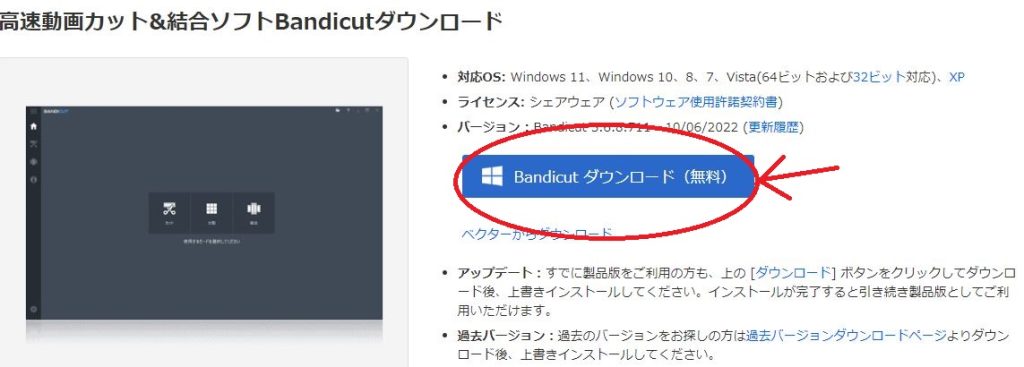
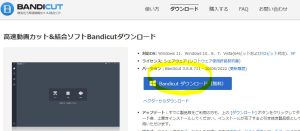
<p><span style="font-size: 14pt;"><strong>１．<span style="font-size: 12pt;">Bandicam（バンディカム）でゲームや動画サイト等の映像を高画質のキャプチャ―編集したい人は<a href="https://www.bandicam.jp/downloads/" target="_blank" rel="nofollow noopener">こちらからダウンロード</a>！</span></strong></span>大抵の方は自動的に始まりダウンロードフォルダへ入りますので特に操作は必要ありませんが一部の人は名前を付けて保存などをダウンロード先を指定する場合があります。ただ32bitの人、WindowsXPの人はダウンロードしても使えませんので別ページからダウンロードしますので注意。</p>
<p><img fetchpriority="high" decoding="async" class="wp-image-1347 aligncenter" src="https://www.fingleforipad.com/wp-content/uploads/2022/10/bandcut-1024x367.jpg" alt="" width="628" height="225" srcset="https://www.fingleforipad.com/wp-content/uploads/2022/10/bandcut-1024x367.jpg 1024w, https://www.fingleforipad.com/wp-content/uploads/2022/10/bandcut-300x108.jpg 300w, https://www.fingleforipad.com/wp-content/uploads/2022/10/bandcut-768x275.jpg 768w, https://www.fingleforipad.com/wp-content/uploads/2022/10/bandcut.jpg 1143w" sizes="(max-width: 628px) 100vw, 628px" /></p>
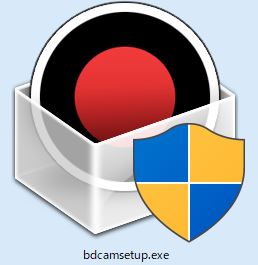
<p>このようなアイコンが出てきたら成功です。ダウンロードは終了です。</p>
<p><img decoding="async" class="wp-image-1349 aligncenter" src="https://www.fingleforipad.com/wp-content/uploads/2022/10/bandcut2.jpg" alt="" width="175" height="180" /></p>
<h3>Bandicam（バンディカム）インストール方法！</h3>
<p>早速Bandicamをインストールして行きましょう！</p>
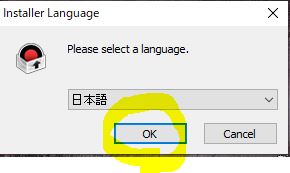
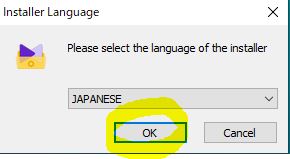
<p><strong><span style="font-size: 14pt;">１．</span></strong>まず言語を指定します。もちろん<span style="font-size: 14pt; color: #ff0000;"><strong>日本語に指定してOKボタン</strong></span>です。英語が得意な外国の方は英語にもできます。</p>
<p><img decoding="async" class="size-full wp-image-1351 aligncenter" src="https://www.fingleforipad.com/wp-content/uploads/2022/10/bandcut2-1.jpg" alt="" width="290" height="173" /></p>
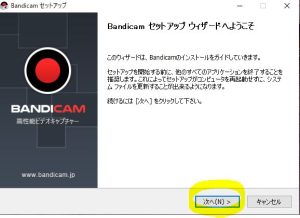
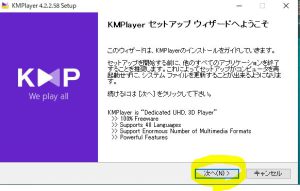
<p><strong><span style="font-size: 14pt;">２．</span></strong>この辺は特にウィザードは特に考えず<span style="font-size: 14pt; color: #ff0000;"><strong>「次へ」をクリック</strong></span>です。</p>
<p><img decoding="async" class="size-medium wp-image-1352 aligncenter" src="https://www.fingleforipad.com/wp-content/uploads/2022/10/bandcut3-300x218.jpg" alt="" width="300" height="218" srcset="https://www.fingleforipad.com/wp-content/uploads/2022/10/bandcut3-300x218.jpg 300w, https://www.fingleforipad.com/wp-content/uploads/2022/10/bandcut3.jpg 578w" sizes="(max-width: 300px) 100vw, 300px" /></p>
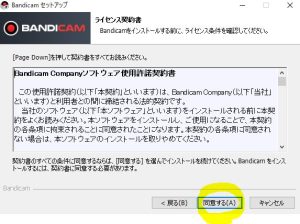
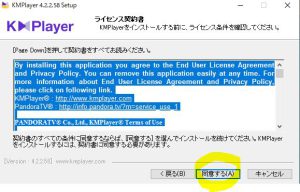
<p><span style="font-size: 14pt;"><strong>３．</strong></span>念のため使用許諾書なので目を通したい方はお読みください。2022年10月5日改定にも改定されているので古く何もされていないソフトでないのが分かります。</p>
<p><span style="font-size: 14pt;"><strong><span style="color: #ff0000;">「同意する」をクリック。</span></strong></span></p>
<p><img decoding="async" class="size-medium wp-image-1353 aligncenter" src="https://www.fingleforipad.com/wp-content/uploads/2022/10/bandicut4-300x224.jpg" alt="" width="300" height="224" srcset="https://www.fingleforipad.com/wp-content/uploads/2022/10/bandicut4-300x224.jpg 300w, https://www.fingleforipad.com/wp-content/uploads/2022/10/bandicut4-400x300.jpg 400w, https://www.fingleforipad.com/wp-content/uploads/2022/10/bandicut4-360x270.jpg 360w, https://www.fingleforipad.com/wp-content/uploads/2022/10/bandicut4.jpg 573w" sizes="(max-width: 300px) 100vw, 300px" /></p>
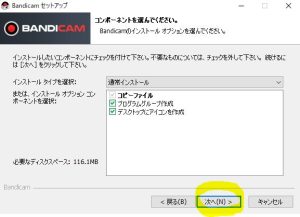
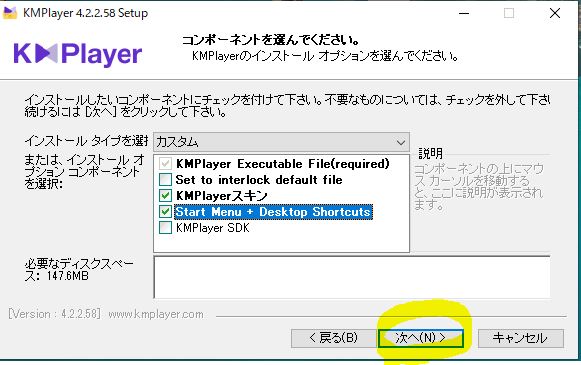
<p><span style="font-size: 14pt;"><strong>４．</strong></span>プログラムグループ作成、デスクトップアイコン作成のチェックが入っている事を確認して<span style="color: #ff0000; font-size: 14pt;"><strong>「次へ」をクリック。</strong></span></p>
<p><img decoding="async" class="size-medium wp-image-1354 aligncenter" src="https://www.fingleforipad.com/wp-content/uploads/2022/10/bandcut5-300x217.jpg" alt="" width="300" height="217" srcset="https://www.fingleforipad.com/wp-content/uploads/2022/10/bandcut5-300x217.jpg 300w, https://www.fingleforipad.com/wp-content/uploads/2022/10/bandcut5.jpg 577w" sizes="(max-width: 300px) 100vw, 300px" /></p>
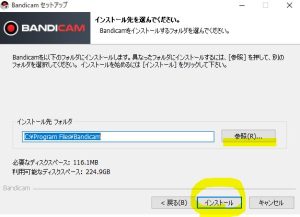
<p><span style="font-size: 14pt;"><strong>５．</strong></span>Bandicamの保存先の指定です。参照でBandicamの保存場所を指定できます。そのままで良いなら<span style="font-size: 14pt; color: #ff0000;"><strong>「インストール」クリック</strong></span>してください。</p>
<p><img decoding="async" class="size-medium wp-image-1355 aligncenter" src="https://www.fingleforipad.com/wp-content/uploads/2022/10/bandcut6-300x217.jpg" alt="" width="300" height="217" srcset="https://www.fingleforipad.com/wp-content/uploads/2022/10/bandcut6-300x217.jpg 300w, https://www.fingleforipad.com/wp-content/uploads/2022/10/bandcut6.jpg 574w" sizes="(max-width: 300px) 100vw, 300px" /></p>
<p><span style="font-size: 14pt;"><strong>（補足）</strong></span></p>
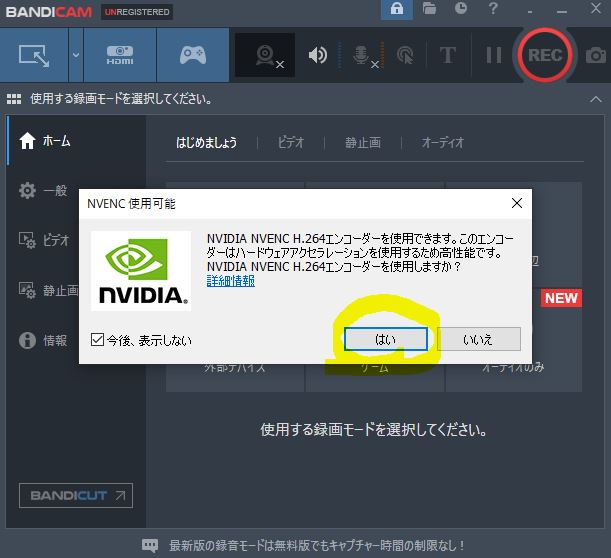
<p>これでインストールが出来ましたが最初のポップアップでこのような表示が出ます。<strong>「NVIDIA NVENCH.264エンコーダーを使用できます。このエンコーダーはハードウェアアクセラレーションをしようするため高機能です。使用しますか？」</strong>と出ます。標準で「今後表示しない」にチェックが付いているので「いいえ」を教えてスルーするとこの設定が面倒になるのでここで「はい」をクリックしておきましょう。システムに負担がなく高速で動作できるようになります。</p>
<p><img decoding="async" class="wp-image-1350 aligncenter" src="https://www.fingleforipad.com/wp-content/uploads/2022/10/bandicut8.jpg" alt="" width="346" height="316" srcset="https://www.fingleforipad.com/wp-content/uploads/2022/10/bandicut8.jpg 611w, https://www.fingleforipad.com/wp-content/uploads/2022/10/bandicut8-300x274.jpg 300w" sizes="(max-width: 346px) 100vw, 346px" /></p>
<p>&nbsp;</p>
<h3>Bandicut（バンディカット）ダウンロード方法！</h3>
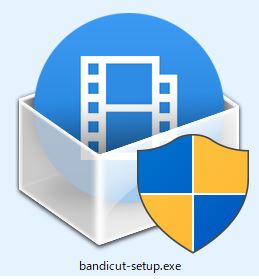
<p>動画をカットしたり結合したりmp3を抽出したい人は<a href="https://www.bandicam.jp/bandicut-video-cutter/download/" target="_blank" rel="nofollow noopener">こちら</a>からダウンロード。こちらをクリックすると下のアイコンが自動生成されます。</p>
<p><img decoding="async" class="size-medium wp-image-1371 aligncenter" src="https://www.fingleforipad.com/wp-content/uploads/2022/10/bandeicut-1-300x131.jpg" alt="" width="300" height="131" srcset="https://www.fingleforipad.com/wp-content/uploads/2022/10/bandeicut-1-300x131.jpg 300w, https://www.fingleforipad.com/wp-content/uploads/2022/10/bandeicut-1-1024x448.jpg 1024w, https://www.fingleforipad.com/wp-content/uploads/2022/10/bandeicut-1-768x336.jpg 768w, https://www.fingleforipad.com/wp-content/uploads/2022/10/bandeicut-1.jpg 1109w" sizes="(max-width: 300px) 100vw, 300px" /></p>
<p><img decoding="async" class="alignnone wp-image-1372" src="https://www.fingleforipad.com/wp-content/uploads/2022/10/bandicut1.jpg" alt="" width="141" height="152" /></p>
<h3>Bandicut（バンディカット）インストール方法！</h3>
<p><span style="font-size: 14pt; color: #000000;"><strong>１．</strong></span>まずは言語指定からです。<span style="font-size: 14pt; color: #ff0000;"><strong>OKを押して</strong></span>進みましょう！</p>
<p><img decoding="async" class="size-full wp-image-1351 aligncenter" src="https://www.fingleforipad.com/wp-content/uploads/2022/10/bandcut2-1.jpg" alt="" width="290" height="173" /></p>
<p><span style="font-size: 14pt;"><strong>２．</strong></span>こちらも表紙のようなものなので<span style="font-size: 14pt;"><strong><span style="color: #ff0000;">「次へ」を押してください。</span></strong></span></p>
<p><img decoding="async" class="size-medium wp-image-1352 aligncenter" src="https://www.fingleforipad.com/wp-content/uploads/2022/10/bandcut3-300x218.jpg" alt="" width="300" height="218" srcset="https://www.fingleforipad.com/wp-content/uploads/2022/10/bandcut3-300x218.jpg 300w, https://www.fingleforipad.com/wp-content/uploads/2022/10/bandcut3.jpg 578w" sizes="(max-width: 300px) 100vw, 300px" /></p>
<p><span style="font-size: 14pt;"><strong>３．</strong></span>内容を呼んで問題なければ<span style="font-size: 14pt; color: #ff0000;"><strong>「同意する」をクリック</strong></span>ですが内容は一般的なものなのでそんなに心配する必要はありません。</p>
<p><img decoding="async" class="size-medium wp-image-1353 aligncenter" src="https://www.fingleforipad.com/wp-content/uploads/2022/10/bandicut4-300x224.jpg" alt="" width="300" height="224" srcset="https://www.fingleforipad.com/wp-content/uploads/2022/10/bandicut4-300x224.jpg 300w, https://www.fingleforipad.com/wp-content/uploads/2022/10/bandicut4-400x300.jpg 400w, https://www.fingleforipad.com/wp-content/uploads/2022/10/bandicut4-360x270.jpg 360w, https://www.fingleforipad.com/wp-content/uploads/2022/10/bandicut4.jpg 573w" sizes="(max-width: 300px) 100vw, 300px" /></p>
<p><span style="font-size: 14pt;"><strong>４．</strong></span>もともと標準でチェックを付けてくれている項目ですので気にせず「<strong><span style="color: #ff0000; font-size: 14pt;">次へ」をクリック。</span></strong></p>
<p><img decoding="async" class="size-medium wp-image-1354 aligncenter" src="https://www.fingleforipad.com/wp-content/uploads/2022/10/bandcut5-300x217.jpg" alt="" width="300" height="217" srcset="https://www.fingleforipad.com/wp-content/uploads/2022/10/bandcut5-300x217.jpg 300w, https://www.fingleforipad.com/wp-content/uploads/2022/10/bandcut5.jpg 577w" sizes="(max-width: 300px) 100vw, 300px" /></p>
<p><strong><span style="font-size: 14pt;">５．</span></strong>さあBandicutをどこに収納しましょう！という事ですが分からない人は特に「Cプログラム」に入れる事は一般的な事なのでこのままでいじらず<span style="font-size: 14pt;"><strong><span style="color: #ff0000;">「インストール」をクリック。</span></strong></span></p>
<p><img decoding="async" class="size-medium wp-image-1355 aligncenter" src="https://www.fingleforipad.com/wp-content/uploads/2022/10/bandcut6-300x217.jpg" alt="" width="300" height="217" srcset="https://www.fingleforipad.com/wp-content/uploads/2022/10/bandcut6-300x217.jpg 300w, https://www.fingleforipad.com/wp-content/uploads/2022/10/bandcut6.jpg 574w" sizes="(max-width: 300px) 100vw, 300px" /></p>
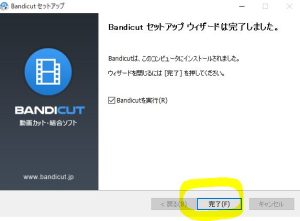
<p><span style="font-size: 14pt;"><strong>６．</strong></span>これでインストール終わりましたので<span style="font-size: 14pt;"><strong><span style="color: #ff0000;">「完了」</span></strong></span>。</p>
<p><img decoding="async" class="size-medium wp-image-1367 aligncenter" src="https://www.fingleforipad.com/wp-content/uploads/2022/10/bandicut8-1-300x221.jpg" alt="" width="300" height="221" srcset="https://www.fingleforipad.com/wp-content/uploads/2022/10/bandicut8-1-300x221.jpg 300w, https://www.fingleforipad.com/wp-content/uploads/2022/10/bandicut8-1.jpg 573w" sizes="(max-width: 300px) 100vw, 300px" /></p>
<p>&nbsp;</p>
<h3>Bandicam（バンディカム）の動画キャプチャWindows XP対応版無料ダウンロード</h3>
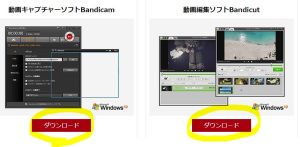
<p><strong><span style="font-size: 14pt;">１．</span></strong>Bandicam（バンディカム）動画キャプチャソフトのWindows XP対応版は通常のダウンロードページではありません。こちらのページからダウンロードをします。</p>
<p>⇒XP用のページは<a href="http://xp.bandicam.com/jp/" target="_blank" rel="nofollow noopener">こちら</a></p>
<p><span style="font-size: 14pt;"><strong>２．</strong></span>動画キャプチャソフトと動画編集ソフトどちらをダウンロードしたいですか？と聞かれるのでご自身の好きな方でダウンロードしてください。やり方は上記のダウンロード方法とほぼ変わりません。</p>
<p>&nbsp;</p>
<p><img decoding="async" class="size-medium wp-image-1345 aligncenter" src="https://www.fingleforipad.com/wp-content/uploads/2022/10/bandicam2-300x147.jpg" alt="" width="300" height="147" srcset="https://www.fingleforipad.com/wp-content/uploads/2022/10/bandicam2-300x147.jpg 300w, https://www.fingleforipad.com/wp-content/uploads/2022/10/bandicam2-768x376.jpg 768w, https://www.fingleforipad.com/wp-content/uploads/2022/10/bandicam2.jpg 914w" sizes="(max-width: 300px) 100vw, 300px" /></p>
]]></content>
		
					<link rel="replies" type="text/html" href="https://www.fingleforipad.com/%e4%bd%93%e9%a8%93%e7%89%88%e3%81%aebandicam%ef%bc%88%e3%83%90%e3%83%b3%e3%83%87%e3%82%a3%e3%82%ab%e3%83%a0%ef%bc%89%e3%81%ae%e7%84%a1%e6%96%99%e3%83%80%e3%82%a6%e3%83%b3%e3%83%ad%e3%83%bc%e3%83%89.html#comments" thr:count="0" />
			<link rel="replies" type="application/atom+xml" href="https://www.fingleforipad.com/%e4%bd%93%e9%a8%93%e7%89%88%e3%81%aebandicam%ef%bc%88%e3%83%90%e3%83%b3%e3%83%87%e3%82%a3%e3%82%ab%e3%83%a0%ef%bc%89%e3%81%ae%e7%84%a1%e6%96%99%e3%83%80%e3%82%a6%e3%83%b3%e3%83%ad%e3%83%bc%e3%83%89.html/feed/atom/" thr:count="0" />
			<thr:total>0</thr:total>
			</entry>
		<entry>
		<author>
			<name>admin</name>
							<uri>http://www.fingleforipad.com</uri>
						</author>

		<title type="html"><![CDATA[セキュリティが安全な無料動画プレイヤーランキング！ウィルスソフト実証]]></title>
		<link rel="alternate" type="text/html" href="https://www.fingleforipad.com/%e3%82%bb%e3%82%ad%e3%83%a5%e3%83%aa%e3%83%86%e3%82%a3%e3%81%8c%e5%ae%89%e5%85%a8%e3%81%aa%e7%84%a1%e6%96%99%e5%8b%95%e7%94%bb%e3%83%97%e3%83%ac%e3%82%a4%e3%83%a4%e3%83%bc%e3%83%a9%e3%83%b3%e3%82%ad.html" />

		<id>https://www.fingleforipad.com/?p=1268</id>
		<updated>2022-04-23T04:42:10Z</updated>
		<published>2022-02-27T08:46:32Z</published>
		<category scheme="https://www.fingleforipad.com" term="無料動画再生ソフト" /><category scheme="https://www.fingleforipad.com" term="セキュリティ" /><category scheme="https://www.fingleforipad.com" term="動画プレイヤー" /><category scheme="https://www.fingleforipad.com" term="安全性" />
		<summary type="html"><![CDATA[現在では無料の動画ソフトのクオリティも上がってきており有料ではなく無料の動画ソフトだけを利用している方の方が多いでしょう。 そこで気になるのがセキュリティ等の安全性です。 確かにコストをかけることができない無料の動画プレ [&#8230;]]]></summary>

					<content type="html" xml:base="https://www.fingleforipad.com/%e3%82%bb%e3%82%ad%e3%83%a5%e3%83%aa%e3%83%86%e3%82%a3%e3%81%8c%e5%ae%89%e5%85%a8%e3%81%aa%e7%84%a1%e6%96%99%e5%8b%95%e7%94%bb%e3%83%97%e3%83%ac%e3%82%a4%e3%83%a4%e3%83%bc%e3%83%a9%e3%83%b3%e3%82%ad.html"><![CDATA[<p>現在では無料の動画ソフトのクオリティも上がってきており有料ではなく無料の動画ソフトだけを利用している方の方が多いでしょう。<br />
そこで気になるのがセキュリティ等の安全性です。<br />
確かにコストをかけることができない無料の動画プレイヤーは危険なにおいがします。<br />
より精度が高いとされるウィルスソフトでダウンロードがスキャンを掛けて調べてみました。</p>
<p>するとこのような内容となりました。</p>
<p>&nbsp;</p>
<div class="balloon5">
<div class="faceicon"><img decoding="async" class="alignnone size-full " src="https://www.fingleforipad.com/wp-content/uploads/2021/11/ea08f5b0304d940a553f0511ab080e9c.jpg " alt="吹き出し女性" /></div>
<div class="chatting">
<div class="says">
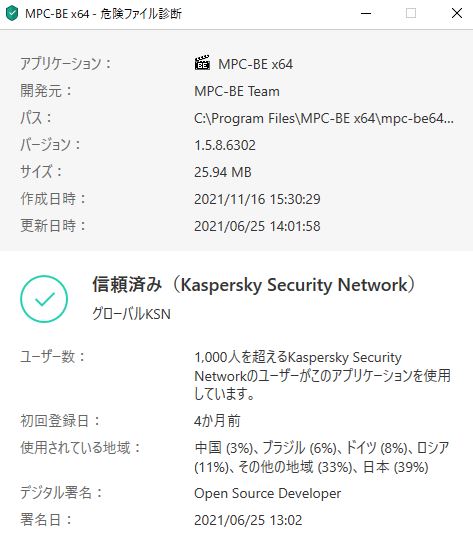
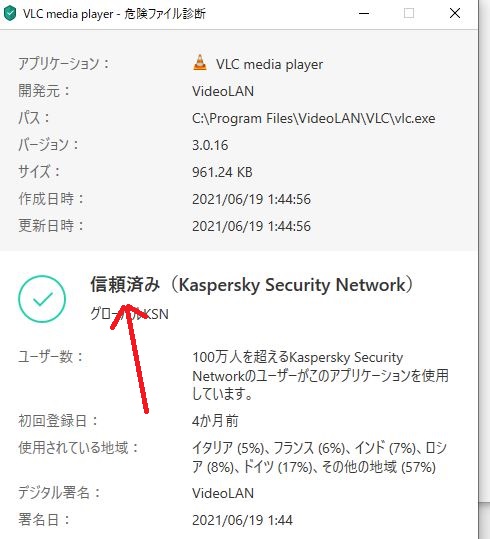
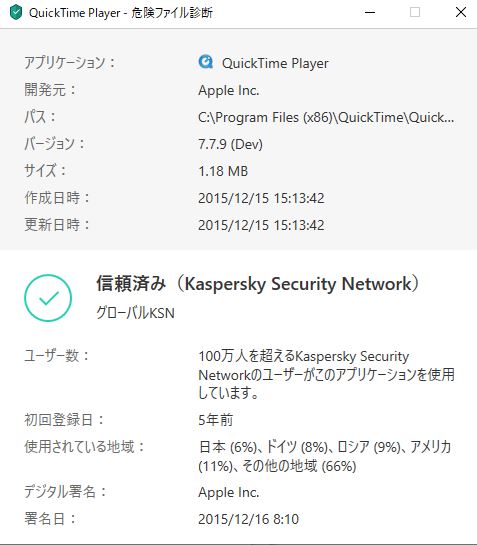
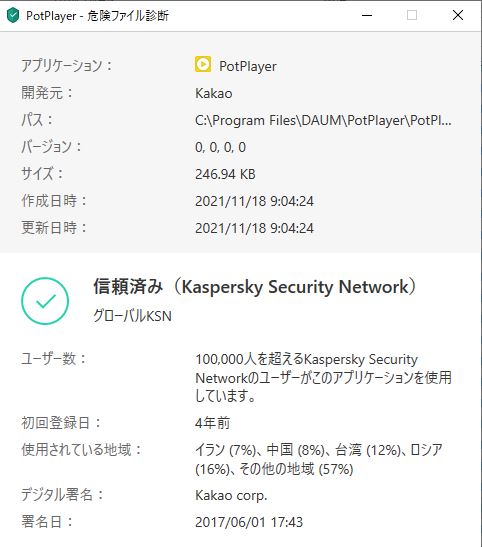
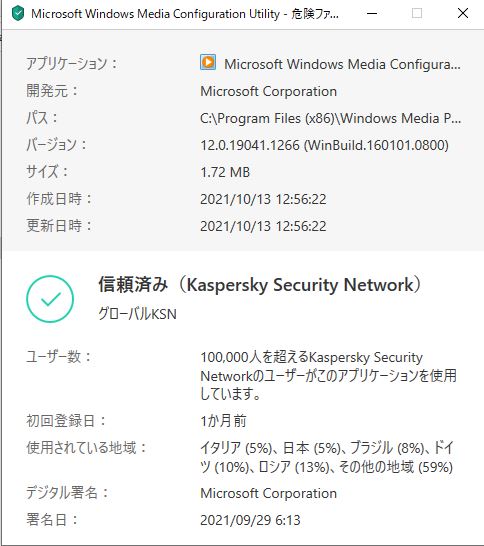
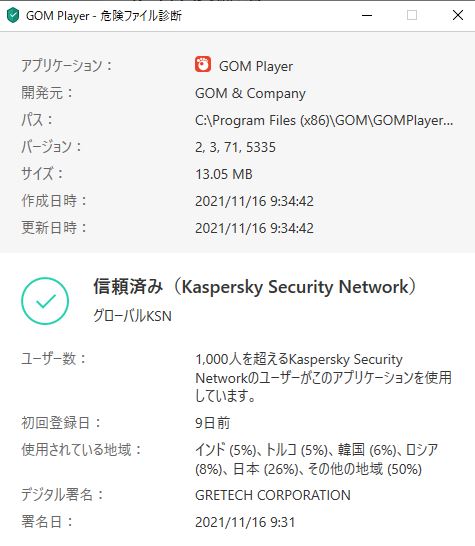
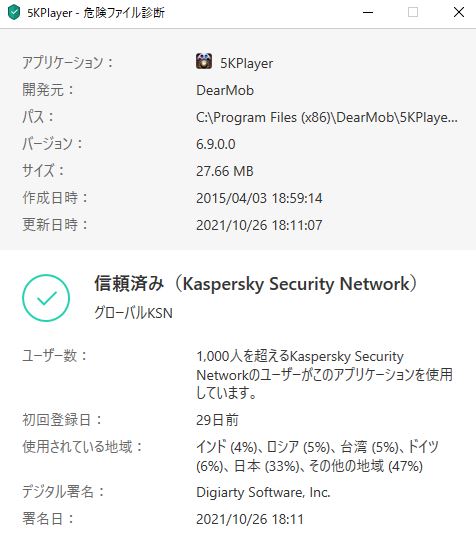
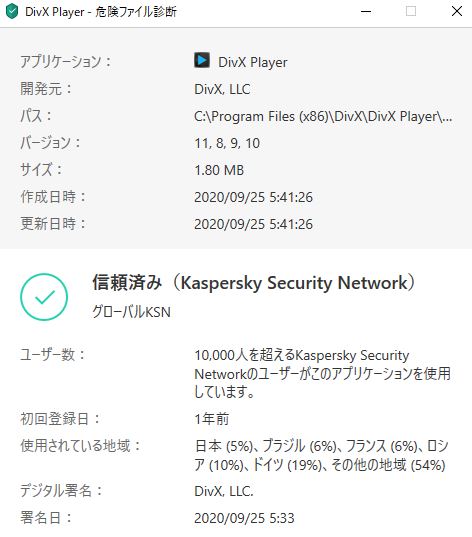
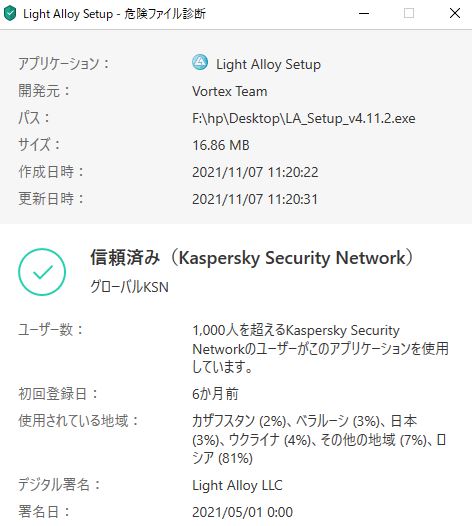
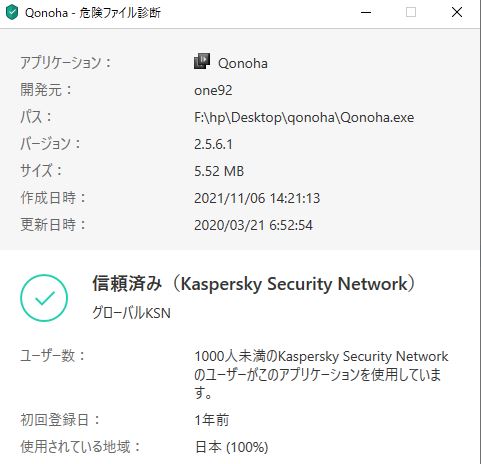
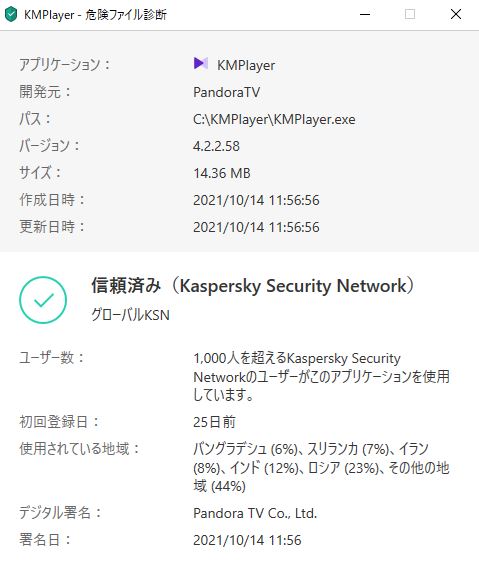
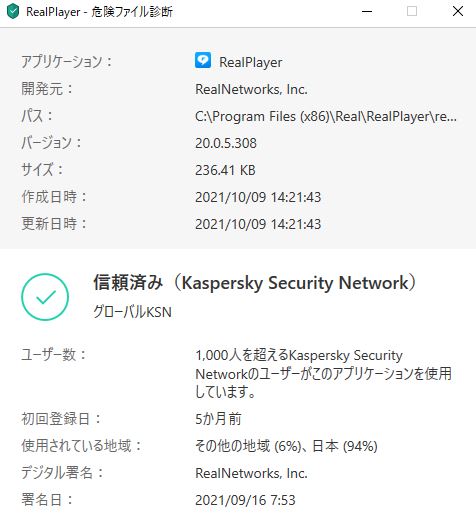
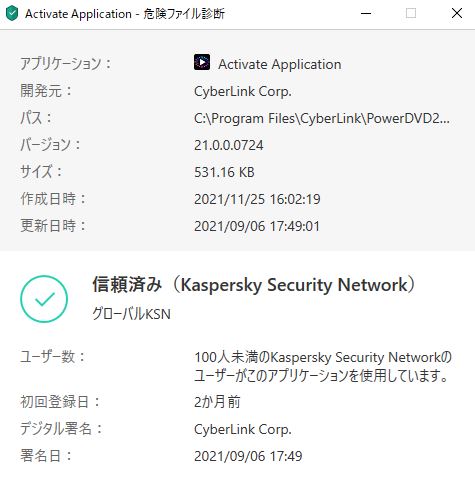
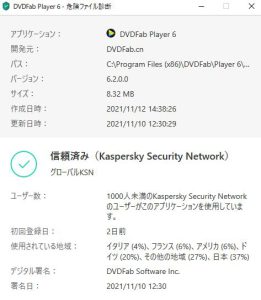
<p>ここでの検証として動画プレイヤーをダウンロードしてカスペルスキーという<span style="color: #ff0000;"><strong>精度の良いスキャンで異常がないかを確認。そしてこのウィルスソフトでの世界的な評価証明書もキャプチャ致しました</strong></span>。</p>
<p>「ユーザーからの安全評価数」とはこの動画playerをダウンロードして利用かつこのウィルスソフトを利用している人の人数です。問題がなかったかを最新情報として危険ファイル診断という名目で評価しています。</p>
<p>人気のあまりない動画プレイヤーですと人数が集まらないのは仕方ないですが人数が少ないと単純に説得力が減少します。</p>
<p>&nbsp;</p>
</div>
</div>
</div>
<p><center>スポンサーリンク</center><script async src="https://pagead2.googlesyndication.com/pagead/js/adsbygoogle.js?client=ca-pub-4881302411306689" crossorigin="anonymous"></script> <!-- 動画プレイヤー --> <ins class="adsbygoogle" style="display: block;" data-ad-client="ca-pub-4881302411306689" data-ad-slot="7343221670" data-ad-format="auto" data-full-width-responsive="true"></ins> <script>
     (adsbygoogle = window.adsbygoogle || []).push({});
</script></p>
<h2></h2>
<h2>動画再生ソフトの安全セキュリティランキング</h2>
<p>&nbsp;</p>
<table style="height: 569px; width: 100%; border-collapse: collapse; background-color: #c8f7e3; border-color: #000000;" border="1">
<tbody>
<tr style="height: 22px;">
<td style="width: 33.3333%; height: 22px; text-align: center;"><strong>動画プレイヤー名</strong></td>
<td style="width: 33.3333%; height: 22px; text-align: center;"><strong>ユーザからの安全評価数</strong></td>
<td style="width: 33.3333%; height: 22px; text-align: center;"><strong>セキュリティ診断のキャプチャ</strong></td>
</tr>
<tr style="height: 22px;">
<td style="width: 33.3333%; height: 10px;"><a href="https://www.fingleforipad.com/windows10%e3%82%82%e5%af%be%e5%bf%9c%e3%80%8cvlc-media-player%e3%80%8d-%e7%84%a1%e6%96%99%e3%83%80%e3%82%a6%e3%83%b3%e3%83%ad%e3%83%bc%e3%83%89-%e6%96%b9%e6%b3%95%ef%bc%81%e6%97%a5%e6%9c%ac%e8%aa%9e.html">VLCplayer</a></td>
<td style="width: 33.3333%; height: 10px;">1,000,000人を超える</td>
<td style="width: 33.3333%; height: 10px;"><a href="https://www.fingleforipad.com/wp-content/uploads/2021/11/504844357fb2f2f3c2fb39881c9e66ac.jpg"><img decoding="async" class="alignnone wp-image-778" src="https://www.fingleforipad.com/wp-content/uploads/2021/11/504844357fb2f2f3c2fb39881c9e66ac-273x300.jpg" alt="VLCカスペルスキー" width="54" height="59" srcset="https://www.fingleforipad.com/wp-content/uploads/2021/11/504844357fb2f2f3c2fb39881c9e66ac-273x300.jpg 273w, https://www.fingleforipad.com/wp-content/uploads/2021/11/504844357fb2f2f3c2fb39881c9e66ac.jpg 490w" sizes="(max-width: 54px) 100vw, 54px" /></a></td>
</tr>
<tr style="height: 22px;">
<td style="width: 33.3333%; height: 22px;"><a href="https://www.fingleforipad.com/quicktime%e6%97%a7%e3%83%90%e3%83%bc%e3%82%b8%e3%83%a7%e3%83%b3%e3%83%80%e3%82%a6%e3%83%b3%e3%83%ad%e3%83%bc%e3%83%89%e3%82%84%e3%82%a2%e3%83%b3%e3%82%a4%e3%83%b3%e3%82%b9%e3%83%88%e3%83%bc%e3%83%ab.html">QuickPlayer</a></td>
<td style="width: 33.3333%; height: 22px;">1,000,000人を超える</td>
<td style="width: 33.3333%; height: 22px;"><a href="https://www.fingleforipad.com/wp-content/uploads/2021/11/ad3989356802f48dbdf1553cb6ab7a55-1.jpg"><img decoding="async" class="alignnone wp-image-1197" src="https://www.fingleforipad.com/wp-content/uploads/2021/11/ad3989356802f48dbdf1553cb6ab7a55-1-263x300.jpg" alt="" width="50" height="57" srcset="https://www.fingleforipad.com/wp-content/uploads/2021/11/ad3989356802f48dbdf1553cb6ab7a55-1-263x300.jpg 263w, https://www.fingleforipad.com/wp-content/uploads/2021/11/ad3989356802f48dbdf1553cb6ab7a55-1.jpg 477w" sizes="(max-width: 50px) 100vw, 50px" /></a></td>
</tr>
<tr style="height: 22px;">
<td style="width: 33.3333%; height: 22px;"><a href="https://www.fingleforipad.com/potplayer%e7%84%a1%e6%96%99%e3%83%80%e3%82%a6%e3%83%b3%e3%83%ad%e3%83%bc%e3%83%89%ef%bc%81%e3%82%a4%e3%83%b3%e3%82%b9%e3%83%88%e3%83%bc%e3%83%ab%e3%82%84%e5%ae%89%e5%85%a8%e6%80%a7%e3%80%81%e4%bd%bf.html">potplayer</a></td>
<td style="width: 33.3333%; height: 22px;">100,000人を超える</td>
<td style="width: 33.3333%; height: 22px;"><a href="https://www.fingleforipad.com/wp-content/uploads/2021/10/potplayereskyyuriteli.jpg"><img decoding="async" class="alignnone wp-image-1223" src="https://www.fingleforipad.com/wp-content/uploads/2021/10/potplayereskyyuriteli-264x300.jpg" alt="" width="52" height="59" srcset="https://www.fingleforipad.com/wp-content/uploads/2021/10/potplayereskyyuriteli-264x300.jpg 264w, https://www.fingleforipad.com/wp-content/uploads/2021/10/potplayereskyyuriteli.jpg 482w" sizes="(max-width: 52px) 100vw, 52px" /></a></td>
</tr>
<tr style="height: 67px;">
<td style="width: 33.3333%; height: 67px;"><a href="https://www.fingleforipad.com/windows-media-player%e7%84%a1%e6%96%99%e3%83%80%e3%82%a6%e3%83%b3%e3%83%ad%e3%83%bc%e3%83%89%e6%96%b9%e6%b3%95%ef%bc%81.html">Windows Media Player</a></td>
<td style="width: 33.3333%; height: 67px;">100,000人を超える</td>
<td style="width: 33.3333%; height: 67px;"><a href="https://www.fingleforipad.com/wp-content/uploads/2021/10/windowsmediaplayersekyuriteli.jpg"><img decoding="async" class="alignnone wp-image-949" src="https://www.fingleforipad.com/wp-content/uploads/2021/10/windowsmediaplayersekyuriteli-266x300.jpg" alt="" width="53" height="59" srcset="https://www.fingleforipad.com/wp-content/uploads/2021/10/windowsmediaplayersekyuriteli-266x300.jpg 266w, https://www.fingleforipad.com/wp-content/uploads/2021/10/windowsmediaplayersekyuriteli.jpg 484w" sizes="(max-width: 53px) 100vw, 53px" /></a></td>
</tr>
<tr style="height: 22px;">
<td style="width: 33.3333%; height: 22px;"><a href="https://www.fingleforipad.com/%e6%97%a5%e6%9c%ac%e8%aa%9e%e7%89%88gom-player-%e7%84%a1%e6%96%99%e3%83%80%e3%82%a6%e3%83%b3%e3%83%ad%e3%83%bc%e3%83%89%e6%96%b9%e6%b3%95%ef%bc%81%e5%ba%83%e5%91%8a%e3%82%92%e9%99%a4%e5%a4%96%e3%81%97.html">GOMplayer</a></td>
<td style="width: 33.3333%; height: 22px;">1,000人未満</td>
<td style="width: 33.3333%; height: 22px;"><a href="https://www.fingleforipad.com/wp-content/uploads/2021/10/GOMsekyuriteli.jpg"><img decoding="async" class="alignnone wp-image-1219" src="https://www.fingleforipad.com/wp-content/uploads/2021/10/GOMsekyuriteli-261x300.jpg" alt="" width="49" height="56" srcset="https://www.fingleforipad.com/wp-content/uploads/2021/10/GOMsekyuriteli-261x300.jpg 261w, https://www.fingleforipad.com/wp-content/uploads/2021/10/GOMsekyuriteli.jpg 475w" sizes="(max-width: 49px) 100vw, 49px" /></a></td>
</tr>
<tr style="height: 22px;">
<td style="width: 33.3333%; height: 22px;"><a href="https://www.fingleforipad.com/%e6%97%a5%e6%9c%ac%e8%aa%9e%ef%bc%95kplayer%e7%84%a1%e6%96%99%e3%83%80%e3%82%a6%e3%83%b3%e3%83%ad%e3%83%bc%e3%83%89%e6%96%b9%e6%b3%95windows-10%ef%bc%81%e4%bd%bf%e3%81%84%e6%96%b9%e3%81%a8%e8%a9%95.html">5Kplayer</a></td>
<td style="width: 33.3333%; height: 22px;">1,000人未満</td>
<td style="width: 33.3333%; height: 22px;"><a href="https://www.fingleforipad.com/wp-content/uploads/2021/10/5Kplyayersekyuritei.jpg"><img decoding="async" class="alignnone wp-image-1212" src="https://www.fingleforipad.com/wp-content/uploads/2021/10/5Kplyayersekyuritei-264x300.jpg" alt="" width="49" height="56" srcset="https://www.fingleforipad.com/wp-content/uploads/2021/10/5Kplyayersekyuritei-264x300.jpg 264w, https://www.fingleforipad.com/wp-content/uploads/2021/10/5Kplyayersekyuritei.jpg 476w" sizes="(max-width: 49px) 100vw, 49px" /></a></td>
</tr>
<tr style="height: 22px;">
<td style="width: 33.3333%; height: 22px;"><a href="https://www.fingleforipad.com/divx-player-%e7%84%a1%e6%96%99%e3%83%80%e3%82%a6%e3%83%b3%e3%83%ad%e3%83%bc%e3%83%89%ef%bc%81%e4%bd%bf%e3%81%84%e6%96%b9%e3%82%84%e3%82%a6%e3%82%a4%e3%83%ab%e3%82%b9%e3%81%aa%e3%81%a9%e3%81%ae.html">DivXplayer</a></td>
<td style="width: 33.3333%; height: 22px;">10,000人を超える</td>
<td style="width: 33.3333%; height: 22px;"><a href="https://www.fingleforipad.com/wp-content/uploads/2021/11/divxsekyuriteli.jpg"><img decoding="async" class="alignnone wp-image-1146" src="https://www.fingleforipad.com/wp-content/uploads/2021/11/divxsekyuriteli-264x300.jpg" alt="" width="55" height="62" srcset="https://www.fingleforipad.com/wp-content/uploads/2021/11/divxsekyuriteli-264x300.jpg 264w, https://www.fingleforipad.com/wp-content/uploads/2021/11/divxsekyuriteli.jpg 472w" sizes="(max-width: 55px) 100vw, 55px" /></a></td>
</tr>
<tr style="height: 22px;">
<td style="width: 33.3333%; height: 22px;"><a href="https://www.fingleforipad.com/light-alloy%e7%84%a1%e6%96%99%e3%83%80%e3%82%a6%e3%83%b3%e3%83%ad%e3%83%bc%e3%83%89%e3%82%84%e4%bd%bf%e3%81%84%e6%96%b9.html">Light Alloy</a></td>
<td style="width: 33.3333%; height: 22px;">1,000人を超える</td>
<td style="width: 33.3333%; height: 22px;"><a href="https://www.fingleforipad.com/wp-content/uploads/2021/11/kasuperulingtaloy.jpg"><img decoding="async" class="alignnone wp-image-935" src="https://www.fingleforipad.com/wp-content/uploads/2021/11/kasuperulingtaloy-269x300.jpg" alt="" width="53" height="59" srcset="https://www.fingleforipad.com/wp-content/uploads/2021/11/kasuperulingtaloy-269x300.jpg 269w, https://www.fingleforipad.com/wp-content/uploads/2021/11/kasuperulingtaloy.jpg 472w" sizes="(max-width: 53px) 100vw, 53px" /></a></td>
</tr>
<tr style="height: 62px;">
<td style="width: 33.3333%; height: 62px;"><a href="https://www.fingleforipad.com/windows10%e5%8f%af%e8%83%bd%e3%80%8cqonoha%e3%80%8d%e3%81%ae%e3%83%80%e3%82%a6%e3%83%b3%e3%83%ad%e3%83%bc%e3%83%89%e6%96%b9%e6%b3%95%ef%bc%81%e4%bd%bf%e3%81%84%e6%96%b9%e3%80%81%e3%82%b3%e3%83%bc.html">Qonoha</a></td>
<td style="width: 33.3333%; height: 62px;">1,000人未満</td>
<td style="width: 33.3333%; height: 62px;"><a href="https://www.fingleforipad.com/wp-content/uploads/2021/11/qonohasekyuriteli.jpg"><img decoding="async" class="alignnone wp-image-939" src="https://www.fingleforipad.com/wp-content/uploads/2021/11/qonohasekyuriteli-300x289.jpg" alt="" width="57" height="54" srcset="https://www.fingleforipad.com/wp-content/uploads/2021/11/qonohasekyuriteli-300x289.jpg 300w, https://www.fingleforipad.com/wp-content/uploads/2021/11/qonohasekyuriteli.jpg 481w" sizes="(max-width: 57px) 100vw, 57px" /></a></td>
</tr>
<tr style="height: 22px;">
<td style="width: 33.3333%; height: 22px;"><a href="https://www.fingleforipad.com/kmplayer%e7%84%a1%e6%96%99%e3%83%80%e3%82%a6%e3%83%b3%e3%83%ad%e3%83%bc%e3%83%89%e3%81%a8%e3%82%a4%e3%83%b3%e3%82%b9%e3%83%88%e3%83%bc%e3%83%ab%ef%bc%81%e4%bd%bf%e3%81%84%e6%96%b9%e3%82%92%e8%a7%a3.html">KMplayer</a></td>
<td style="width: 33.3333%; height: 22px;">1,000人超え</td>
<td style="width: 33.3333%; height: 22px;"><a href="https://www.fingleforipad.com/wp-content/uploads/2021/11/kmplayersekyuriteli.jpg"><img decoding="async" class="alignnone wp-image-1026" src="https://www.fingleforipad.com/wp-content/uploads/2021/11/kmplayersekyuriteli-256x300.jpg" alt="" width="53" height="62" srcset="https://www.fingleforipad.com/wp-content/uploads/2021/11/kmplayersekyuriteli-256x300.jpg 256w, https://www.fingleforipad.com/wp-content/uploads/2021/11/kmplayersekyuriteli.jpg 479w" sizes="(max-width: 53px) 100vw, 53px" /></a></td>
</tr>
<tr style="height: 42px;">
<td style="width: 33.3333%; height: 42px;"><a href="https://www.fingleforipad.com/%e6%9c%80%e6%96%b0dvdfabplayer6%e7%84%a1%e6%96%99%e7%89%88%e3%83%80%e3%82%a6%e3%83%b3%e3%83%ad%e3%83%bc%e3%83%89%e6%96%b9%e6%b3%95%ef%bc%81%e4%bd%bf%e3%81%84%e6%96%b9%e3%82%84%e8%a9%95%e5%88%a4.html">DVDFab</a></td>
<td style="width: 33.3333%; height: 42px;">1,000人未満</td>
<td style="width: 33.3333%; height: 42px;"><a href="https://www.fingleforipad.com/wp-content/uploads/2021/11/DVDfabulirusu.jpg"><img decoding="async" class="alignnone wp-image-994" src="https://www.fingleforipad.com/wp-content/uploads/2021/11/DVDfabulirusu-261x300.jpg" alt="" width="51" height="59" srcset="https://www.fingleforipad.com/wp-content/uploads/2021/11/DVDfabulirusu-261x300.jpg 261w, https://www.fingleforipad.com/wp-content/uploads/2021/11/DVDfabulirusu.jpg 473w" sizes="(max-width: 51px) 100vw, 51px" /></a></td>
</tr>
<tr style="height: 75px;">
<td style="width: 33.3333%; height: 75px;"><a href="https://www.fingleforipad.com/mpc-be%ef%bc%88media-player-classic-black-edition%ef%bc%89%e6%97%a5%e6%9c%ac%e8%aa%9e%e7%84%a1%e6%96%99%e3%83%80%e3%82%a6%e3%83%b3%e3%83%ad%e3%83%bc%e3%83%89%e6%96%b9%e6%b3%95%ef%bc%81.html">MPC-BE</a></td>
<td style="width: 33.3333%; height: 75px;">1,000人超え</td>
<td style="width: 33.3333%; height: 75px;"><a href="https://www.fingleforipad.com/wp-content/uploads/2021/11/039700a9796c3c16998f32c6924a12e2.jpg"><img decoding="async" class="alignnone wp-image-1103" src="https://www.fingleforipad.com/wp-content/uploads/2021/11/039700a9796c3c16998f32c6924a12e2-264x300.jpg" alt="" width="53" height="60" srcset="https://www.fingleforipad.com/wp-content/uploads/2021/11/039700a9796c3c16998f32c6924a12e2-264x300.jpg 264w, https://www.fingleforipad.com/wp-content/uploads/2021/11/039700a9796c3c16998f32c6924a12e2.jpg 473w" sizes="(max-width: 53px) 100vw, 53px" /></a></td>
</tr>
<tr style="height: 75px;">
<td style="width: 33.3333%; height: 75px;"><a href="https://www.fingleforipad.com/realplayer-%e3%83%80%e3%82%a6%e3%83%b3%e3%83%ad%e3%83%bc%e3%83%89%e6%96%b9%e6%b3%95%ef%bc%81%e8%a9%95%e5%88%a4%e3%81%af%e3%81%a9%e3%81%86%e3%81%aa%e3%81%ae%ef%bc%9f.html">realplayer</a></td>
<td style="width: 33.3333%; height: 75px;">1,000人超え</td>
<td style="width: 33.3333%; height: 75px;"><a href="https://www.fingleforipad.com/wp-content/uploads/2022/02/d237db6ca1efc98e1aca4c5663316c20.jpg"><img decoding="async" class="alignnone wp-image-1270" src="https://www.fingleforipad.com/wp-content/uploads/2022/02/d237db6ca1efc98e1aca4c5663316c20-273x300.jpg" alt="" width="52" height="57" srcset="https://www.fingleforipad.com/wp-content/uploads/2022/02/d237db6ca1efc98e1aca4c5663316c20-273x300.jpg 273w, https://www.fingleforipad.com/wp-content/uploads/2022/02/d237db6ca1efc98e1aca4c5663316c20.jpg 476w" sizes="(max-width: 52px) 100vw, 52px" /></a></td>
</tr>
<tr style="height: 62px;">
<td style="width: 33.3333%; height: 62px;"><a href="https://www.fingleforipad.com/%e3%83%95%e3%83%aa%e3%83%bc%e7%89%88cyberlink%e3%80%8cpowerdvd%e3%80%8d%e3%81%ae%e7%84%a1%e6%96%99%e3%83%80%e3%82%a6%e3%83%b3%e3%83%ad%e3%83%bc%e3%83%89%ef%bc%81%e4%bd%bf%e3%81%84%e6%96%b9%ef%bc%88.html">PowerDVD</a></td>
<td style="height: 62px; width: 33.3333%;">100人未満</td>
<td style="height: 62px; width: 33.3333%;"><a href="https://www.fingleforipad.com/wp-content/uploads/2021/10/powerDVDsekyuriteli.jpg"><img decoding="async" class="alignnone wp-image-1215" src="https://www.fingleforipad.com/wp-content/uploads/2021/10/powerDVDsekyuriteli-296x300.jpg" alt="" width="54" height="54" srcset="https://www.fingleforipad.com/wp-content/uploads/2021/10/powerDVDsekyuriteli-296x300.jpg 296w, https://www.fingleforipad.com/wp-content/uploads/2021/10/powerDVDsekyuriteli-150x150.jpg 150w, https://www.fingleforipad.com/wp-content/uploads/2021/10/powerDVDsekyuriteli.jpg 475w" sizes="(max-width: 54px) 100vw, 54px" /></a></td>
</tr>
</tbody>
</table>
<p>&nbsp;</p>
<p>すべてここにある動画プレイヤーは安全性があり信頼済みと評価されたプレイヤーでした。5KplayerやGOMplayerは一時期ウィルス被害等がありましたが現在は良好という事でした。ただここにあるウィルスソフトが必ず安全かというものは保証できません。あくまでも一般レベルで高いウイルスソフトを利用した場合は特定はできないという内容です。</p>
]]></content>
		
					<link rel="replies" type="text/html" href="https://www.fingleforipad.com/%e3%82%bb%e3%82%ad%e3%83%a5%e3%83%aa%e3%83%86%e3%82%a3%e3%81%8c%e5%ae%89%e5%85%a8%e3%81%aa%e7%84%a1%e6%96%99%e5%8b%95%e7%94%bb%e3%83%97%e3%83%ac%e3%82%a4%e3%83%a4%e3%83%bc%e3%83%a9%e3%83%b3%e3%82%ad.html#comments" thr:count="0" />
			<link rel="replies" type="application/atom+xml" href="https://www.fingleforipad.com/%e3%82%bb%e3%82%ad%e3%83%a5%e3%83%aa%e3%83%86%e3%82%a3%e3%81%8c%e5%ae%89%e5%85%a8%e3%81%aa%e7%84%a1%e6%96%99%e5%8b%95%e7%94%bb%e3%83%97%e3%83%ac%e3%82%a4%e3%83%a4%e3%83%bc%e3%83%a9%e3%83%b3%e3%82%ad.html/feed/atom/" thr:count="0" />
			<thr:total>0</thr:total>
			</entry>
		<entry>
		<author>
			<name>admin</name>
							<uri>http://www.fingleforipad.com</uri>
						</author>

		<title type="html"><![CDATA[無料のblu-ray 再生ソフト おすすめ一覧！人気の動画プレイヤーでも再生できる？]]></title>
		<link rel="alternate" type="text/html" href="https://www.fingleforipad.com/%e7%84%a1%e6%96%99%e3%81%aeblu-ray-%e5%86%8d%e7%94%9f%e3%82%bd%e3%83%95%e3%83%88-%e3%81%8a%e3%81%99%e3%81%99%e3%82%81%e4%b8%80%e8%a6%a7%ef%bc%81%e4%ba%ba%e6%b0%97%e3%81%ae%e5%8b%95%e7%94%bb%e3%83%97.html" />

		<id>https://www.fingleforipad.com/?p=1251</id>
		<updated>2024-02-29T10:47:56Z</updated>
		<published>2022-02-25T09:37:51Z</published>
		<category scheme="https://www.fingleforipad.com" term="その他動画再生関連記事" /><category scheme="https://www.fingleforipad.com" term="blu-ray" /><category scheme="https://www.fingleforipad.com" term="ブルーレイ" /><category scheme="https://www.fingleforipad.com" term="再生ソフト" /><category scheme="https://www.fingleforipad.com" term="無料" />
		<summary type="html"><![CDATA[ブルーレイ（blu-ray）対応の無料動画プレイヤ―を紹介しています。一般的な動画再生ソフトから見て行きましょう。ご自身が持っている動画ソフトでも利用できるかもしれません。 ここでは無料ソフト限定で一覧にしています。 動 [&#8230;]]]></summary>

					<content type="html" xml:base="https://www.fingleforipad.com/%e7%84%a1%e6%96%99%e3%81%aeblu-ray-%e5%86%8d%e7%94%9f%e3%82%bd%e3%83%95%e3%83%88-%e3%81%8a%e3%81%99%e3%81%99%e3%82%81%e4%b8%80%e8%a6%a7%ef%bc%81%e4%ba%ba%e6%b0%97%e3%81%ae%e5%8b%95%e7%94%bb%e3%83%97.html"><![CDATA[<p>ブルーレイ（blu-ray）対応の無料動画プレイヤ―を紹介しています。一般的な動画再生ソフトから見て行きましょう。ご自身が持っている動画ソフトでも利用できるかもしれません。</p>
<p>ここでは無料ソフト限定で一覧にしています。</p>
<table style="height: 198px; width: 100%; border-collapse: collapse; border-color: #000000;" border="１">
<tbody>
<tr style="height: 22px;">
<td style="width: 33.3333%; height: 22px; text-align: center;"><strong>動画再生ソフト名</strong></td>
<td style="width: 33.3333%; height: 22px; text-align: center;"><strong>対応可否</strong></td>
<td style="width: 33.3333%; height: 22px; text-align: center;"><strong>詳細・内容</strong></td>
</tr>
<tr style="height: 22px;">
<td style="width: 33.3333%; height: 22px; text-align: center;">VLCplayer</td>
<td style="width: 33.3333%; height: 22px; text-align: center;">△</td>
<td style="width: 33.3333%; height: 22px;">基本的に対応していますが市販レンタル等のblu-rayは再生できません。</td>
</tr>
<tr style="height: 22px;">
<td style="width: 33.3333%; height: 22px; text-align: center;">GOM Player</td>
<td style="width: 33.3333%; height: 22px; text-align: center;">×</td>
<td style="width: 33.3333%; height: 22px;">対応していません。</td>
</tr>
<tr style="height: 22px;">
<td style="width: 33.3333%; height: 22px; text-align: center;">RealPlayer</td>
<td style="width: 33.3333%; height: 22px; text-align: center;">×</td>
<td style="width: 33.3333%; height: 22px;">対応していません。</td>
</tr>
<tr style="height: 22px;">
<td style="width: 33.3333%; height: 22px; text-align: center;">Windows Media Player</td>
<td style="width: 33.3333%; height: 22px; text-align: center;">×</td>
<td style="width: 33.3333%; height: 22px;">対応していません。</td>
</tr>
<tr style="height: 22px;">
<td style="width: 33.3333%; height: 22px; text-align: center;">PotPlayer</td>
<td style="width: 33.3333%; height: 22px; text-align: center;">〇</td>
<td style="width: 33.3333%; height: 22px;">基本的にBlu-rayが再生できます。</td>
</tr>
<tr style="height: 22px;">
<td style="width: 33.3333%; height: 22px; text-align: center;">Qonoha</td>
<td style="width: 33.3333%; height: 22px; text-align: center;">×</td>
<td style="width: 33.3333%; height: 22px;">対応していません。</td>
</tr>
<tr style="height: 22px;">
<td style="width: 33.3333%; text-align: center; height: 22px;">SMplayer</td>
<td style="width: 33.3333%; text-align: center; height: 22px;">〇</td>
<td style="width: 33.3333%; height: 22px;">ISOファイルとドライブのBlu-ray対応</td>
</tr>
<tr style="height: 22px;">
<td style="width: 33.3333%; text-align: center; height: 22px;">PowerDVD</td>
<td style="width: 33.3333%; text-align: center; height: 22px;">×</td>
<td style="width: 33.3333%; height: 22px;">良く誤解されますが無料版は再生できません。Ultra版のみ</td>
</tr>
</tbody>
</table>
<div class="balloon5">
<div class="faceicon"><img decoding="async" class="alignnone " src="https://www.fingleforipad.com/wp-content/uploads/2021/11/ea08f5b0304d940a553f0511ab080e9c.jpg " alt="吹き出し女性" width="101" height="128" /></div>
<div class="chatting">
<div class="says">これで分かるように最近人気でおすすめとされる動画プレイヤーではブルーレイディスクを再生する事は難しいようです。VLCはガードがかかっていないようなBlu-rayは再生できますが映画など市販されているブルーレイは再生できません。ポットプレイヤーやSMプレイヤーは市販のブルーレイも再生できるという人が多いので環境によっては通常通りBlu－ray再生ができそうです♪ただ無料だけに不具合が生じストレスを感じる方はそんなに高くないものですしpowerDVDの有料版を購入した方が早そうです。</div>
</div>
</div>

<h3>blu-ray再生できるおすすめの動画プレイヤー</h3>
<p>ブルーレイできるおすすめの動画プレイヤーを調査してみました。その中でも機能や画質などを踏まえてベスト１～５を決めてみました。</p>
<table style="border-collapse: collapse; width: 100%; height: 219px;">
<tbody>
<tr style="height: 22px;">
<td style="width: 100%; height: 22px;"><strong>5KPlayer</strong></td>
</tr>
<tr style="height: 22px;">
<td style="width: 100%; height: 22px;">Blu－ray再生のみならず元々多くの動画ファイルを再生できるプレイヤーとして知られるソフトです。Blu－rayが再生できなくてももともと人気がある。しかし中国開発なのでセキュリティなど日本人は若干不安を覚えている人もいる。</td>
</tr>
<tr style="height: 21px;">
<td style="width: 100%; height: 21px;"><strong>SMplayer</strong></td>
</tr>
<tr style="height: 22px;">
<td style="width: 100%; height: 22px;">非常にバランスの取れた動画プレイヤーで日本人の愛好家が多い。セキュリティも悪い評判を特に聞かない。Blu－rayもフォルダやドライブで開き再生できる。</td>
</tr>
<tr style="height: 22px;">
<td style="width: 100%; height: 22px;"><strong>PotPlayer</strong></td>
</tr>
<tr style="height: 22px;">
<td style="width: 100%; height: 22px;">ダウンロードする際などに広告等が多くセキュリティでは少し心配な面があったが10万人以上の愛用者が世界各国にいる。ブルーレイが再生できるソフトとして若干知名度がある。</td>
</tr>
<tr style="height: 22px;">
<td style="width: 100%; height: 22px;"><strong>Leawo Blu-ray Player</strong></td>
</tr>
<tr style="height: 22px;">
<td style="width: 100%; height: 22px;">機能性などは他を圧倒する程特にないがブルーレイ再生だけができる専門的なソフトです。高画質で視聴可能。</td>
</tr>
<tr style="height: 22px;">
<td style="width: 100%; height: 22px;"><strong>Leawo Blu-ray Player</strong></td>
</tr>
<tr style="height: 22px;">
<td style="width: 100%; height: 22px;">今までに3.4万人以上がダウンロードしている人気の動画プレイヤーでブルーレイの他DVDやISO,４KやHDの再生もできます。有料版もあるが無料版でも充分利用できる。</td>
</tr>
<tr style="height: 22px;">
<td style="width: 100%; height: 22px;"><strong>MPC-BE</strong></td>
</tr>
<tr style="height: 22px;">
<td style="width: 100%; height: 22px;">このソフトと非常に似たソフトでMPC-HCというものがあり他サイトではブルーレイが再生できるソフトとして紹介しているがサポートが停止しているためこのMPC-BEの方をお進めしている。</td>
</tr>
</tbody>
</table>
<div class="balloon5">
<div class="faceicon"><img decoding="async" class="alignnone size-full " src="https://www.fingleforipad.com/wp-content/uploads/2021/11/ea08f5b0304d940a553f0511ab080e9c.jpg " alt="吹き出し女性" /></div>
<div class="chatting">
<div class="says">結構完全無料でもこれだけのブルーレイ動画再生ソフトが存在する。やはり利用するのであれば動画再生ソフトはブルーレイ再生と一般ファイル再生とが両方できるソフトの方がシンプルでパソコンの容量も喰わなくて良いだろう。ブルーレイディスクだけを再生するためならLenovoが知名度もあり企業的にも安心だと思います。総合的に見るなら5kplayerなどがお勧めです。しかし５kは非常に有名なサイトであるがその脆弱性という面で評判があまり良くない。心配な方は特に悪い噂もないSMplayerを利用すると良いだろう。</div>
</div>
</div>
]]></content>
		
					<link rel="replies" type="text/html" href="https://www.fingleforipad.com/%e7%84%a1%e6%96%99%e3%81%aeblu-ray-%e5%86%8d%e7%94%9f%e3%82%bd%e3%83%95%e3%83%88-%e3%81%8a%e3%81%99%e3%81%99%e3%82%81%e4%b8%80%e8%a6%a7%ef%bc%81%e4%ba%ba%e6%b0%97%e3%81%ae%e5%8b%95%e7%94%bb%e3%83%97.html#comments" thr:count="1" />
			<link rel="replies" type="application/atom+xml" href="https://www.fingleforipad.com/%e7%84%a1%e6%96%99%e3%81%aeblu-ray-%e5%86%8d%e7%94%9f%e3%82%bd%e3%83%95%e3%83%88-%e3%81%8a%e3%81%99%e3%81%99%e3%82%81%e4%b8%80%e8%a6%a7%ef%bc%81%e4%ba%ba%e6%b0%97%e3%81%ae%e5%8b%95%e7%94%bb%e3%83%97.html/feed/atom/" thr:count="1" />
			<thr:total>1</thr:total>
			</entry>
		<entry>
		<author>
			<name>admin</name>
							<uri>http://www.fingleforipad.com</uri>
						</author>

		<title type="html"><![CDATA[動画再生 に強い ノートパソコンとは！見分け方ってあるの？]]></title>
		<link rel="alternate" type="text/html" href="https://www.fingleforipad.com/%e5%8b%95%e7%94%bb%e5%86%8d%e7%94%9f-%e3%81%ab%e5%bc%b7%e3%81%84-%e3%83%8e%e3%83%bc%e3%83%88%e3%83%91%e3%82%bd%e3%82%b3%e3%83%b3%e8%a6%8b%e5%88%86%e3%81%91%e6%96%b9%e3%81%a3%e3%81%a6%e3%81%82%e3%82%8b.html" />

		<id>https://www.fingleforipad.com/?p=384</id>
		<updated>2022-04-22T09:32:00Z</updated>
		<published>2022-02-18T06:29:09Z</published>
		<category scheme="https://www.fingleforipad.com" term="その他動画再生関連記事" /><category scheme="https://www.fingleforipad.com" term="ノートパソコン" /><category scheme="https://www.fingleforipad.com" term="動画再生" /><category scheme="https://www.fingleforipad.com" term="強い" />
		<summary type="html"><![CDATA[動画再生に強いノートパソコンはどのようなところをみれば良いのでしょうか。 そもそもスペックなどはどこに着目すれば良いのでしょう。 動画再生に必要なのはCPUとメモリです。 CPUとは簡単に言うと処理速度。 メモリは処理を [&#8230;]]]></summary>

					<content type="html" xml:base="https://www.fingleforipad.com/%e5%8b%95%e7%94%bb%e5%86%8d%e7%94%9f-%e3%81%ab%e5%bc%b7%e3%81%84-%e3%83%8e%e3%83%bc%e3%83%88%e3%83%91%e3%82%bd%e3%82%b3%e3%83%b3%e8%a6%8b%e5%88%86%e3%81%91%e6%96%b9%e3%81%a3%e3%81%a6%e3%81%82%e3%82%8b.html"><![CDATA[<p>動画再生に強いノートパソコンはどのようなところをみれば良いのでしょうか。</p>
<p>そもそもスペックなどはどこに着目すれば良いのでしょう。</p>
<p>動画再生に必要なのはCPUとメモリです。</p>
<p><strong>CPUとは簡単に言うと処理速度。</strong></p>
<p><strong>メモリは処理をするための箱</strong></p>
<p>箱（メモリ）が大きければそれだけ色んなものを入れられて尚且つその仕事が早い（CＰＵ）と円滑という事です。</p>
<p>逆に箱が小さいと仕事が出来てもできる事は限られているという事にもなります。</p>
<p>ですから両方ないと仕事ができるとは言いません。</p>
<p><center>スポンサーリンク</center><script async src="https://pagead2.googlesyndication.com/pagead/js/adsbygoogle.js?client=ca-pub-4881302411306689" crossorigin="anonymous"></script> <!-- 動画プレイヤー --> <ins class="adsbygoogle" style="display: block;" data-ad-client="ca-pub-4881302411306689" data-ad-slot="7343221670" data-ad-format="auto" data-full-width-responsive="true"></ins> <script>
     (adsbygoogle = window.adsbygoogle || []).push({});
</script></p>
<h3>動画再生に強いノートパソコンを探す手順</h3>
<p>上記の事からCPU メモリはどの程度ないと駄目という事なのでしょうか？</p>
<p>それは実は個人差があって人によって強いと感じるイメージが違います。それは現時点で利用しているpcを確認するのが一番早いです。</p>
<p>まず現在パソコンを使っている人は自分のcpuを見て見ましょう。自分のPCを基準に考えると処理速度のおおよそのイメージが付くと思います。</p>
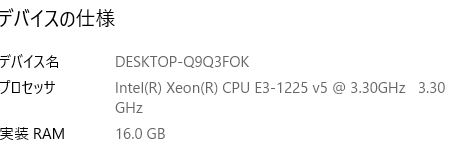
<p>スタートボタンを右クリックすればシステムの所で自分のCPUを見ることができます。</p>
<p><img decoding="async" class="alignnone wp-image-1232 size-full" src="https://www.fingleforipad.com/wp-content/uploads/2022/02/6cde4a92b0debae7527ec2546dd58e88.jpg" alt="" width="453" height="149" srcset="https://www.fingleforipad.com/wp-content/uploads/2022/02/6cde4a92b0debae7527ec2546dd58e88.jpg 453w, https://www.fingleforipad.com/wp-content/uploads/2022/02/6cde4a92b0debae7527ec2546dd58e88-300x99.jpg 300w" sizes="(max-width: 453px) 100vw, 453px" /></p>
<p>プロセッサと記載されているところがメモリです。こちらはインテル型番で3.3GHZですね。</p>
<p>ノートパソコンを買う際にCPUがIntel、AMD等と書かれて意味が分からない方がいますが会社名ですね。</p>
<p>しかも大体がIntelかAMDで後は知名度が低いものという認識で良いのでそんなに複雑に考える必要はありません。だいたいこの２社が記載されていますしそんなに大差はありません。</p>
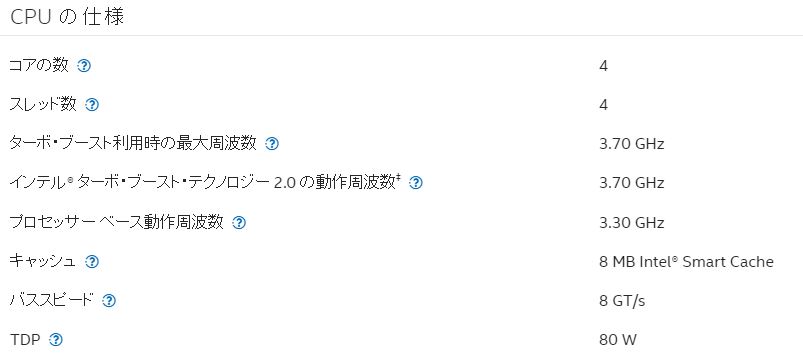
<p>ちなみにプロセッサの型番「Xeon E3-1225 v5」を<a href="https://ark.intel.com/content/www/jp/ja/ark/search.html?_charset_=UTF-8&amp;q=AMD+Ryzen+5+5600U" target="_blank" rel="nofollow noopener">IIntelのホームページ</a>で検索するとすぐに仕様を確認する事ができます。AMDの方は<a href="https://www.amd.com/ja/partner/processor-specifications" target="_blank" rel="nofollow noopener">こちら</a></p>
<p>同じメーカーならサイト内で両社とも比較ができます。コア数4，プロセッサー3.3GHZ、メモリ64GB</p>
<p><img decoding="async" class="alignnone wp-image-1233 " src="https://www.fingleforipad.com/wp-content/uploads/2022/02/CPUSIYOU.jpg" alt="" width="689" height="308" srcset="https://www.fingleforipad.com/wp-content/uploads/2022/02/CPUSIYOU.jpg 803w, https://www.fingleforipad.com/wp-content/uploads/2022/02/CPUSIYOU-300x134.jpg 300w, https://www.fingleforipad.com/wp-content/uploads/2022/02/CPUSIYOU-768x343.jpg 768w, https://www.fingleforipad.com/wp-content/uploads/2022/02/CPUSIYOU-800x359.jpg 800w" sizes="(max-width: 689px) 100vw, 689px" /></p>
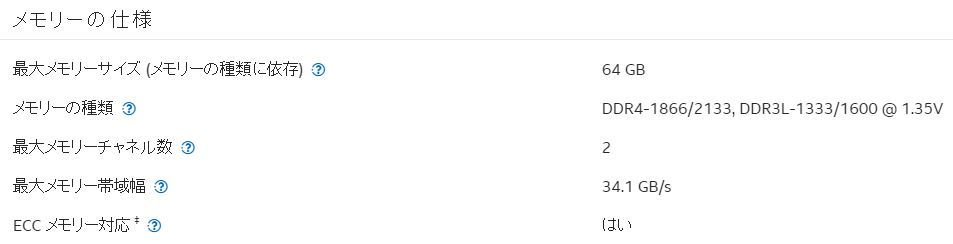
<p>実装RAMはメモリの事です。16ＧＢですね。同ページで確認可能です。</p>
<p><img decoding="async" class="alignnone wp-image-1234 size-full" src="https://www.fingleforipad.com/wp-content/uploads/2022/02/MEMORISIYOU.jpg" alt="" width="953" height="244" srcset="https://www.fingleforipad.com/wp-content/uploads/2022/02/MEMORISIYOU.jpg 953w, https://www.fingleforipad.com/wp-content/uploads/2022/02/MEMORISIYOU-300x77.jpg 300w, https://www.fingleforipad.com/wp-content/uploads/2022/02/MEMORISIYOU-768x197.jpg 768w" sizes="(max-width: 953px) 100vw, 953px" /></p>
<p>今使われているパソコン以上のスペックのパソコンが利用すれば良いという事になりますね。コア数、GHZ、最大メモリGB等が多いものを選びましょう。</p>
<p><strong>・Hzは周波数で高いと処理が早くなる上記の表では通常は3.3GHZでターボブースト時は37GHZという事でしょう。</strong></p>
<p><strong>・コア数はマンパワーのようなもので多くいると同時に複数の処理ができます。最近では８コアというPCもあります。</strong></p>
<p>難しく考えると分からなくなると思いますので単純に数の多いのを選べばよいでしょう。</p>
<p>考え方としては今あるPCと比較して数が少し上か大きく異なるかで体感も異なるという事です。</p>
<p>最近のパソコンは性能が良くなったとは言えメモリや周波数が２～３個数字が上がったからと言ってあまり変わらないと思ってるぐらいが良いでしょう。</p>
<p>&nbsp;</p>
<p>早速強いノート型パソコンを探す</p>
<p>ネットなどから購入する人、家電量販店で購入する人など多種多様にいるかと思います。</p>
<p>大体の感覚を掴んでいきましょう。</p>
<p>１０万円程度のノート型パソコンCPUやメモリ</p>
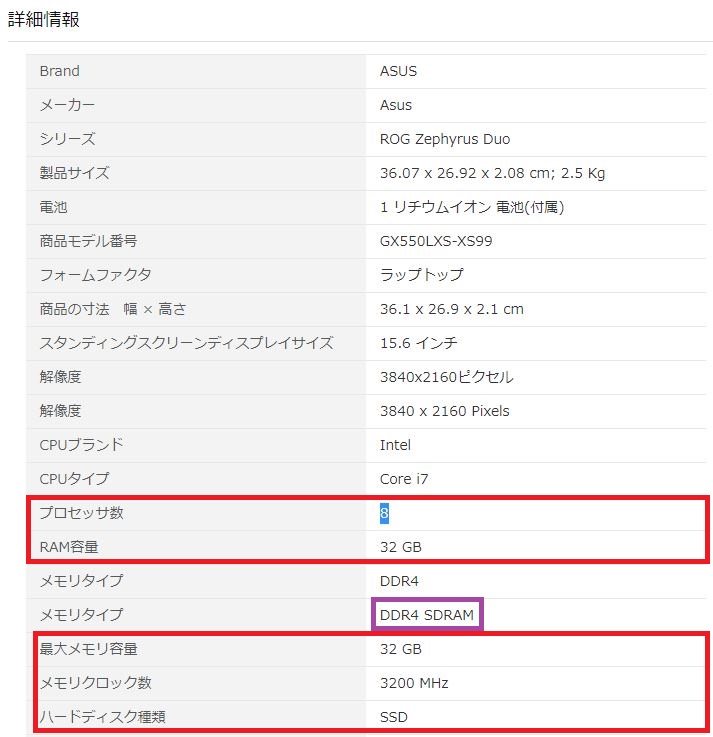
<p>Amazon等でノート型を検索するとこのような商品の下の方に詳細情報が書かれていて見ることができます。</p>
<p><img decoding="async" class="alignnone wp-image-1238 size-full" src="https://www.fingleforipad.com/wp-content/uploads/2022/02/1AMAZONSYOUSAI.jpg" alt="" width="713" height="737" srcset="https://www.fingleforipad.com/wp-content/uploads/2022/02/1AMAZONSYOUSAI.jpg 713w, https://www.fingleforipad.com/wp-content/uploads/2022/02/1AMAZONSYOUSAI-290x300.jpg 290w" sizes="(max-width: 713px) 100vw, 713px" /></p>
<p><strong>・プロセッサ数８個</strong></p>
<p><strong>・RAMやメモリが32ＧＢ</strong></p>
<p><strong>・周波数3200MHZ</strong></p>
<p>私の場合はプロセッサ数しか上回っているものがありません。周波数は現在GBなので低くなってしまいます。</p>
<p>もう少し高いのを購入しないと満足はできないでしょう。</p>
<p>ただ現時点で利用している私のパソコンのスペックは引くわけではないので動画は既に快適に見ることができます。</p>
<p>&nbsp;</p>
<p>また再生するだけならメモリやCPUを気にすれば良いのですが多くの動画を保存したいという場合はハードディスクの容量も見て置く必要あります。</p>
<p>多くの動画を保存しておくだけではなく<strong><span style="color: #ff0000;">最近ではHDDより次世代のSSDの方が壊れにくく読み込みが早いものもあります。</span></strong></p>
<p>この10万円のアマゾンの商品はSSDですね。</p>
<p>ちなみにもっと詳しく見たい場合は紫で囲った四角のDDR4SDRAMをAMDの仕様検索に入力すればもっと詳しく調べることができます。</p>
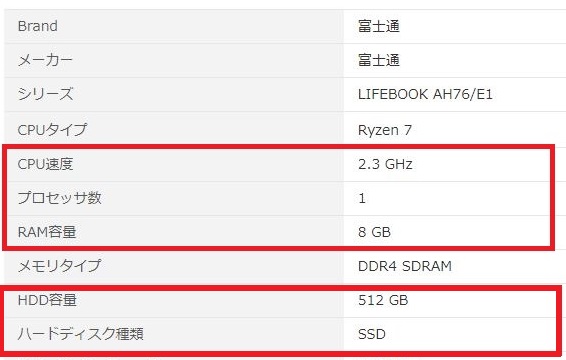
<p>遊びで100万円のパソコンのスペックも見て見ましょう。</p>
<p><img decoding="async" class="alignnone wp-image-1239 size-full" src="https://www.fingleforipad.com/wp-content/uploads/2022/02/10NO-TOPASOKON.jpg" alt="" width="566" height="360" srcset="https://www.fingleforipad.com/wp-content/uploads/2022/02/10NO-TOPASOKON.jpg 566w, https://www.fingleforipad.com/wp-content/uploads/2022/02/10NO-TOPASOKON-300x191.jpg 300w" sizes="(max-width: 566px) 100vw, 566px" /></p>
<p><strong>・プロセッサ数１</strong></p>
<p><strong>・2.3GHZ</strong></p>
<p><strong>・HDD512GＢ</strong></p>
<p>思ったよりスペック的にはHDDは桁外れですがそんなに変わらないか周波数は現時点で持っているパソコンの方が高いですね。</p>
<p>ここで分かったのは高いからと言ってスペックが凄く高いというわけではないという点です。</p>
<p>動画多く保存できたからと言って高いお金を支払うのもおかしいですよね。</p>
<p>値段では中々判断しにくいという事なのでメモリやCPU速度などを注視して探しましょう。</p>
<table style="height: 110px; width: 100%; border-collapse: collapse; border-color: #000000;" border="1">
<tbody>
<tr style="height: 22px;">
<td style="width: 100%; height: 22px; text-align: center;"><span style="font-size: 14pt; color: #ff6600; background-color: #ffffff;"><strong>注視する内容</strong></span></td>
</tr>
<tr style="height: 22px;">
<td style="width: 100%; height: 22px; text-align: center;">プロセッサ数（コア数）</td>
</tr>
<tr style="height: 22px;">
<td style="width: 100%; height: 22px; text-align: center;">CPU速度（周波数）</td>
</tr>
<tr style="height: 22px;">
<td style="width: 100%; height: 22px; text-align: center;">最大メモリ容量（RAM容量など）</td>
</tr>
<tr style="height: 22px;">
<td style="width: 100%; height: 22px; text-align: center;">HDDではなくSSD</td>
</tr>
</tbody>
</table>
<p>ちなみに私が持っているコア数4，プロセッサー3.3GHZ、メモリ64GBのpcはかなり快適に動画を楽しめる速度です。</p>
<p>ノートパソコンは‎１５万円のぐらいの商品も見るとこんな感じのスペックです。</p>
<table id="productDetails_techSpec_section_1" class="a-keyvalue prodDetTable" style="width: 100%;" role="presentation">
<tbody>
<tr>
<th class="a-color-secondary a-size-base prodDetSectionEntry">CPU</th>
<td class="a-size-base prodDetAttrValue">‎1.8 GHz</td>
</tr>
<tr>
<th class="a-color-secondary a-size-base prodDetSectionEntry">プロセッサ</th>
<td class="a-size-base prodDetAttrValue">‎1</td>
</tr>
<tr>
<th class="a-color-secondary a-size-base prodDetSectionEntry">RAM容量</th>
<td class="a-size-base prodDetAttrValue">‎16 GB</td>
</tr>
<tr>
<th class="a-color-secondary a-size-base prodDetSectionEntry">メモリ</th>
<td class="a-size-base prodDetAttrValue">‎LPDDR3</td>
</tr>
<tr>
<th class="a-color-secondary a-size-base prodDetSectionEntry">最大メモリ量</th>
<td class="a-size-base prodDetAttrValue">‎16 GB</td>
</tr>
<tr>
<th class="a-color-secondary a-size-base prodDetSectionEntry">HDD容量</th>
<td class="a-size-base prodDetAttrValue">‎1 TB</td>
</tr>
</tbody>
</table>
<p>これだけあれば動画再生に強いノートパソコンと言えます。これを参考にして探してみてはどうでしょうか。</p>
]]></content>
		
					<link rel="replies" type="text/html" href="https://www.fingleforipad.com/%e5%8b%95%e7%94%bb%e5%86%8d%e7%94%9f-%e3%81%ab%e5%bc%b7%e3%81%84-%e3%83%8e%e3%83%bc%e3%83%88%e3%83%91%e3%82%bd%e3%82%b3%e3%83%b3%e8%a6%8b%e5%88%86%e3%81%91%e6%96%b9%e3%81%a3%e3%81%a6%e3%81%82%e3%82%8b.html#comments" thr:count="0" />
			<link rel="replies" type="application/atom+xml" href="https://www.fingleforipad.com/%e5%8b%95%e7%94%bb%e5%86%8d%e7%94%9f-%e3%81%ab%e5%bc%b7%e3%81%84-%e3%83%8e%e3%83%bc%e3%83%88%e3%83%91%e3%82%bd%e3%82%b3%e3%83%b3%e8%a6%8b%e5%88%86%e3%81%91%e6%96%b9%e3%81%a3%e3%81%a6%e3%81%82%e3%82%8b.html/feed/atom/" thr:count="0" />
			<thr:total>0</thr:total>
			</entry>
		<entry>
		<author>
			<name>admin</name>
							<uri>http://www.fingleforipad.com</uri>
						</author>

		<title type="html"><![CDATA[QuickTime旧バージョンダウンロードやアンインストール方法！セキュリティは今も安全？]]></title>
		<link rel="alternate" type="text/html" href="https://www.fingleforipad.com/quicktime%e6%97%a7%e3%83%90%e3%83%bc%e3%82%b8%e3%83%a7%e3%83%b3%e3%83%80%e3%82%a6%e3%83%b3%e3%83%ad%e3%83%bc%e3%83%89%e3%82%84%e3%82%a2%e3%83%b3%e3%82%a4%e3%83%b3%e3%82%b9%e3%83%88%e3%83%bc%e3%83%ab.html" />

		<id>https://www.fingleforipad.com/?p=1150</id>
		<updated>2022-04-23T04:49:38Z</updated>
		<published>2021-11-23T06:07:47Z</published>
		<category scheme="https://www.fingleforipad.com" term="無料動画再生ソフト" /><category scheme="https://www.fingleforipad.com" term="QuickTime" /><category scheme="https://www.fingleforipad.com" term="アンインストール" /><category scheme="https://www.fingleforipad.com" term="ダウンロード" /><category scheme="https://www.fingleforipad.com" term="旧バージョン" />
		<summary type="html"><![CDATA[QuickTime Playerは、ビデオファイルを再生するためのマルチメディアフレームワークであるソフトウェアです しかしアップル社が開発した素晴らしい動画プレイヤーであったが現在はサポートを終了しています。2014年 [&#8230;]]]></summary>

					<content type="html" xml:base="https://www.fingleforipad.com/quicktime%e6%97%a7%e3%83%90%e3%83%bc%e3%82%b8%e3%83%a7%e3%83%b3%e3%83%80%e3%82%a6%e3%83%b3%e3%83%ad%e3%83%bc%e3%83%89%e3%82%84%e3%82%a2%e3%83%b3%e3%82%a4%e3%83%b3%e3%82%b9%e3%83%88%e3%83%bc%e3%83%ab.html"><![CDATA[<p>QuickTime Playerは、ビデオファイルを再生するためのマルチメディアフレームワークであるソフトウェアです</p>
<p>しかしアップル社が開発した素晴らしい動画プレイヤーであったが現在はサポートを終了しています。2014年での終了なので大分経過しています。</p>
<p>基本的にサポートが終了しているものは脆弱性を付かれてウイルスが入りやすいものですのでAppleはコチラのソフトをアンインストールして削除してほしいというアナウンスが流れている。</p>
<p>それでも一部の方は未だに使用しているという状況ですが現実トレンドマイクロなどのセキュリティ会社は脆弱性を付かれる内容も明確に公開している。</p>
<p>&nbsp;</p>
<table border="1">
<tbody>
<tr>
<td><strong>開発者：Apple</strong></td>
</tr>
<tr>
<td>開発国：アメリカ</td>
</tr>
<tr>
<td>対応OS:   Windows10～7、XP、 Vista 、Mac</td>
</tr>
<tr>
<td>対応形式：mp3、wav、aiff、3gpp2、mov、mov、avi、flac、jpeg、mp4、3gpp</td>
</tr>
</tbody>
</table>
<div class="balloon5">
<div class="faceicon"><img decoding="async" class="alignnone size-full ls-is-cached lazyloaded" src="https://sp-ao.shortpixel.ai/client/to_webp,q_glossy,ret_img/https://www.fingleforipad.com/wp-content/uploads/2021/11/ea08f5b0304d940a553f0511ab080e9c.jpg%20" alt="吹き出し女性" data-src="https://sp-ao.shortpixel.ai/client/to_webp,q_glossy,ret_img/https://www.fingleforipad.com/wp-content/uploads/2021/11/ea08f5b0304d940a553f0511ab080e9c.jpg%20" /></div>
<div class="chatting">
<div class="says">
<p>Apple社が行っているぐらいなのでセキュリティは万全でしたが現在はサポートが終了しているという事でリスクがを承知で使用しなければいけません。現にトレンドマイクロで脆弱性を検知しています。ですから現在は多くの無料プレイヤーが存在しますのでわざわざquicktimeplayerを好き好んで使う必要もなく他のプレイヤーを使用する方を良いと思います。機能も特別すごいわけでもありません。iTunesを再生する際に昔はquicktimeが必要だったのですがiTunes10.5からquicktimeプレイヤーが必要ではなくなっています。またそれ以前のiTunesでもquicktimeを連動させようとすると容量が33MBに膨れ上がり不評でした。ちなみにMac版のquicktimeも2018年にサポートを終了しています。</p>
</div>
</div>
</div>
<p>&nbsp;</p>
<p><center>スポンサーリンク</center><script async src="https://pagead2.googlesyndication.com/pagead/js/adsbygoogle.js?client=ca-pub-4881302411306689" crossorigin="anonymous"></script> <!-- 動画プレイヤー --> <ins class="adsbygoogle" style="display: block;" data-ad-client="ca-pub-4881302411306689" data-ad-slot="7343221670" data-ad-format="auto" data-full-width-responsive="true"></ins> <script>
     (adsbygoogle = window.adsbygoogle || []).push({});
</script><br />
&nbsp;</p>
<h2><div class="su-heading su-heading-style-default su-heading-align-center" id="" style="font-size:13px;margin-bottom:20px"><div class="su-heading-inner"><span style="font-size: 18pt;">QuickTime旧バージョンダウンロード方法</span></div></div></h2>
<p>&nbsp;</p>
<p>古いQuickTime旧バージョンのダウンロード方法を解説します。旧バージョンではあるがなるべく最新のバージョンであり公式ページから入手した方が良いと思います。</p>
<p><a href="https://support.apple.com/ja_JP/downloads/quicktime" target="_blank" rel="nofollow noopener">公式ぺージ</a>はコチラの画面となります。ちゃんと日本語に対応しているアプリケーションがダウンロードできます。</p>
<p>&nbsp;</p>
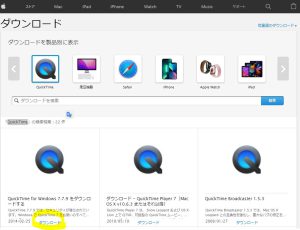
<p><span style="font-size: 14pt;"><strong>1.</strong></span>日付が一番新しいquicktime(QuickTime for Windows 7.7.9)の黄色枠の場所を<span style="color: #ff0000;"><strong><span style="font-size: 14pt;">「ダウンロード」を押します。</span></strong></span></p>
<p><img decoding="async" class="size-medium wp-image-1174 aligncenter" src="https://www.fingleforipad.com/wp-content/uploads/2021/11/quicktime-300x230.jpg" alt="" width="300" height="230" srcset="https://www.fingleforipad.com/wp-content/uploads/2021/11/quicktime-300x230.jpg 300w, https://www.fingleforipad.com/wp-content/uploads/2021/11/quicktime-768x589.jpg 768w, https://www.fingleforipad.com/wp-content/uploads/2021/11/quicktime.jpg 995w" sizes="(max-width: 300px) 100vw, 300px" /></p>
<p>&nbsp;</p>
<p>2.私はデスクトップに一旦置きました。こんな感じのアイコンです。<strong>「QuickTimeInstaller.exe」</strong></p>
<p><img decoding="async" class="size-full wp-image-1175 aligncenter" src="https://www.fingleforipad.com/wp-content/uploads/2021/11/d8b9b5888075fc3329d59a7dde3af3e9.jpg" alt="" width="131" height="87" /></p>
<p>&nbsp;</p>
<p>ダウンロードが出来ましたら次はインストールです。</p>
<p>&nbsp;</p>
<h2><div class="su-heading su-heading-style-default su-heading-align-center" id="" style="font-size:13px;margin-bottom:20px"><div class="su-heading-inner"><span style="font-size: 18pt;">QuickTime旧バージョンインストール方法</span></div></div></h2>
<p>&nbsp;</p>
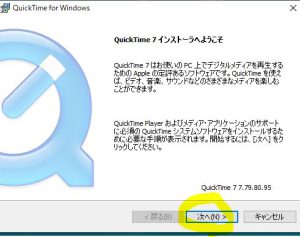
<p><span style="font-size: 14pt;"><strong>1.</strong></span>Quicktimeのインストーラへようこそ。<strong><span style="color: #ff0000; font-size: 14pt;">「次へ」を押します。</span></strong></p>
<p><img decoding="async" class="size-medium wp-image-1176 aligncenter" src="https://www.fingleforipad.com/wp-content/uploads/2021/11/quicktime2-300x237.jpg" alt="" width="300" height="237" srcset="https://www.fingleforipad.com/wp-content/uploads/2021/11/quicktime2-300x237.jpg 300w, https://www.fingleforipad.com/wp-content/uploads/2021/11/quicktime2.jpg 491w" sizes="(max-width: 300px) 100vw, 300px" /></p>
<p>&nbsp;</p>
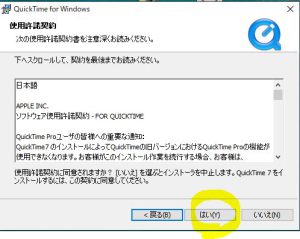
<p><strong><span style="font-size: 14pt;"> 2.</span></strong>使用許諾契約<span style="font-size: 14pt; color: #ff0000;"><strong>「はい」をクリック</strong></span></p>
<p><img decoding="async" class="size-medium wp-image-1177 aligncenter" src="https://www.fingleforipad.com/wp-content/uploads/2021/11/quicktime3-300x239.jpg" alt="" width="300" height="239" srcset="https://www.fingleforipad.com/wp-content/uploads/2021/11/quicktime3-300x239.jpg 300w, https://www.fingleforipad.com/wp-content/uploads/2021/11/quicktime3.jpg 498w" sizes="(max-width: 300px) 100vw, 300px" /></p>
<p>&nbsp;</p>
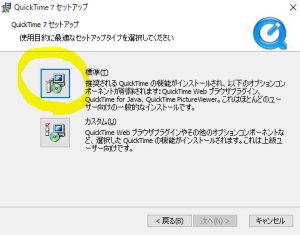
<p><strong><span style="font-size: 14pt;">3.</span></strong>標準とカスタムが指定されますが簡単に行いたい方は<span style="font-size: 14pt; color: #ff0000;"><strong>「標準」をクリック</strong></span>すれば問題ありません。</p>
<p><img decoding="async" class="size-medium wp-image-1178 aligncenter" src="https://www.fingleforipad.com/wp-content/uploads/2021/11/quicktime4-300x235.jpg" alt="" width="300" height="235" srcset="https://www.fingleforipad.com/wp-content/uploads/2021/11/quicktime4-300x235.jpg 300w, https://www.fingleforipad.com/wp-content/uploads/2021/11/quicktime4.jpg 488w" sizes="(max-width: 300px) 100vw, 300px" /></p>
<p>&nbsp;</p>
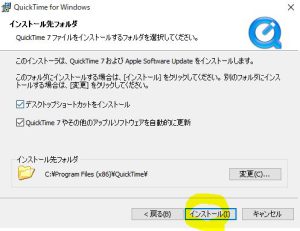
<p><span style="font-size: 14pt;"><strong>4.</strong></span>これでインストールを初めて良いですか？quicktimeに入れたいのはCプログラムで良いですか？という質問となりますのでOKなので<strong><span style="color: #ff0000; font-size: 14pt;">「インストール」をクリック！</span></strong></p>
<p><img decoding="async" class="size-medium wp-image-1179 aligncenter" src="https://www.fingleforipad.com/wp-content/uploads/2021/11/quicktime5-300x231.jpg" alt="" width="300" height="231" srcset="https://www.fingleforipad.com/wp-content/uploads/2021/11/quicktime5-300x231.jpg 300w, https://www.fingleforipad.com/wp-content/uploads/2021/11/quicktime5.jpg 497w" sizes="(max-width: 300px) 100vw, 300px" /></p>
<p>&nbsp;</p>
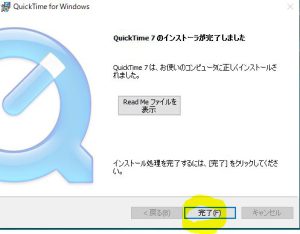
<p><strong><span style="font-size: 14pt;">5.</span></strong>デスクトップ上にquicktimeのショートカットがこれで出来ているかと思います。<strong><span style="color: #ff0000; font-size: 14pt;">「完了」をクリックしてください。</span></strong></p>
<p><img decoding="async" class="size-medium wp-image-1180 aligncenter" src="https://www.fingleforipad.com/wp-content/uploads/2021/11/quicktime6-300x234.jpg" alt="" width="300" height="234" srcset="https://www.fingleforipad.com/wp-content/uploads/2021/11/quicktime6-300x234.jpg 300w, https://www.fingleforipad.com/wp-content/uploads/2021/11/quicktime6.jpg 497w" sizes="(max-width: 300px) 100vw, 300px" /></p>
<p>これで終了です。Quicktimeプレイヤーをお楽しみください。</p>
<p>&nbsp;</p>
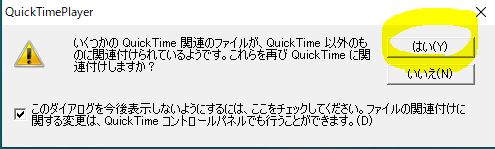
<p>Quicktimeを一番最初に立ち上げるにこのような画面が出ます。</p>
<p>apple社の商品ですからそれに関連するものが関連づけられているようです。</p>
<p>再生するだけではなく色んな機能と併用して使いたい方は<strong><span style="color: #ff0000;">「はい」をクリック</span></strong>しておきましょう。</p>
<p>その際はまたこういった画面が開くと煩わしいので「このダイアログを今後表示しないようにするには・・」の左横にチェックを入れておきましょう。</p>
<p>&nbsp;</p>
<p><img decoding="async" class="wp-image-1182 size-full aligncenter" src="https://www.fingleforipad.com/wp-content/uploads/2021/11/adfdf288320fe8f262ae8d6ec6a82f37.jpg" alt="" width="495" height="149" srcset="https://www.fingleforipad.com/wp-content/uploads/2021/11/adfdf288320fe8f262ae8d6ec6a82f37.jpg 495w, https://www.fingleforipad.com/wp-content/uploads/2021/11/adfdf288320fe8f262ae8d6ec6a82f37-300x90.jpg 300w" sizes="(max-width: 495px) 100vw, 495px" /></p>
<p>&nbsp;</p>
<h2><div class="su-heading su-heading-style-default su-heading-align-center" id="" style="font-size:13px;margin-bottom:20px"><div class="su-heading-inner"><span style="font-size: 18pt;">QuickTimeアンインストール方法</span></div></div></h2>
<p>アンインストール方法を解説します。</p>
<p>&nbsp;</p>
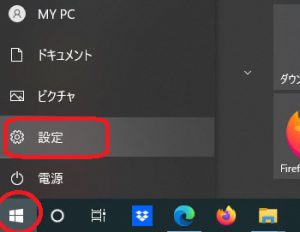
<p><span style="font-size: 14pt;"><strong>1.</strong></span>Windows10の場合のアンインストール方法ですが他のWindowsも基本的に同じ作業です。</p>
<p>下図の<span style="font-size: 14pt;"><strong><span style="color: #ff0000;">スタートメニューから設定⇒アプリの順にクリック！</span></strong></span></p>
<p><img decoding="async" class="size-medium wp-image-1195 aligncenter" src="https://www.fingleforipad.com/wp-content/uploads/2021/11/Quicktimeuninstall1-300x232.jpg" alt="" width="300" height="232" srcset="https://www.fingleforipad.com/wp-content/uploads/2021/11/Quicktimeuninstall1-300x232.jpg 300w, https://www.fingleforipad.com/wp-content/uploads/2021/11/Quicktimeuninstall1.jpg 350w" sizes="(max-width: 300px) 100vw, 300px" /></p>
<p>&nbsp;</p>
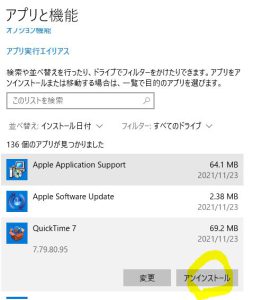
<p><span style="font-size: 14pt;"><strong>2.</strong></span>Quicktime７の場所の<strong><span style="color: #ff0000; font-size: 14pt;">「アンインストール」をクリック</span></strong>すれば削除可能です。</p>
<p><img decoding="async" class="size-medium wp-image-1194 aligncenter" src="https://www.fingleforipad.com/wp-content/uploads/2021/11/Quicktimeuninstall-253x300.jpg" alt="" width="253" height="300" srcset="https://www.fingleforipad.com/wp-content/uploads/2021/11/Quicktimeuninstall-253x300.jpg 253w, https://www.fingleforipad.com/wp-content/uploads/2021/11/Quicktimeuninstall.jpg 478w" sizes="(max-width: 253px) 100vw, 253px" /></p>
<p>&nbsp;</p>
<p>削除の仕方は簡単ですね。あっさりとアンインストールができました。</p>
<p>&nbsp;</p>
<h2><div class="su-heading su-heading-style-default su-heading-align-center" id="" style="font-size:13px;margin-bottom:20px"><div class="su-heading-inner">今のQuicktimeplayerウイルスなど安全性は？</div></div></h2>
<p>安全性は冒頭でも説明したようにサポートがだいぶ前に終了している点と現実に大手セキュリティ会社トレンドマイクロが脆弱性を発見している点を考えれば安全性としてはないと考えた方が良いでしょう。</p>
<p>セキュリティ大手カスペルスキーでも検索してみました。</p>
<p>結果は下記のようになりました。</p>
<p><img decoding="async" class="wp-image-1197 size-full aligncenter" src="https://www.fingleforipad.com/wp-content/uploads/2021/11/ad3989356802f48dbdf1553cb6ab7a55-1.jpg" alt="" width="477" height="545" srcset="https://www.fingleforipad.com/wp-content/uploads/2021/11/ad3989356802f48dbdf1553cb6ab7a55-1.jpg 477w, https://www.fingleforipad.com/wp-content/uploads/2021/11/ad3989356802f48dbdf1553cb6ab7a55-1-263x300.jpg 263w" sizes="(max-width: 477px) 100vw, 477px" /></p>
<p>&nbsp;</p>
<p>まず驚くのが100万人を超えるユーザー数です。しかしよく見ると署名日が2015年12月16日と署名されているのでデーターとしては2015年以降は無いという事になります。</p>
<p>やはりセキュリティに関してカスペルスキーも現在はデーターがないという事でしょう。</p>
<p>現在使用しても大丈夫かという問いの結論としては<strong>「現在は使用したらウイルスに侵入されるリスクを承知しなければいけない」</strong>という事になります。</p>
]]></content>
		
					<link rel="replies" type="text/html" href="https://www.fingleforipad.com/quicktime%e6%97%a7%e3%83%90%e3%83%bc%e3%82%b8%e3%83%a7%e3%83%b3%e3%83%80%e3%82%a6%e3%83%b3%e3%83%ad%e3%83%bc%e3%83%89%e3%82%84%e3%82%a2%e3%83%b3%e3%82%a4%e3%83%b3%e3%82%b9%e3%83%88%e3%83%bc%e3%83%ab.html#comments" thr:count="1" />
			<link rel="replies" type="application/atom+xml" href="https://www.fingleforipad.com/quicktime%e6%97%a7%e3%83%90%e3%83%bc%e3%82%b8%e3%83%a7%e3%83%b3%e3%83%80%e3%82%a6%e3%83%b3%e3%83%ad%e3%83%bc%e3%83%89%e3%82%84%e3%82%a2%e3%83%b3%e3%82%a4%e3%83%b3%e3%82%b9%e3%83%88%e3%83%bc%e3%83%ab.html/feed/atom/" thr:count="1" />
			<thr:total>1</thr:total>
			</entry>
		<entry>
		<author>
			<name>admin</name>
							<uri>http://www.fingleforipad.com</uri>
						</author>

		<title type="html"><![CDATA[Divx player 無料ダウンロード！使い方やウイルスなどのセキュリティ]]></title>
		<link rel="alternate" type="text/html" href="https://www.fingleforipad.com/divx-player-%e7%84%a1%e6%96%99%e3%83%80%e3%82%a6%e3%83%b3%e3%83%ad%e3%83%bc%e3%83%89%ef%bc%81%e4%bd%bf%e3%81%84%e6%96%b9%e3%82%84%e3%82%a6%e3%82%a4%e3%83%ab%e3%82%b9%e3%81%aa%e3%81%a9%e3%81%ae.html" />

		<id>https://www.fingleforipad.com/?p=1114</id>
		<updated>2024-02-29T10:50:06Z</updated>
		<published>2021-11-19T09:57:05Z</published>
		<category scheme="https://www.fingleforipad.com" term="無料動画再生ソフト" /><category scheme="https://www.fingleforipad.com" term="Divx player" /><category scheme="https://www.fingleforipad.com" term="ウイルス" /><category scheme="https://www.fingleforipad.com" term="ダウンロード" /><category scheme="https://www.fingleforipad.com" term="使い方" />
		<summary type="html"><![CDATA[divx playerの無料ダウンロード方法などを説明しています。 運営サポート：DivX、LLC 初制作：2012年11月15日 所在国：アメリカ 対応OS：Windows(10，8.1，8、7、VISTA、XP)、M [&#8230;]]]></summary>

					<content type="html" xml:base="https://www.fingleforipad.com/divx-player-%e7%84%a1%e6%96%99%e3%83%80%e3%82%a6%e3%83%b3%e3%83%ad%e3%83%bc%e3%83%89%ef%bc%81%e4%bd%bf%e3%81%84%e6%96%b9%e3%82%84%e3%82%a6%e3%82%a4%e3%83%ab%e3%82%b9%e3%81%aa%e3%81%a9%e3%81%ae.html"><![CDATA[<p>divx playerの無料ダウンロード方法などを説明しています。</p>
<table style="height: 100％; width: 100％;" border="1">
<tbody>
<tr>
<td>運営サポート：<strong>DivX、LLC</strong></td>
</tr>
<tr>
<td>初制作：2012年11月15日</td>
</tr>
<tr>
<td>所在国：アメリカ</td>
</tr>
<tr>
<td>対応OS：Windows(10，8.1，8、7、VISTA、XP)、Mac</td>
</tr>
<tr>
<td>対応形式：MP4、MKV、MOV、MPEG4</td>
</tr>
</tbody>
</table>
<div class="balloon5">
<div class="faceicon"><img decoding="async" class="alignnone size-full ls-is-cached lazyloaded" src="https://sp-ao.shortpixel.ai/client/to_webp,q_glossy,ret_img/https://www.fingleforipad.com/wp-content/uploads/2021/11/ea08f5b0304d940a553f0511ab080e9c.jpg%20" alt="吹き出し女性" data-src="https://sp-ao.shortpixel.ai/client/to_webp,q_glossy,ret_img/https://www.fingleforipad.com/wp-content/uploads/2021/11/ea08f5b0304d940a553f0511ab080e9c.jpg%20" /></div>
<div class="chatting">
<div class="says">
<p>アメリカの大きな会社が行っている事もあり動画プレイヤーは高級感を感じます。動画のクオリティも圧縮効果も高いためキレイな映像で機能もそこそこ豊富です。無料プレイヤーとして素人でも充分に使いこなせます。ダウンロードも途中広告が出るものの作業自体は少な目で手軽にインストール可能です。ただ最初だけですが対応するファイル形式が少ないためか新規形式のファイルを再生する時にいちいちコーディックのインストールをしなければいけません。そこは他の動画プレイヤーと比較すると面倒な部分となります。世界的に見たらダウンロード数はかなり多いソフトで人気はトップクラスの動画プレイヤーであることは間違いないでしょう。日本人はその中で5％程の利用者で19％がドイツ、10％がロシア、その他の国が54％の割合となっています。意外にも日本では知名度があまりない動画プレイヤーという事でしょう。
</p></div>
</div>
</div>
<p>&nbsp;<br />

&nbsp;</p>
<h2><div class="su-heading su-heading-style-default su-heading-align-center" id="" style="font-size:13px;margin-bottom:20px"><div class="su-heading-inner"><span style="font-size: 18pt;">divx player 無料ダウンロード方法</span></div></div></h2>
<p>&nbsp;</p>
<p>divx player 無料ダウンロード方法を説明します。</p>
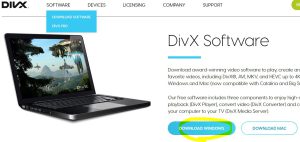
<p><strong><span style="font-size: 14pt;">１．</span></strong><a href="https://www.divx.com" target="_blank" rel="nofollow noopener">公式ページ</a>からdivx playerをダウンロードできます。他のソフトウェアダウンロードサイトより最新バージョンが手に入ります。</p>
<p>日本語翻訳するとなぜかWindowsの方がクリックできないという声があります。クリックしても反応しない時は日本語翻訳しないでノーマル表示に戻したりブラウザを変えたりして見てください。</p>
<p><span style="color: #ff0000;"><strong><span style="font-size: 14pt;">DownloadWindowsをクリック！</span></strong></span>Macの人はDownload MACをクリックしてください。</p>
<p>&nbsp;</p>
<p><img decoding="async" class="size-medium wp-image-1116 aligncenter" src="https://www.fingleforipad.com/wp-content/uploads/2021/11/divx-300x142.jpg" alt="" width="300" height="142" srcset="https://www.fingleforipad.com/wp-content/uploads/2021/11/divx-300x142.jpg 300w, https://www.fingleforipad.com/wp-content/uploads/2021/11/divx-1024x484.jpg 1024w, https://www.fingleforipad.com/wp-content/uploads/2021/11/divx-768x363.jpg 768w, https://www.fingleforipad.com/wp-content/uploads/2021/11/divx-1536x726.jpg 1536w, https://www.fingleforipad.com/wp-content/uploads/2021/11/divx.jpg 1547w" sizes="(max-width: 300px) 100vw, 300px" /></p>
<p>&nbsp;</p>
<p><strong><span style="font-size: 14pt;">２．</span></strong>ダウンロードができました。ファイルは<strong>「DivXInstaller.exe」</strong>です。</p>
<p><img decoding="async" class="size-full wp-image-1117 aligncenter" src="https://www.fingleforipad.com/wp-content/uploads/2021/11/divx1.jpg" alt="" width="98" height="77" /></p>
<p>&nbsp;</p>
<p>Divx player インストールしよう！手順</p>
<p>&nbsp;</p>
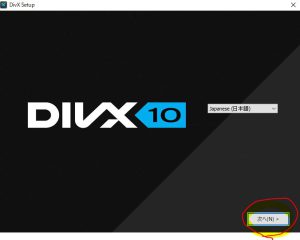
<p><strong><span style="font-size: 14pt;">１．</span>「DivXInstaller.exe」</strong>をクリックするとこんな画面となります。ここは次へを押す前にちゃんと日本語だかを確認してください。</p>
<p>英語だと後々面倒です。確認したら<span style="font-size: 14pt;"><strong><span style="color: #ff0000;">「次へ」をクリック！</span></strong></span></p>
<p><img decoding="async" class="size-medium wp-image-1118 aligncenter" src="https://www.fingleforipad.com/wp-content/uploads/2021/11/divx2-300x240.jpg" alt="" width="300" height="240" srcset="https://www.fingleforipad.com/wp-content/uploads/2021/11/divx2-300x240.jpg 300w, https://www.fingleforipad.com/wp-content/uploads/2021/11/divx2.jpg 676w" sizes="(max-width: 300px) 100vw, 300px" /></p>
<p>&nbsp;</p>
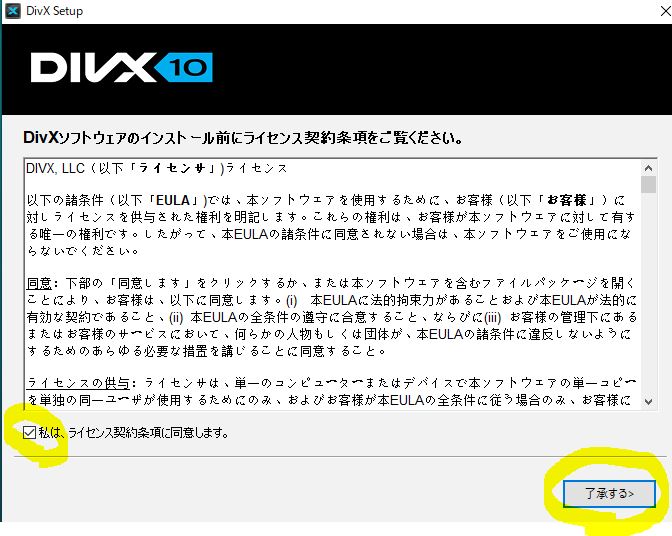
<p><strong><span style="font-size: 14pt;">２．</span><span style="color: #ff0000; font-size: 14pt;">「私はライセン</span></strong><strong><span style="color: #ff0000; font-size: 14pt;">ス条項に同意する」にチェックを入れた後に「次へ」をクリック</span></strong>します。</p>
<p><img decoding="async" class="wp-image-1119 size-full aligncenter" src="https://www.fingleforipad.com/wp-content/uploads/2021/11/divx3.jpg" alt="" width="672" height="536" srcset="https://www.fingleforipad.com/wp-content/uploads/2021/11/divx3.jpg 672w, https://www.fingleforipad.com/wp-content/uploads/2021/11/divx3-300x239.jpg 300w" sizes="(max-width: 672px) 100vw, 672px" /></p>
<p>&nbsp;</p>
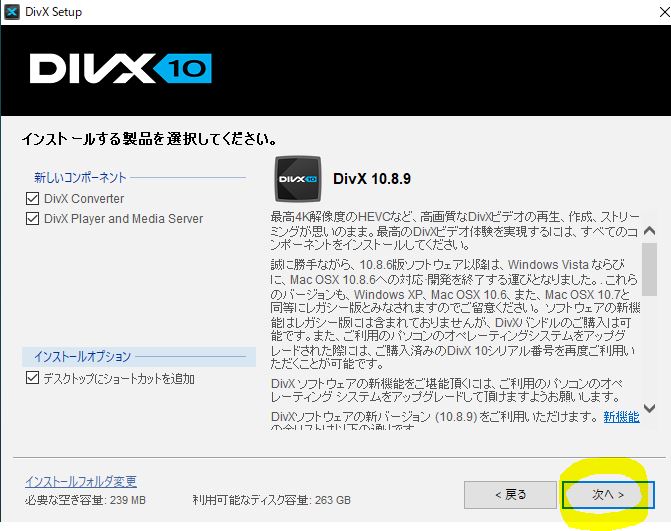
<p><strong><span style="font-size: 14pt;">３．<span style="color: #ff0000;">「新しいコンポ―ネント」は必要があれば二つともチェック</span></span></strong>しましょう。</p>
<p>・DivX Converter：これが無いと色んな動画ファイルなどを再生できません。さまざなな動画ファイルをDivXファイルに変換してくれる機能です。</p>
<p>・DivX Media Server：プレイヤーの動画をテレビで表示させたりできる機能です。Roku、Chromecast、アップルTV対応。</p>
<p><strong><span style="color: #ff0000; font-size: 14pt;">チェックしたら「次へ」。</span></strong></p>
<p><img decoding="async" class="wp-image-1120 size-full aligncenter" src="https://www.fingleforipad.com/wp-content/uploads/2021/11/divx4.jpg" alt="" width="671" height="531" srcset="https://www.fingleforipad.com/wp-content/uploads/2021/11/divx4.jpg 671w, https://www.fingleforipad.com/wp-content/uploads/2021/11/divx4-300x237.jpg 300w" sizes="(max-width: 671px) 100vw, 671px" /></p>
<p>&nbsp;</p>
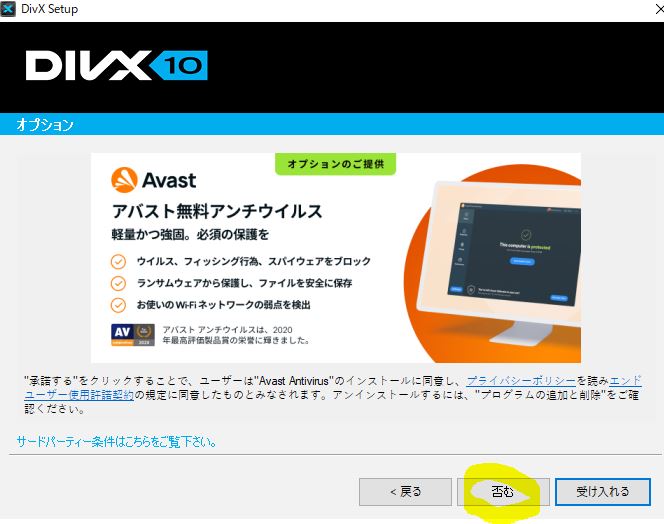
<p><span style="font-size: 14pt;"><strong>４．</strong></span>Divx playerも無料で配布しているので広告収入を稼ぎたいのでしょう。セキュリティソフトとしては有名ですが必要がなければ<span style="color: #ff0000;"><strong><span style="font-size: 14pt;">「否む」にチェック</span></strong></span>をして先に進みましょう。</p>
<p>読むのが面倒で全部次へ次へをしている人は間違いそうな場所なのでここが一番注意ですね。</p>
<p><img decoding="async" class="aligncenter wp-image-1121 size-full" src="https://www.fingleforipad.com/wp-content/uploads/2021/11/divx5.jpg" alt="" width="664" height="524" srcset="https://www.fingleforipad.com/wp-content/uploads/2021/11/divx5.jpg 664w, https://www.fingleforipad.com/wp-content/uploads/2021/11/divx5-300x237.jpg 300w" sizes="(max-width: 664px) 100vw, 664px" /></p>
<p>&nbsp;</p>
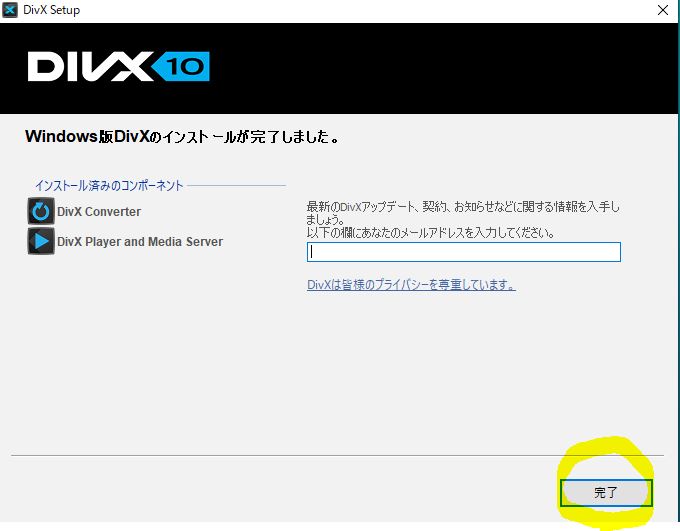
<p><span style="color: #000000;"><strong><span style="font-size: 14pt;">５．</span></strong></span>長くDivx playerとお付き合いした人はメールアドレスなどを入れてお知らせ情報などを手に入れたい方向けですが私は特に必要ないので何も入力しないでこれで<span style="color: #ff0000;"><strong><span style="font-size: 14pt;">「完了」をクリック。</span></strong></span></p>
<p><img decoding="async" class="wp-image-1122 size-full aligncenter" src="https://www.fingleforipad.com/wp-content/uploads/2021/11/divx6.jpg" alt="" width="680" height="531" srcset="https://www.fingleforipad.com/wp-content/uploads/2021/11/divx6.jpg 680w, https://www.fingleforipad.com/wp-content/uploads/2021/11/divx6-300x234.jpg 300w" sizes="(max-width: 680px) 100vw, 680px" /></p>
<p>&nbsp;</p>
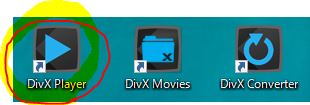
<p><span style="font-size: 14pt;"><strong>６．</strong></span>すると３つのショートカットがデスクトップ上に作成されます。Divx player以外は特に開くというわけではないので邪魔なら他の<span style="color: #ff0000;">二つは削除しても構いません。</span></p>
<p>・Divx player：動画を再生するためのプレイヤ―</p>
<p>・DivX Movies：再生した動画の保存先フォルダ</p>
<p>・DivX Converter：動画の変換コンバートを行った動画一覧</p>
<p><img decoding="async" class="wp-image-1123 size-full aligncenter" src="https://www.fingleforipad.com/wp-content/uploads/2021/11/divx10.jpg" alt="" width="310" height="105" srcset="https://www.fingleforipad.com/wp-content/uploads/2021/11/divx10.jpg 310w, https://www.fingleforipad.com/wp-content/uploads/2021/11/divx10-300x102.jpg 300w" sizes="(max-width: 310px) 100vw, 310px" /></p>
<p>&nbsp;</p>
<p>&nbsp;</p>
<h2><div class="su-heading su-heading-style-default su-heading-align-center" id="" style="font-size:13px;margin-bottom:20px"><div class="su-heading-inner"><span style="font-size: 18pt;">divx player 使い方について</span></div></div></h2>
<p>&nbsp;</p>
<p>初めにdivx player動画再生するための使い方について説明します。</p>
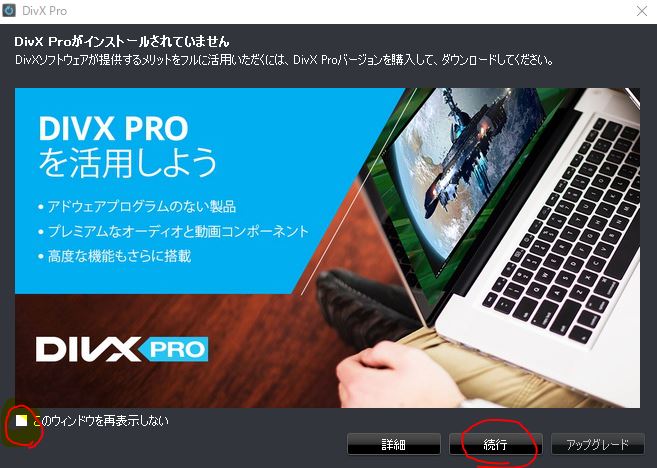
<p>まず初めに立ち上げ時の説明からします。詳細はdivx playerの公式ページに飛ぶだけですのでスルーで大丈夫です。アップグレードは有料商品です。</p>
<p><span style="color: #ff0000;"><strong><span style="font-size: 14pt;">このウインドウを再表示しないをクリックして「続行」を押してください。</span></strong></span><br />
<img decoding="async" class="wp-image-1125 aligncenter" src="https://www.fingleforipad.com/wp-content/uploads/2021/11/divx7.jpg" alt="" width="428" height="305" srcset="https://www.fingleforipad.com/wp-content/uploads/2021/11/divx7.jpg 657w, https://www.fingleforipad.com/wp-content/uploads/2021/11/divx7-300x214.jpg 300w" sizes="(max-width: 428px) 100vw, 428px" /></p>
<p>&nbsp;</p>
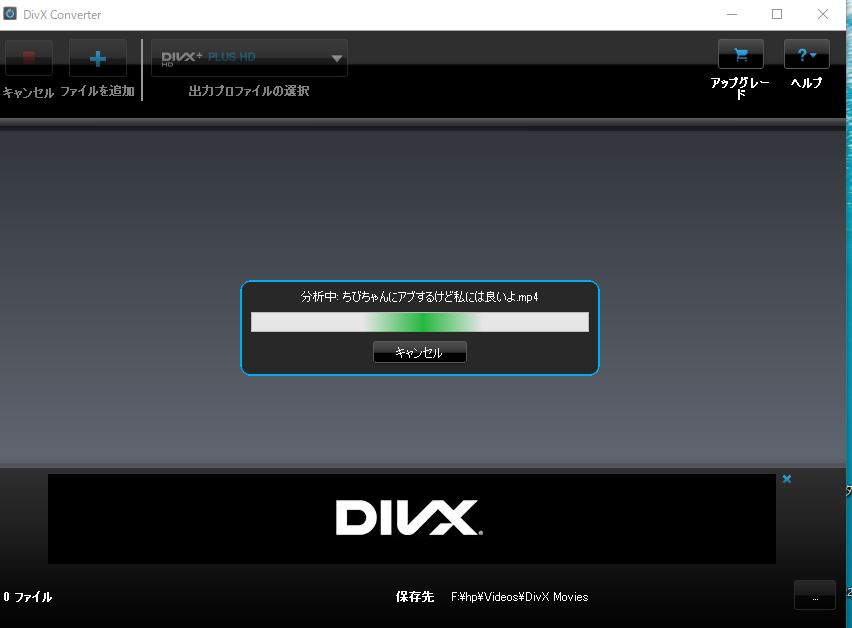
<p>早速divx playerを使用するのですが動画を見る場合ドロップ＆ドラックで再生が可能です。</p>
<p>しかし最初はmp４などの動画を再生する時に対応するためのコーディックのダウンロードが必要です。</p>
<p>コーディックのダウンロードは自動的に行ってくれます。そういった意味ではいちいち探してダウンロードする手間が省けて良いのですが他のプレイヤ―と比較すると最初から再生してもらえるので面倒と言えば面倒です。ただ最初だけで一度行えばそのファイル形式は対応しているのでこの作業はありません。</p>
<p><img decoding="async" class="wp-image-1126 aligncenter" src="https://www.fingleforipad.com/wp-content/uploads/2021/11/divx8.jpg" alt="" width="362" height="267" srcset="https://www.fingleforipad.com/wp-content/uploads/2021/11/divx8.jpg 852w, https://www.fingleforipad.com/wp-content/uploads/2021/11/divx8-300x221.jpg 300w, https://www.fingleforipad.com/wp-content/uploads/2021/11/divx8-768x566.jpg 768w" sizes="(max-width: 362px) 100vw, 362px" /></p>
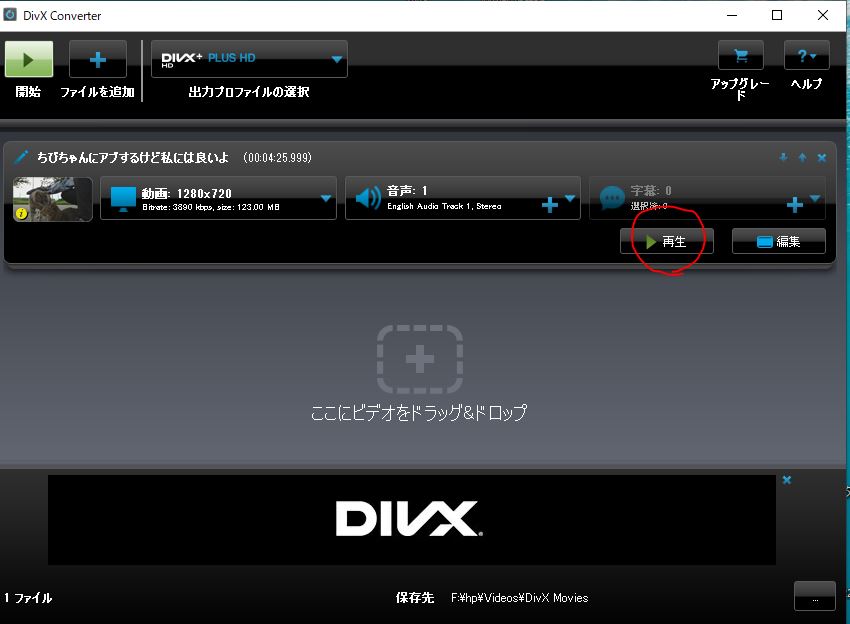
<p>ダウンロードした後はショートカットにもあったDivX Converterに動画が格納されます。「再生」ボタンを押せば再生が開始されます。</p>
<p>ここで毎度同じようにボタンを押すわけではありません。次からは動画をドロップ＆ドラックもしくはファイルを開けばすぐに再生できます。</p>
<p><img decoding="async" class="wp-image-1127 aligncenter" src="https://www.fingleforipad.com/wp-content/uploads/2021/11/divx9.jpg" alt="" width="567" height="416" srcset="https://www.fingleforipad.com/wp-content/uploads/2021/11/divx9.jpg 850w, https://www.fingleforipad.com/wp-content/uploads/2021/11/divx9-300x220.jpg 300w, https://www.fingleforipad.com/wp-content/uploads/2021/11/divx9-768x564.jpg 768w" sizes="(max-width: 567px) 100vw, 567px" /></p>
<p>このようにしてMOVやMP4等初めて再生する動画に関してはこの行程をします。</p>
<p>ショートカットキーを記載しておきます。</p>
<p>使用できる機能もこれで分かると思います。</p>
<p>&nbsp;</p>
<p>&nbsp;</p>
<table style="height: 100％; width: 100％;" border="1">
<tbody>
<tr>
<td style="text-align: center;"><span style="color: #0000ff;"><strong>アクション</strong></span></td>
<td style="text-align: center;"><span style="color: #0000ff;"><strong>キーボード</strong></span></td>
</tr>
<tr>
<td> 高度なコントロール</td>
<td style="text-align: center;"><strong>ビデオでマウスを右クリック</strong></td>
</tr>
<tr>
<td> ビデオ領域からドラッグ</td>
<td style="text-align: center;"><strong>右クリック + ドラッグ</strong></td>
</tr>
<tr>
<td> コマンド</td>
<td style="text-align: center;"><strong>キーシーケンス</strong></td>
</tr>
<tr>
<td> 2倍サイズ(D)</td>
<td style="text-align: center;"><strong>Ctrl+3</strong></td>
</tr>
<tr>
<td> Scrub Backward Percents</td>
<td style="text-align: center;"><strong>Shift+→</strong></td>
</tr>
<tr>
<td> Scrub Backward Seconds</td>
<td style="text-align: center;"><strong>→</strong></td>
</tr>
<tr>
<td> Scrub Forward Percents</td>
<td style="text-align: center;"><strong>Shift+←</strong></td>
</tr>
<tr>
<td> Scrub Forward Seconds</td>
<td style="text-align: center;"><strong>←</strong></td>
</tr>
<tr>
<td> チャプター 1</td>
<td style="text-align: center;"><strong>1</strong></td>
</tr>
<tr>
<td> チャプター 2</td>
<td style="text-align: center;"><strong>2</strong></td>
</tr>
<tr>
<td> チャプター 3</td>
<td style="text-align: center;"><strong>3</strong></td>
</tr>
<tr>
<td> チャプター 4</td>
<td style="text-align: center;"><strong>4</strong></td>
</tr>
<tr>
<td> チャプター 5</td>
<td style="text-align: center;"><strong>5</strong></td>
</tr>
<tr>
<td> チャプター 6</td>
<td style="text-align: center;"><strong>6</strong></td>
</tr>
<tr>
<td> チャプター 7</td>
<td style="text-align: center;"><strong>7</strong></td>
</tr>
<tr>
<td> チャプター 8</td>
<td style="text-align: center;"><strong>8</strong></td>
</tr>
<tr>
<td> チャプター 9</td>
<td style="text-align: center;"><strong>9</strong></td>
</tr>
<tr>
<td> ハーフサイズ(H)</td>
<td style="text-align: center;"><strong>Ctrl+2</strong></td>
</tr>
<tr>
<td> ビデオを開く (O)&#8230;</td>
<td style="text-align: center;"><strong>Ctrl+O</strong></td>
</tr>
<tr>
<td> ビデオを閉じる</td>
<td style="text-align: center;"><strong>Ctrl+Shift+W</strong></td>
</tr>
<tr>
<td> ファイルが含まれるフォルダを開く(E)&#8230;</td>
<td style="text-align: center;"><strong>Ctrl+R</strong></td>
</tr>
<tr>
<td> 音量下げる</td>
<td style="text-align: center;"><strong>&#8211;</strong></td>
</tr>
<tr>
<td> 音量上げる</td>
<td style="text-align: center;"><strong>+</strong></td>
</tr>
<tr>
<td> 巻き戻し</td>
<td style="text-align: center;"><strong>Ctrl+→</strong></td>
</tr>
<tr>
<td> 再生/一時停止</td>
<td style="text-align: center;"><strong>Space</strong></td>
</tr>
<tr>
<td> 次のタイトル</td>
<td style="text-align: center;"><strong>T</strong></td>
</tr>
<tr>
<td> 次のチャプター</td>
<td style="text-align: center;"><strong>]</strong></td>
</tr>
<tr>
<td> 次のファイル</td>
<td style="text-align: center;"><strong>↓</strong></td>
</tr>
<tr>
<td> 次の音声トラック</td>
<td style="text-align: center;"><strong>A</strong></td>
</tr>
<tr>
<td> 次の字幕トラック</td>
<td style="text-align: center;"><strong>S</strong></td>
</tr>
<tr>
<td> 終了(X)</td>
<td style="text-align: center;"><strong>Alt+F4</strong></td>
</tr>
<tr>
<td> 消音</td>
<td style="text-align: center;"><strong>V</strong></td>
</tr>
<tr>
<td> 常に最前面に表示(A)</td>
<td style="text-align: center;"><strong>Ctrl+A</strong></td>
</tr>
<tr>
<td> 前のチャプター</td>
<td style="text-align: center;"><strong>[</strong></td>
</tr>
<tr>
<td> 前のファイル</td>
<td style="text-align: center;"><strong>↑</strong></td>
</tr>
<tr>
<td> 全画面(F)</td>
<td style="text-align: center;"><strong>Ctrl+4</strong></td>
</tr>
<tr>
<td> 早送り</td>
<td style="text-align: center;"><strong>Ctrl+←</strong></td>
</tr>
<tr>
<td> 停止</td>
<td style="text-align: center;"><strong>P</strong></td>
</tr>
<tr>
<td> 標準サイズ(N)</td>
<td style="text-align: center;"><strong>Ctrl+1</strong></td>
</tr>
</tbody>
</table>
<p>後はコントラスト、彩度などを調整できる画像調整という機能もおすすめです。</p>
<p>画像調整は「ファイル」⇒「画像調整」⇒「再生」</p>
<p><img decoding="async" class="size-medium wp-image-1145 aligncenter" src="https://www.fingleforipad.com/wp-content/uploads/2021/11/divxgazou-300x261.jpg" alt="" width="300" height="261" srcset="https://www.fingleforipad.com/wp-content/uploads/2021/11/divxgazou-300x261.jpg 300w, https://www.fingleforipad.com/wp-content/uploads/2021/11/divxgazou-1024x890.jpg 1024w, https://www.fingleforipad.com/wp-content/uploads/2021/11/divxgazou-768x668.jpg 768w, https://www.fingleforipad.com/wp-content/uploads/2021/11/divxgazou.jpg 1027w" sizes="(max-width: 300px) 100vw, 300px" /></p>
<p>バーをずらしただけでは動画の色は変わりませんので適用を押して一度確認してから「OK]を押しましょう。</p>
<p>&nbsp;</p>
<p>&nbsp;</p>
<h2><div class="su-heading su-heading-style-default su-heading-align-center" id="" style="font-size:13px;margin-bottom:20px"><div class="su-heading-inner"><span style="font-size: 18pt;">divx player セキュリティ</span></div></div></h2>
<p>大手企業が行っているという事もありセキュリティは心配なさそうです。</p>
<p>カスペルスキーの診断結果です。１万人を超えるデーターがあるようです。</p>
<p>これだけの方が使用して「信頼済み」、安全と出るのであれが問題なさそうですね。</p>
<p><img decoding="async" class="wp-image-1146 size-full aligncenter" src="https://www.fingleforipad.com/wp-content/uploads/2021/11/divxsekyuriteli.jpg" alt="" width="472" height="537" srcset="https://www.fingleforipad.com/wp-content/uploads/2021/11/divxsekyuriteli.jpg 472w, https://www.fingleforipad.com/wp-content/uploads/2021/11/divxsekyuriteli-264x300.jpg 264w" sizes="(max-width: 472px) 100vw, 472px" /></p>
<p>取り敢えずこれだけの方が利用してる人気のある動画プレイヤーあることに驚きだがインストール時に広告が出てくるのが気になる程度でしょう。</p>
<p>GOMプレイヤーではないですがあまり金儲けに走っているような会社にはセキュリティ面でも個人情報を抜かれているのではないかと心配になってしまいます。</p>
<p>ただこれは私の勝手な主観ですしこれだけの大人数が問題なかったわけですので気になさらずにご使用ください。</p>
]]></content>
		
					<link rel="replies" type="text/html" href="https://www.fingleforipad.com/divx-player-%e7%84%a1%e6%96%99%e3%83%80%e3%82%a6%e3%83%b3%e3%83%ad%e3%83%bc%e3%83%89%ef%bc%81%e4%bd%bf%e3%81%84%e6%96%b9%e3%82%84%e3%82%a6%e3%82%a4%e3%83%ab%e3%82%b9%e3%81%aa%e3%81%a9%e3%81%ae.html#comments" thr:count="1" />
			<link rel="replies" type="application/atom+xml" href="https://www.fingleforipad.com/divx-player-%e7%84%a1%e6%96%99%e3%83%80%e3%82%a6%e3%83%b3%e3%83%ad%e3%83%bc%e3%83%89%ef%bc%81%e4%bd%bf%e3%81%84%e6%96%b9%e3%82%84%e3%82%a6%e3%82%a4%e3%83%ab%e3%82%b9%e3%81%aa%e3%81%a9%e3%81%ae.html/feed/atom/" thr:count="1" />
			<thr:total>1</thr:total>
			</entry>
		<entry>
		<author>
			<name>admin</name>
							<uri>http://www.fingleforipad.com</uri>
						</author>

		<title type="html"><![CDATA[MPC-BE（Media Player Classic Black Edition）日本語無料ダウンロード方法と使い方！windows10]]></title>
		<link rel="alternate" type="text/html" href="https://www.fingleforipad.com/mpc-be%ef%bc%88media-player-classic-black-edition%ef%bc%89%e6%97%a5%e6%9c%ac%e8%aa%9e%e7%84%a1%e6%96%99%e3%83%80%e3%82%a6%e3%83%b3%e3%83%ad%e3%83%bc%e3%83%89%e6%96%b9%e6%b3%95%ef%bc%81.html" />

		<id>https://www.fingleforipad.com/?p=1071</id>
		<updated>2024-02-29T10:54:02Z</updated>
		<published>2021-11-16T06:35:15Z</published>
		<category scheme="https://www.fingleforipad.com" term="無料動画再生ソフト" /><category scheme="https://www.fingleforipad.com" term="Media Player Classic Black Edition" /><category scheme="https://www.fingleforipad.com" term="MPC-BE" /><category scheme="https://www.fingleforipad.com" term="windows10" /><category scheme="https://www.fingleforipad.com" term="ダウンロード" /><category scheme="https://www.fingleforipad.com" term="日本語" /><category scheme="https://www.fingleforipad.com" term="無料" />
		<summary type="html"><![CDATA[MPC-BE（Media Player Classic Black Edition）はMPCの類似派生版です。同派生版のMPC-HCと違いリニュールが今もされている。 Media Player Classicの最新ソフト [&#8230;]]]></summary>

					<content type="html" xml:base="https://www.fingleforipad.com/mpc-be%ef%bc%88media-player-classic-black-edition%ef%bc%89%e6%97%a5%e6%9c%ac%e8%aa%9e%e7%84%a1%e6%96%99%e3%83%80%e3%82%a6%e3%83%b3%e3%83%ad%e3%83%bc%e3%83%89%e6%96%b9%e6%b3%95%ef%bc%81.html"><![CDATA[<p>MPC-BE（Media Player Classic Black Edition）はMPCの類似派生版です。同派生版のMPC-HCと違いリニュールが今もされている。</p>
<p>Media Player Classicの最新ソフトを探されている方はこのMPCｰBEを使うと良いでしょう。</p>
<p>&nbsp;</p>
<table border="1">
<tbody>
<tr>
<td><strong>開発者：Gabest 現在はファンベースコミュニティが行っている</strong></td>
</tr>
<tr>
<td>開発国：アメリカ</td>
</tr>
<tr>
<td>対応OS: Windows vista,7～10</td>
</tr>
<tr>
<td>対応形式：<br />
flv、ogg、mp3、amv、dsm、aif、amr、au、ts、wav、mka、mid、mpg、asf、ape、divx、m4a、ofr、ra、alac、tta、wv、webm、ivf、d2v、mkv、wmadrc、flimp4、m4v、3gp、ogm、flac、mov、mpa、mp2、、m2v、ac3、ratdvd、rm、raq、swf、smk、avi、wmv、aac、mpc、rmvb</td>
</tr>
</tbody>
</table>
<p>&nbsp;</p>
<div class="balloon5">
<div class="faceicon"><img decoding="async" class="alignnone size-full ls-is-cached lazyloaded" src="https://sp-ao.shortpixel.ai/client/to_webp,q_glossy,ret_img/https://www.fingleforipad.com/wp-content/uploads/2021/11/ea08f5b0304d940a553f0511ab080e9c.jpg%20" alt="吹き出し女性" data-src="https://sp-ao.shortpixel.ai/client/to_webp,q_glossy,ret_img/https://www.fingleforipad.com/wp-content/uploads/2021/11/ea08f5b0304d940a553f0511ab080e9c.jpg%20" /></div>
<div class="chatting">
<div class="says">
<p>現在はコミュニティだけで運営してるソフトですが元々はＭＰＣという動画再生ソフトの人気が高く有名な開発者のgabestから引き継いだものです。運営として企業が行っているというわけではないので信用性などは不安がありますが現在でも随時更新し続けているソフトではあります。アクティブという事です。</p>
<p>人気の理由は軽さでしょう。このソフトは軽くＣＰＵも数パーセントで稼働するためにＰＣの負担がほとんどありません。他製品と比較すると良く分かります。機能性としては差ほど驚くような機能はありません。解像度に合った画面で表示されたり字幕機能や静止画のキャプチャ保存などどのソフトでもありそうな機能です。動画再生するファイルも特別多いわけではありません。しかしオープンソースなので詳しい人はデコードなどのチューイングはしやすいのかもしれません。</p>
</div>
</div>
</div>
<p>&nbsp;<br />

&nbsp;</p>
<h2><div class="su-heading su-heading-style-default su-heading-align-center" id="" style="font-size:13px;margin-bottom:20px"><div class="su-heading-inner"><span style="font-size: 18pt;">MPC-BE（Media Player Classic Black Edition）ダウンロード方法（日本語対応）</span></div></div></h2>
<p>MPC-BE（Media Player Classic Black Edition）のダウンロード方法を説明致します。</p>
<p>MPC-BEは運営は個人チームなので特に公式ページがなくオープンソースコミュニティの「<a href="https://sourceforge.net/projects/mpcbe/files/MPC-BE/" target="_blank" rel="nofollow noopener">SOURCEFORGE</a>」でダウンロードをします。</p>
<p>&nbsp;</p>
<p><span style="font-size: 14pt;">１.</span>こちらのページの<span style="font-size: 14pt; color: #ff0000;"><strong>「Downlord latest Version」をクリック</strong></span>して最新バージョンをダウンロードしてください。</p>
<p><img decoding="async" class="wp-image-1084 size-full aligncenter" src="https://www.fingleforipad.com/wp-content/uploads/2021/11/MPCBE.jpg" alt="" width="750" height="500" srcset="https://www.fingleforipad.com/wp-content/uploads/2021/11/MPCBE.jpg 750w, https://www.fingleforipad.com/wp-content/uploads/2021/11/MPCBE-300x200.jpg 300w" sizes="(max-width: 750px) 100vw, 750px" /></p>
<p>&nbsp;</p>
<p><span style="font-size: 14pt;"><strong>２．</strong></span>こちらからインストーラー「MPC-BE.1.5.8.6302.x64-」のZIPファイルがダウンロードされました。<span style="font-size: 14pt;"><strong><span style="color: #ff0000;">ダブルクリック等をして解凍してください。</span></strong></span></p>
<p><img decoding="async" class="size-full wp-image-1087 aligncenter" src="https://www.fingleforipad.com/wp-content/uploads/2021/11/MPCZIP.jpg" alt="" width="100" height="79" /></p>
<p>解凍されたフォルダはコチラとなります。この中の<span style="color: #800080;"><strong><span style="font-size: 14pt;">「MPC-BE.1.5.8.6302.x64.exe」をクリックするとインストールが開始されます。</span></strong></span></p>
<p><img decoding="async" class="size-full wp-image-1085 aligncenter" src="https://www.fingleforipad.com/wp-content/uploads/2021/11/MPCBE2.jpg" alt="" width="118" height="136" /></p>
<p><img decoding="async" class="size-medium wp-image-1086 aligncenter" src="https://www.fingleforipad.com/wp-content/uploads/2021/11/MPCBE3.jpg" alt="" width="180" height="35" /></p>
<p>&nbsp;</p>
<h2><div class="su-heading su-heading-style-default su-heading-align-center" id="" style="font-size:13px;margin-bottom:20px"><div class="su-heading-inner"><span style="font-size: 18pt;">MPC-BE（Media Player Classic Black Edition）インストール手順！</span></div></div></h2>
<p>&nbsp;</p>
<p><span style="font-size: 14pt;"><strong>１．</strong></span>日本語対応にするかしないかは一番最初のこの設定で決まります。<span style="font-size: 14pt; color: #ff0000;"><strong>「日本語」でOKボタンクリック！</strong></span></p>
<p>この設定をしないと他の言語になってしまいますので注意しましょう。</p>
<p><img decoding="async" class="size-medium wp-image-1089 aligncenter" src="https://www.fingleforipad.com/wp-content/uploads/2021/11/MPCBE5.jpg" alt="" width="300" height="184" /></p>
<p>&nbsp;</p>
<p><span style="font-size: 14pt;"><strong>２．</strong></span>大抵ソフトをダウンロードしようとするとこの使用許諾に同意しなければいけません。結構有名なプレイヤーで使っている人も多いので特に不安を覚える必要はないですしセキュリティ検査なども異常なしが出ています。<strong><span style="font-size: 14pt; color: #ff0000;">「同意する」⇒次へをクリック！</span></strong></p>
<p><img decoding="async" class="size-medium wp-image-1090 aligncenter" src="https://www.fingleforipad.com/wp-content/uploads/2021/11/MPCBE6-300x245.jpg" alt="" width="300" height="245" srcset="https://www.fingleforipad.com/wp-content/uploads/2021/11/MPCBE6-300x245.jpg 300w, https://www.fingleforipad.com/wp-content/uploads/2021/11/MPCBE6.jpg 495w" sizes="(max-width: 300px) 100vw, 300px" /></p>
<p>&nbsp;</p>
<p><span style="font-size: 14pt;"><strong>３．</strong></span>MPCを貯蔵しておく場所ですがアンインストールする時用に覚えていなくともプログラムでちゃんと削除してくれるので神経質になる必要ないでしょう。</p>
<p>どこでも良いので<span style="font-size: 14pt;"><strong><span style="color: #ff0000;">「次へ」クリック！</span></strong></span></p>
<p><img decoding="async" class="size-medium wp-image-1091 aligncenter" src="https://www.fingleforipad.com/wp-content/uploads/2021/11/MPCBE7-300x239.jpg" alt="" width="300" height="239" srcset="https://www.fingleforipad.com/wp-content/uploads/2021/11/MPCBE7-300x239.jpg 300w, https://www.fingleforipad.com/wp-content/uploads/2021/11/MPCBE7.jpg 499w" sizes="(max-width: 300px) 100vw, 300px" /></p>
<p>&nbsp;</p>
<p><span style="font-size: 14pt;"><strong>４．</strong></span>いろいろチェックする項目があると考えてしまいますが初期設定のままで大丈夫です。<span style="font-size: 14pt; color: #ff0000;"><strong>特に変更なしで次へをクリック！</strong></span></p>
<p><img decoding="async" class="wp-image-1092 size-full aligncenter" src="https://www.fingleforipad.com/wp-content/uploads/2021/11/MPCBE8.jpg" alt="" width="491" height="401" srcset="https://www.fingleforipad.com/wp-content/uploads/2021/11/MPCBE8.jpg 491w, https://www.fingleforipad.com/wp-content/uploads/2021/11/MPCBE8-300x245.jpg 300w" sizes="(max-width: 491px) 100vw, 491px" /></p>
<p>一応内容だけ伝えておくと</p>
<p><span style="color: #ff9900;"><strong>・アイコンライブラリー</strong></span></p>
<p>ツールバーなどにアイコンを置くと表示される画像</p>
<p><strong>・<span style="color: #ff9900;">翻訳</span></strong></p>
<p>日本語対応に最初指定しましたがここを外してしまうと日本語になりません。</p>
<p><span style="color: #ff9900;"><strong>・動画ファイル・音声ファイル、プレイリスト関連付け</strong></span></p>
<p>動画や音楽、プレイリストを開こうとするとＭＰＣで立ち上がる機能</p>
<p><span style="color: #ff9900;"><strong>・シェル拡張のインストール</strong></span></p>
<p>右クリックした際に出てくる窓に「コマンド」が追加される</p>
<p><strong><span style="color: #ff9900;">・H.264 MVC 3D デコーダー（追加ダウンロード）</span></strong></p>
<p>３D用のデコーダーですね。規格なので必要がある方は追加でダウンロード</p>
<p>&nbsp;</p>
<p><span style="font-size: 14pt;"><strong>５．</strong></span>スタートメニューに表示させたくない人は<span style="color: #ff0000;"><strong><span style="font-size: 14pt;">チェックを入れて「次へ」。</span></strong></span></p>
<p><img decoding="async" class="size-medium wp-image-1093 aligncenter" src="https://www.fingleforipad.com/wp-content/uploads/2021/11/MPCBE9-300x244.jpg" alt="" width="300" height="244" srcset="https://www.fingleforipad.com/wp-content/uploads/2021/11/MPCBE9-300x244.jpg 300w, https://www.fingleforipad.com/wp-content/uploads/2021/11/MPCBE9.jpg 496w" sizes="(max-width: 300px) 100vw, 300px" /></p>
<p>&nbsp;</p>
<p><span style="font-size: 14pt;"><strong>６．</strong></span>デスクトップにアイコンがあるとすぐ立ち上げられるのがうれしいので私は<span style="font-size: 14pt;"><strong><span style="color: #ff0000;">チェックを入れて「次へ」クリック！</span></strong></span></p>
<p><img decoding="async" class="size-medium wp-image-1096 aligncenter" src="https://www.fingleforipad.com/wp-content/uploads/2021/11/MPCBE10-300x237.jpg" alt="" width="300" height="237" srcset="https://www.fingleforipad.com/wp-content/uploads/2021/11/MPCBE10-300x237.jpg 300w, https://www.fingleforipad.com/wp-content/uploads/2021/11/MPCBE10.jpg 501w" sizes="(max-width: 300px) 100vw, 300px" /></p>
<p><strong><span style="font-size: 14pt;">７．</span></strong>準備が完了したのでインストールを実行するという事です。<span style="font-size: 14pt;"><strong><span style="color: #ff0000;">「インストール」クリック！</span></strong></span></p>
<p><img decoding="async" class="size-medium wp-image-1095 aligncenter" src="https://www.fingleforipad.com/wp-content/uploads/2021/11/MPCBE11-300x238.jpg" alt="" width="300" height="238" srcset="https://www.fingleforipad.com/wp-content/uploads/2021/11/MPCBE11-300x238.jpg 300w, https://www.fingleforipad.com/wp-content/uploads/2021/11/MPCBE11.jpg 500w" sizes="(max-width: 300px) 100vw, 300px" /></p>
<p>しばらく経つと終わりますのでこの画面が出てきたら完了してください。</p>
<p><img decoding="async" class="size-medium wp-image-1097 aligncenter" src="https://www.fingleforipad.com/wp-content/uploads/2021/11/MPCBE12-300x241.jpg" alt="" width="300" height="241" srcset="https://www.fingleforipad.com/wp-content/uploads/2021/11/MPCBE12-300x241.jpg 300w, https://www.fingleforipad.com/wp-content/uploads/2021/11/MPCBE12.jpg 501w" sizes="(max-width: 300px) 100vw, 300px" /></p>
<h2><div class="su-heading su-heading-style-default su-heading-align-center" id="" style="font-size:13px;margin-bottom:20px"><div class="su-heading-inner"><span style="font-size: 18pt;">MPC-BE（Media Player Classic Black Edition）ウイルス等の安全性は？</span></div></div></h2>
<p>ウイルスなどの安全性は特にコミュニティで直接的な被害にあったという人はいません。私も実験的にダウンロードし確認はしましたが広告が入るなどもなく高機能なカスペルスキーというソフトでも反応はありません。このソフトにはソフトごとの評価がありこのようなデーターが出ます。ダウンロードしている人は意外と多いですね。1000人を超えるユーザーが信頼済みと出ています。これで見る限りだと一先ず安心のソフトです。</p>
<p><img decoding="async" class="wp-image-1103 size-full aligncenter" src="https://www.fingleforipad.com/wp-content/uploads/2021/11/039700a9796c3c16998f32c6924a12e2.jpg" alt="" width="473" height="537" srcset="https://www.fingleforipad.com/wp-content/uploads/2021/11/039700a9796c3c16998f32c6924a12e2.jpg 473w, https://www.fingleforipad.com/wp-content/uploads/2021/11/039700a9796c3c16998f32c6924a12e2-264x300.jpg 264w" sizes="(max-width: 473px) 100vw, 473px" /></p>
<h2><div class="su-heading su-heading-style-default su-heading-align-center" id="" style="font-size:13px;margin-bottom:20px"><div class="su-heading-inner"><span style="font-size: 18pt;">MPC-BE（Media Player Classic Black Edition）評価評判は？</span></div></div></h2>
<p>先程のデーターは使用されている地域まで出ますが日本人が４割近くもいますね。その他世界各国で使用されている評価の高いソフトと言えます。</p>
<p>他のソフトも同じように検査をしましたが1,000人以下のユーザー数と表示されているものも多かったので評判は良い動画再生ソフトなのでしょう。</p>
<p>ソースが公になっているオープンソースなのでテコ入れが出来ない分信頼性が高く、玄人の方にはいじりやすい自由度の高いソフトとなっているという事もあるでしょう。</p>
<div class="balloon5">
<div class="faceicon"><img decoding="async" class="alignnone size-full " src="https://www.fingleforipad.com/wp-content/uploads/2021/11/ea08f5b0304d940a553f0511ab080e9c.jpg " alt="吹き出し女性" /></div>
<div class="chatting">
<div class="says">初心者レベルの私からすると早い軽いという点は利点です。<br />
しかしながら他の動画再生ソフトと比較するとそこまで優れているプレイヤーには感じません。<br />
軽いだけなら当サイトのトップページにはそれを超えるものがあります。<br />
安全性やそこそこ利用者も多いソフトでそれ以上を望まない人にはおすすめです。</div>
</div>
</div>
<div></div>
<h2><div class="su-heading su-heading-style-default su-heading-align-center" id="" style="font-size:13px;margin-bottom:20px"><div class="su-heading-inner"><span style="font-size: 18pt;">MPC-BE（Media Player Classic Black Edition）使い方を解説！</span></div></div></h2>
<div></div>
<div>とても使い勝手の良いソフトですのでパッと見てパッと操作できる仕様になっています。</div>
<div>動画プレイヤーで再生や早送りを見ただけで分からない方はあまりいないと思いすので他製品にない部分と使いたいツールだけを説明します。</div>
<div></div>
<div><span style="color: #800080;"><strong><span style="font-size: 12pt;">★さまざまな形態の動画を開けます。</span></strong></span></div>
<div>開けるデバイスはたくさんあります。</div>
<div></div>
<div><span style="color: #800000;"><strong>・ファイル/URLを開く</strong></span></div>
<div>後述説明します。</div>
<div><span style="color: #800000;"><strong>・DVD/BDを開く</strong></span></div>
<div>DVDを開く事ができます。BDはブルーレイの事です。</div>
<div><span style="color: #800000;"><strong>・デバイスを開く</strong></span></div>
<div>お持ちのUSBメモリ―などを開く場合に選択</div>
<div><span style="color: #800000;"><strong>・ディリクトリをを開く</strong></span></div>
<div>Cプログラムなどのディリクトリなどに入っている動画</div>
<div><span style="color: #800000;"><strong>・ISOイメージを開く</strong></span></div>
<div>自分でISOファイルを作った方はこちら。</div>
<div>ファイルの形式が「.iso」の物。主にCDのトラックなどを一つにまとめたファイルなど</div>
<div></div>
<div><img decoding="async" class="alignnone wp-image-1109 size-full" src="https://www.fingleforipad.com/wp-content/uploads/2021/11/038f2abb076b81e6fc51eb7270bd0fe7.jpg" alt="" width="677" height="517" srcset="https://www.fingleforipad.com/wp-content/uploads/2021/11/038f2abb076b81e6fc51eb7270bd0fe7.jpg 677w, https://www.fingleforipad.com/wp-content/uploads/2021/11/038f2abb076b81e6fc51eb7270bd0fe7-300x229.jpg 300w" sizes="(max-width: 677px) 100vw, 677px" /></div>
<div></div>
<div></div>
<div></div>
<div><span style="font-size: 12pt;"><strong><span style="color: #800080;">★YouTubeなどの動画サイトをこのMPC-BEで操作したいという場合</span></strong></span></div>
<div></div>
<div><span style="color: #ff0000;"><strong>「ファイル」⇒「ファイル/URLで開く」をクリック</strong></span></div>
<div>動画サイトのURLをコピーしこちらに貼り付けます。</div>
<div>OKを押せば動画内でYouTubeが再生されます。</div>
<div></div>
<div><img decoding="async" class="alignnone wp-image-1108 size-full" src="https://www.fingleforipad.com/wp-content/uploads/2021/11/MPCBEgazou-1.jpg" alt="" width="677" height="520" srcset="https://www.fingleforipad.com/wp-content/uploads/2021/11/MPCBEgazou-1.jpg 677w, https://www.fingleforipad.com/wp-content/uploads/2021/11/MPCBEgazou-1-300x230.jpg 300w" sizes="(max-width: 677px) 100vw, 677px" /></div>
<div></div>
<div><strong><span style="color: #800080; font-size: 12pt;">★動画の画質を変える</span></strong></div>
<div></div>
<div>動画をより高画質でみるために動画ごとに色の補正などができます。</div>
<div>この操作は動画を見ながら補正できる点が良いですね。</div>
<div></div>
<div><span style="font-size: 14pt; color: #ff0000;"><strong>表示⇒オプション⇒補正して⇒OKボタン</strong></span></div>
<div></div>
<div><img decoding="async" class="alignnone size-medium wp-image-1110" src="https://www.fingleforipad.com/wp-content/uploads/2021/11/MPCBEirohenkou-300x290.jpg" alt="" width="300" height="290" srcset="https://www.fingleforipad.com/wp-content/uploads/2021/11/MPCBEirohenkou-300x290.jpg 300w, https://www.fingleforipad.com/wp-content/uploads/2021/11/MPCBEirohenkou.jpg 669w" sizes="(max-width: 300px) 100vw, 300px" /></div>
<div><img decoding="async" class="alignnone size-medium wp-image-1111" src="https://www.fingleforipad.com/wp-content/uploads/2021/11/MPCBEkypurya-300x270.jpg" alt="" width="300" height="270" srcset="https://www.fingleforipad.com/wp-content/uploads/2021/11/MPCBEkypurya-300x270.jpg 300w, https://www.fingleforipad.com/wp-content/uploads/2021/11/MPCBEkypurya.jpg 759w" sizes="(max-width: 300px) 100vw, 300px" /></div>
<div></div>
<div>基本的に他の操作などを行う事は滅多にないでしょう。</div>
<div>最低限度おさえておくべき操作使い方はこの上記の操作で充分です。</div>
<div></div>
<h2><div class="su-heading su-heading-style-default su-heading-align-center" id="" style="font-size:13px;margin-bottom:20px"><div class="su-heading-inner"><span style="font-size: 18pt;">MPC-BE（Media Player Classic Black Edition）評価や評判</span></div></div></h2>
<p>&nbsp;</p>
<p>このMPC-BEは非常に分かりやすい操作とPCに影響を与えない軽さ、動画の鮮明さが評判の世界各国で使われている評判の良いソフトだと思います。</p>
<p>CPUも3.7～4.2％しか使いません。</p>
<p>私目線の感覚ですが他の動画プレイヤーと比較すると動画が高画質です。</p>
<p>少し玄人の方はオープンソースで分かりやすいのでコーディックなどを入れながら自分好みで操作する人も多いのではないでしょうか。</p>
<p>動画を再生するだけならとてもバランスの良い動画プレイヤーです。</p>
<p>個人ネットワークで構成されているソフトであるのにも関わらず使用している人も多いことを考えると評価は高いソフトです。</p>
<p>しかしトータル的な評価を考えますと企業ではないのでセキュリティも含め責任能力という点で不安を感じます。</p>
]]></content>
		
					<link rel="replies" type="text/html" href="https://www.fingleforipad.com/mpc-be%ef%bc%88media-player-classic-black-edition%ef%bc%89%e6%97%a5%e6%9c%ac%e8%aa%9e%e7%84%a1%e6%96%99%e3%83%80%e3%82%a6%e3%83%b3%e3%83%ad%e3%83%bc%e3%83%89%e6%96%b9%e6%b3%95%ef%bc%81.html#comments" thr:count="1" />
			<link rel="replies" type="application/atom+xml" href="https://www.fingleforipad.com/mpc-be%ef%bc%88media-player-classic-black-edition%ef%bc%89%e6%97%a5%e6%9c%ac%e8%aa%9e%e7%84%a1%e6%96%99%e3%83%80%e3%82%a6%e3%83%b3%e3%83%ad%e3%83%bc%e3%83%89%e6%96%b9%e6%b3%95%ef%bc%81.html/feed/atom/" thr:count="1" />
			<thr:total>1</thr:total>
			</entry>
		<entry>
		<author>
			<name>admin</name>
							<uri>http://www.fingleforipad.com</uri>
						</author>

		<title type="html"><![CDATA[最新MPC-HC（classic media player）日本語無料ダウンロード方法！使い方]]></title>
		<link rel="alternate" type="text/html" href="https://www.fingleforipad.com/%e6%9c%80%e6%96%b0mpc-hc%ef%bc%88classic-media-player%ef%bc%89%e6%97%a5%e6%9c%ac%e8%aa%9e%e7%84%a1%e6%96%99%e3%83%80%e3%82%a6%e3%83%b3%e3%83%ad%e3%83%bc%e3%83%89%e6%96%b9%e6%b3%95%ef%bc%81%e4%bd%bf.html" />

		<id>https://www.fingleforipad.com/?p=1040</id>
		<updated>2024-02-29T10:53:02Z</updated>
		<published>2021-11-15T10:19:20Z</published>
		<category scheme="https://www.fingleforipad.com" term="無料動画再生ソフト" /><category scheme="https://www.fingleforipad.com" term="MPC-HC" /><category scheme="https://www.fingleforipad.com" term="ダウンロード" /><category scheme="https://www.fingleforipad.com" term="日本語化" /><category scheme="https://www.fingleforipad.com" term="無料" />
		<summary type="html"><![CDATA[最新のMPC-HC（Media Player Classic Home Cinema）の無料ダウンロード方法を説明しております。現在のMedia Player Classic Home Cinemaは派生版でオリジナル版 [&#8230;]]]></summary>

					<content type="html" xml:base="https://www.fingleforipad.com/%e6%9c%80%e6%96%b0mpc-hc%ef%bc%88classic-media-player%ef%bc%89%e6%97%a5%e6%9c%ac%e8%aa%9e%e7%84%a1%e6%96%99%e3%83%80%e3%82%a6%e3%83%b3%e3%83%ad%e3%83%bc%e3%83%89%e6%96%b9%e6%b3%95%ef%bc%81%e4%bd%bf.html"><![CDATA[<p>最新のMPC-HC（Media Player Classic Home Cinema）の無料ダウンロード方法を説明しております。現在のMedia Player Classic Home Cinemaは派生版でオリジナル版は終了している。</p>
<table style="height: 100%; width: 100%;" border="1">
<tbody>
<tr style="height: 22px;">
<td style="height: 22px;">運営サポート：<strong>Gabest</strong></td>
</tr>
<tr style="height: 22px;">
<td style="height: 22px;">初制作：2003年～2010年終了。現在は派生版ですが2017年７月16日にそれもリニューアルが最後となっている。</td>
</tr>
<tr style="height: 22px;">
<td style="height: 22px;">所在国：アメリカ</td>
</tr>
<tr style="height: 22px;">
<td style="height: 22px;">対応OS：Windows(10、8.1，8、7、VISTA、XP)</td>
</tr>
<tr>
<td>対応形式：flv、ogg、mp3、amv、dsm、aif、amr、au、ts、wav、mka、mid、mpg、asf、ape、divx、m4a、ofr、ra、alac、tta、wv、webm、ivf、d2v、mkv、wmadrc、flimp4、m4v、3gp、ogm、flac、mov、mpa、mp2、、m2v、ac3、ratdvd、rm、raq、swf、smk、avi、wmv、aac、mpc、rmvb</td>
</tr>
</tbody>
</table>
<div class="balloon5">
<div class="faceicon"><img decoding="async" class="alignnone size-full ls-is-cached lazyloaded" src="https://sp-ao.shortpixel.ai/client/to_webp,q_glossy,ret_img/https://www.fingleforipad.com/wp-content/uploads/2021/11/ea08f5b0304d940a553f0511ab080e9c.jpg%20" alt="吹き出し女性" data-src="https://sp-ao.shortpixel.ai/client/to_webp,q_glossy,ret_img/https://www.fingleforipad.com/wp-content/uploads/2021/11/ea08f5b0304d940a553f0511ab080e9c.jpg%20" /></div>
<div class="chatting">
<div class="says">
<p>2017年の最新のMediaPlayer Classic Home Cinemaはティアリング防止やサブタイトルの動機、Vista 64bit等のサポート、追加のビデオデコーダー、特にDXVAをサポートするH.264およびVC-1等が改良されている。しかし基本的に2017年からなんのリニューアルもされていないという点では使用するのは微妙です。これと同じく派生したMPC-BEは未だ動きを見せているのでMPCを使いたいのであれば個人的はBEの方がおすすめです。
</p></div>
</div>
<p>&nbsp;<br />

<h2><div class="su-heading su-heading-style-default su-heading-align-center" id="" style="font-size:13px;margin-bottom:20px"><div class="su-heading-inner"><span style="font-size: 18pt;">一般的な「MPC-HC（classic media player）」無料ダウンロード方法</span></div></div></h2>
<div></div>
</div>
<div></div>
<div>MPC-HC（classic media player）のダウンロード方法を解説します。</div>
<div>MPCチームが行っている公式ページからはダウンロードできなくなっていますので他のダウンロードサイトから落とすしかありません。</div>
<div>ウィキペディアで紹介しているサイトが安全性も高いかと思いますので<a href="https://sourceforge.net/projects/guliverkli/" target="_blank" rel="nofollow noopener">そのダウンロードサイト</a>から落とすことにします。</div>
<div></div>
<div><span style="font-size: 14pt;"><strong>１．</strong></span>まず初めにSOURCEFORGEという外国のダウンロードソフトサイトのMPC-HCの画面に行き<span style="font-size: 14pt;"><strong><span style="color: #ff0000;">「DOWNLOAD」ボタンを押してください。</span></strong></span></div>
<div>特に何もしなくても自動でダウンロードされるかダウンロード先を指定する窓が出てくるだけです。</div>
<div></div>
<div><img decoding="async" class="alignnone size-medium wp-image-1046" src="https://www.fingleforipad.com/wp-content/uploads/2021/11/MPCCM-300x167.jpg" alt="" width="300" height="167" srcset="https://www.fingleforipad.com/wp-content/uploads/2021/11/MPCCM-300x167.jpg 300w, https://www.fingleforipad.com/wp-content/uploads/2021/11/MPCCM.jpg 686w" sizes="(max-width: 300px) 100vw, 300px" /></div>
<div></div>
<div><span style="font-size: 14pt;"><strong>２．</strong></span>アプリケーションがダウンロードできました。名前は<strong>「mpc_6490+_2kXP_cze.zip」</strong>というアプリです。</div>
<div>これを解凍するだけです。最近の<span style="font-size: 14pt; color: #ff0000;"><strong>Windowsはダブルクリックすれば解凍してくれます。</strong></span></div>
<div>出来なければ右クリックで解凍を押すか解凍ソフトで解凍してください。</div>
<div></div>
<div><img decoding="async" class="alignnone size-full wp-image-1043" src="https://www.fingleforipad.com/wp-content/uploads/2021/11/MPCCM1.jpg" alt="" width="109" height="90" /></div>
<div></div>
<div><span style="font-size: 14pt;"><strong>３．</strong></span>解凍された「mpc_6490+_2kXP_cze」というフォルダがありますのでそのフォルダ内の「mplayerc.exe」をクリックすれば動画プレイヤーが立ち上がります。</div>
<div>早速もう使えるようになってるのは驚異的ですね。</div>
<div>MPC-HC（classic media player）が人気の理由はインストールが必要ない事です。</div>
<div>この後は面倒だったりとするのですがそういった事が一切ありません。</div>
<div></div>
<div><img decoding="async" class="alignnone size-medium wp-image-1044" src="https://www.fingleforipad.com/wp-content/uploads/2021/11/MPCCM2.jpg" alt="" width="103" height="78" /> <img decoding="async" class="alignnone size-medium wp-image-1045" src="https://www.fingleforipad.com/wp-content/uploads/2021/11/MPC3-300x67.jpg" alt="" width="300" height="67" srcset="https://www.fingleforipad.com/wp-content/uploads/2021/11/MPC3-300x67.jpg 300w, https://www.fingleforipad.com/wp-content/uploads/2021/11/MPC3.jpg 329w" sizes="(max-width: 300px) 100vw, 300px" /></div>
<div></div>
<div>ただここは日本語化ではなく外国語です。日本語対応しているMPC-HC（classic media player）は下記の方法となります。</div>
<div></div>
<div></div>
<div>日本語化しているMPC-HC（classic media player）のダウンロード方法！</div>
<div></div>
<div></div>
<div><span style="font-size: 14pt;"><strong>１．</strong></span>日本語対応のサイトは<a href="https://github.com/clsid2/mpc-hc/releases/tag/1.9.17" target="_blank" rel="nofollow noopener">こちら</a>からダウンロードします。下の方へ行くと<strong><span style="color: #ff0000; font-size: 14pt;">「MPC-HC.1.9.17.x64.exe」という場所があると思います。ここをクリックします。</span></strong></div>
<div><img decoding="async" class="wp-image-1049 size-full aligncenter" src="https://www.fingleforipad.com/wp-content/uploads/2021/11/MPCCM4.jpg" alt="" width="1134" height="319" srcset="https://www.fingleforipad.com/wp-content/uploads/2021/11/MPCCM4.jpg 1134w, https://www.fingleforipad.com/wp-content/uploads/2021/11/MPCCM4-300x84.jpg 300w, https://www.fingleforipad.com/wp-content/uploads/2021/11/MPCCM4-1024x288.jpg 1024w, https://www.fingleforipad.com/wp-content/uploads/2021/11/MPCCM4-768x216.jpg 768w" sizes="(max-width: 1134px) 100vw, 1134px" /></div>
<div></div>
<div><span style="font-size: 14pt;"><strong>２．</strong></span>するとダウンロードが開始されますのでこれでOKです。どこかに「MPC-HC.1.9.17.x64.exe」というアプリケーションがあると思います。一般的にダウンロードフォルダ、デスクトップ上にあります。<strong><span style="color: #ff0000; font-size: 14pt;">ダブルクリックで開始！</span></strong><img decoding="async" class="size-full wp-image-1050 aligncenter" src="https://www.fingleforipad.com/wp-content/uploads/2021/11/MPCHC5.jpg" alt="" width="128" height="110" /></div>
<div></div>
<div><strong><span style="font-size: 14pt;">３．</span></strong>早速ダブルクリックすると小窓が立ち上がりどの言語にするか記載されています。もちろん日本人は日本語ですが多くの言語に対応しています。<span style="color: #ff0000;"><strong><span style="font-size: 14pt;">指定したら「OK]ボタンで先に進みましょう。</span></strong></span></div>
<div><img decoding="async" class="size-full wp-image-1048 aligncenter" src="https://www.fingleforipad.com/wp-content/uploads/2021/11/MPCCM5.jpg" alt="" width="296" height="162" /></div>
<div></div>
<div><strong><span style="font-size: 14pt;">４．</span></strong>定番の使用許諾ですね。<span style="color: #ff0000;"><strong><span style="font-size: 14pt;">「同意する」次へです。</span></strong></span></div>
<div><img decoding="async" class="size-medium wp-image-1051 aligncenter" src="https://www.fingleforipad.com/wp-content/uploads/2021/11/MPCCM6-300x241.jpg" alt="" width="300" height="241" srcset="https://www.fingleforipad.com/wp-content/uploads/2021/11/MPCCM6-300x241.jpg 300w, https://www.fingleforipad.com/wp-content/uploads/2021/11/MPCCM6.jpg 502w" sizes="(max-width: 300px) 100vw, 300px" /></div>
<div></div>
<div><span style="font-size: 14pt;"><strong>５．</strong></span>Cプログラムにインストールするのが一般的ですが変更がある人は他の場所へ指定し<span style="font-size: 14pt;"><strong><span style="color: #ff0000;">「次へ」をクリック。</span></strong></span></div>
<div><img decoding="async" class="size-medium wp-image-1052 aligncenter" src="https://www.fingleforipad.com/wp-content/uploads/2021/11/MPCCM7-300x250.jpg" alt="" width="300" height="250" srcset="https://www.fingleforipad.com/wp-content/uploads/2021/11/MPCCM7-300x250.jpg 300w, https://www.fingleforipad.com/wp-content/uploads/2021/11/MPCCM7.jpg 499w" sizes="(max-width: 300px) 100vw, 300px" /></div>
<div></div>
<div><strong><span style="font-size: 14pt;">６．</span></strong>ここは一番重要！ここで翻訳をチェックしない日本語にならないので元も子もありません。必ず<span style="font-size: 14pt;"><strong><span style="color: #ff0000;">翻訳の場所にチェックを入れて「次へ」を押してください。</span></strong></span>アイコンライブラリは付いていなくてもどちらでも大丈夫です。</div>
<div><img decoding="async" class="size-medium wp-image-1053 aligncenter" src="https://www.fingleforipad.com/wp-content/uploads/2021/11/MPCCM8-300x240.jpg" alt="" width="300" height="240" srcset="https://www.fingleforipad.com/wp-content/uploads/2021/11/MPCCM8-300x240.jpg 300w, https://www.fingleforipad.com/wp-content/uploads/2021/11/MPCCM8.jpg 498w" sizes="(max-width: 300px) 100vw, 300px" /></div>
<div></div>
<div><strong><span style="font-size: 14pt;">７．</span></strong>ここも特に問題ないので<span style="font-size: 14pt;"><strong><span style="color: #ff0000;">「次へ」をクリック！</span></strong></span></div>
<div><img decoding="async" class="size-medium wp-image-1054 aligncenter" src="https://www.fingleforipad.com/wp-content/uploads/2021/11/MPCCM9-300x242.jpg" alt="" width="300" height="242" srcset="https://www.fingleforipad.com/wp-content/uploads/2021/11/MPCCM9-300x242.jpg 300w, https://www.fingleforipad.com/wp-content/uploads/2021/11/MPCCM9.jpg 494w" sizes="(max-width: 300px) 100vw, 300px" /></div>
<div></div>
<div><strong><span style="font-size: 14pt;">８．</span></strong>デスクトップ上にアイコンがあると後で探さなくても良いのでおすすめです。<span style="font-size: 14pt;"><strong><span style="color: #ff0000;">「次へ」をクリック！</span></strong></span></div>
<div><img decoding="async" class="size-medium wp-image-1055 aligncenter" src="https://www.fingleforipad.com/wp-content/uploads/2021/11/MPCCM10-300x239.jpg" alt="" width="300" height="239" srcset="https://www.fingleforipad.com/wp-content/uploads/2021/11/MPCCM10-300x239.jpg 300w, https://www.fingleforipad.com/wp-content/uploads/2021/11/MPCCM10.jpg 493w" sizes="(max-width: 300px) 100vw, 300px" /></div>
<div></div>
<div><strong><span style="font-size: 14pt;">９．</span></strong>これで準備OKですね。インストールを始めてください。<span style="font-size: 14pt;"><strong>「インストール」をクリック！</strong></span></div>
<div><img decoding="async" class="size-medium wp-image-1059 aligncenter" src="https://www.fingleforipad.com/wp-content/uploads/2021/11/MPCCM11-300x245.jpg" alt="" width="300" height="245" srcset="https://www.fingleforipad.com/wp-content/uploads/2021/11/MPCCM11-300x245.jpg 300w, https://www.fingleforipad.com/wp-content/uploads/2021/11/MPCCM11.jpg 495w" sizes="(max-width: 300px) 100vw, 300px" /></div>
<div><span style="font-size: 14pt;"><strong>１０．</strong></span>それで開始されますので終わったら完了ボタンを押して終了です。ちゃんと日本語化しているか確認してみてください。</div>
<div><img decoding="async" class="size-medium wp-image-1058 aligncenter" src="https://www.fingleforipad.com/wp-content/uploads/2021/11/MPCCM12-300x241.jpg" alt="" width="300" height="241" srcset="https://www.fingleforipad.com/wp-content/uploads/2021/11/MPCCM12-300x241.jpg 300w, https://www.fingleforipad.com/wp-content/uploads/2021/11/MPCCM12.jpg 495w" sizes="(max-width: 300px) 100vw, 300px" /></div>
<div></div>
<div>結局日本語対応するとこのインストール作業もありますので一般的な動画プレイヤーソフトをダウンロードする手間と同じぐらいかかります。</div>
<div>データー容量は57.4MBで３～4％のCPUですので意外と容量を取らないソフトですね。</div>
<p>&nbsp;</p>
<h2><div class="su-heading su-heading-style-default su-heading-align-center" id="" style="font-size:13px;margin-bottom:20px"><div class="su-heading-inner"><span style="font-size: 18pt;">一般的な「MPC-HC（classic media player）」使い方</span></div></div></h2>
<p>MPC-HCの使用方法はそんなに難しくありません。<br />
オーソドックスに再生をするだけのソフトです。<br />
唯一使う所と言えば「ファイル」でしょう。<br />
開くとこのような表示が出ます。</p>
<p><img decoding="async" class="alignnone wp-image-1069 size-full" src="https://www.fingleforipad.com/wp-content/uploads/2021/11/nakayaosi.jpg" alt="" width="848" height="595" srcset="https://www.fingleforipad.com/wp-content/uploads/2021/11/nakayaosi.jpg 848w, https://www.fingleforipad.com/wp-content/uploads/2021/11/nakayaosi-300x210.jpg 300w, https://www.fingleforipad.com/wp-content/uploads/2021/11/nakayaosi-768x539.jpg 768w" sizes="(max-width: 848px) 100vw, 848px" /></p>
<p>ファイル/URLを開くは使える機能でしょう。</p>
<p>インターネットにある動画サイトなどのURLを入れるとMPC-HC内で動画を再生する事が出来ます。</p>
<p>他に使える機能としては同じく上のバーにある「お気に入り機能」でしょうか。</p>
<p>再生した動画で気に入ったものがあった場合このボタンを押すといつでも見たい時にすぐにその動画を見ることができます。</p>
<p>場所を登録しているようなものなので移動したりURLが変わったりすれば再生はされません。</p>
<p>MPC-HCは非常にシンプルなので操作の奥の深さはありません。</p>
<p>それが利点でもありますし物足りない所でもありますね。</p>
<p>&nbsp;</p>
<h2><div class="su-heading su-heading-style-default su-heading-align-center" id="" style="font-size:13px;margin-bottom:20px"><div class="su-heading-inner"><span style="font-size: 18pt;">MPC-HCの画面が黒く動画が写らない</span></div></div></h2>
<p>&nbsp;</p>
<p>音は聞こえるが動画が写らないという事が非常に多いようですがこれはすぐに解決ができる。</p>
<p>動画の上で右クリックでオプションへ。</p>
<p>オプションのVMR-9（レンダーレス）を指定し適用をクリック。</p>
<p>画面を<img src="https://s.w.org/images/core/emoji/17.0.2/72x72/2716.png" alt="✖" class="wp-smiley" style="height: 1em; max-height: 1em;" />で消してもう一度立ち上げると動画映るようになっています。</p>
<p><img decoding="async" class="alignnone wp-image-1072 size-full" src="https://www.fingleforipad.com/wp-content/uploads/2021/11/eizou.jpg" alt="" width="620" height="400" srcset="https://www.fingleforipad.com/wp-content/uploads/2021/11/eizou.jpg 620w, https://www.fingleforipad.com/wp-content/uploads/2021/11/eizou-300x194.jpg 300w" sizes="(max-width: 620px) 100vw, 620px" /></p>
<p><img decoding="async" class="alignnone wp-image-1073 size-full" src="https://www.fingleforipad.com/wp-content/uploads/2021/11/b983998d04dafb08490e0a00193a7a10.jpg" alt="" width="841" height="258" srcset="https://www.fingleforipad.com/wp-content/uploads/2021/11/b983998d04dafb08490e0a00193a7a10.jpg 841w, https://www.fingleforipad.com/wp-content/uploads/2021/11/b983998d04dafb08490e0a00193a7a10-300x92.jpg 300w, https://www.fingleforipad.com/wp-content/uploads/2021/11/b983998d04dafb08490e0a00193a7a10-768x236.jpg 768w" sizes="(max-width: 841px) 100vw, 841px" /></p>
<p>こういった初期設定が必要な点などは開発が終わっているソフトなので致し方がない手間です。</p>
<p>他にも動画プレイヤーが多くありますのでこういった事がないストレスフリーの動画を探した方が良いかもしれませんね。</p>
<p>動画プレイヤーの一覧はこちら<a href="https://www.fingleforipad.com/">こちら</a>にあります。</p>
]]></content>
		
					<link rel="replies" type="text/html" href="https://www.fingleforipad.com/%e6%9c%80%e6%96%b0mpc-hc%ef%bc%88classic-media-player%ef%bc%89%e6%97%a5%e6%9c%ac%e8%aa%9e%e7%84%a1%e6%96%99%e3%83%80%e3%82%a6%e3%83%b3%e3%83%ad%e3%83%bc%e3%83%89%e6%96%b9%e6%b3%95%ef%bc%81%e4%bd%bf.html#comments" thr:count="1" />
			<link rel="replies" type="application/atom+xml" href="https://www.fingleforipad.com/%e6%9c%80%e6%96%b0mpc-hc%ef%bc%88classic-media-player%ef%bc%89%e6%97%a5%e6%9c%ac%e8%aa%9e%e7%84%a1%e6%96%99%e3%83%80%e3%82%a6%e3%83%b3%e3%83%ad%e3%83%bc%e3%83%89%e6%96%b9%e6%b3%95%ef%bc%81%e4%bd%bf.html/feed/atom/" thr:count="1" />
			<thr:total>1</thr:total>
			</entry>
		<entry>
		<author>
			<name>admin</name>
							<uri>http://www.fingleforipad.com</uri>
						</author>

		<title type="html"><![CDATA[KMPlayer無料ダウンロードとインストール！使い方を評価、セキュリティ危険性等]]></title>
		<link rel="alternate" type="text/html" href="https://www.fingleforipad.com/kmplayer%e7%84%a1%e6%96%99%e3%83%80%e3%82%a6%e3%83%b3%e3%83%ad%e3%83%bc%e3%83%89%e3%81%a8%e3%82%a4%e3%83%b3%e3%82%b9%e3%83%88%e3%83%bc%e3%83%ab%ef%bc%81%e4%bd%bf%e3%81%84%e6%96%b9%e3%82%92%e8%a7%a3.html" />

		<id>https://www.fingleforipad.com/?p=1003</id>
		<updated>2022-04-23T04:58:53Z</updated>
		<published>2021-11-14T08:58:40Z</published>
		<category scheme="https://www.fingleforipad.com" term="無料動画再生ソフト" /><category scheme="https://www.fingleforipad.com" term="KMPlayer" /><category scheme="https://www.fingleforipad.com" term="インストール" /><category scheme="https://www.fingleforipad.com" term="セキュリティ" /><category scheme="https://www.fingleforipad.com" term="ダウンロード" /><category scheme="https://www.fingleforipad.com" term="無料" />
		<summary type="html"><![CDATA[KMPlayerは様々な機種に対応しておりパソコンだけではなくスマホのアプリとしても活用している人が多いようです。 ちなみにKMPlayerは二つあり混同しやすいが全く別物のプレイヤーがある。一つは非営利団体Ubuntu [&#8230;]]]></summary>

					<content type="html" xml:base="https://www.fingleforipad.com/kmplayer%e7%84%a1%e6%96%99%e3%83%80%e3%82%a6%e3%83%b3%e3%83%ad%e3%83%bc%e3%83%89%e3%81%a8%e3%82%a4%e3%83%b3%e3%82%b9%e3%83%88%e3%83%bc%e3%83%ab%ef%bc%81%e4%bd%bf%e3%81%84%e6%96%b9%e3%82%92%e8%a7%a3.html"><![CDATA[<p>KMPlayerは様々な機種に対応しておりパソコンだけではなくスマホのアプリとしても活用している人が多いようです。<br />
ちなみにKMPlayerは二つあり混同しやすいが全く別物のプレイヤーがある。一つは非営利団体Ubuntu Linux開発のプレイヤーとパンドラTV開発のK-Multimedia Player（KMプレイヤー）である。</p>
<p>知名度があって皆が良く使っているスマホアプリにもあるプレイヤーはパンドラTV開発のKMプレイヤーですのでお間違えないようお気を付けください。以前は所有がパンドラ社でなかったのですが全所有者は現在<a href="https://www.fingleforipad.com/potplayer%e7%84%a1%e6%96%99%e3%83%80%e3%82%a6%e3%83%b3%e3%83%ad%e3%83%bc%e3%83%89%ef%bc%81%e3%82%a4%e3%83%b3%e3%82%b9%e3%83%88%e3%83%bc%e3%83%ab%e3%82%84%e5%ae%89%e5%85%a8%e6%80%a7%e3%80%81%e4%bd%bf.html">PotPlayer</a>という名前のプレイヤーを販売している。</p>
<table style="height: 100%; width: 100%;" border="1">
<tbody>
<tr style="height: 22px;">
<td style="height: 22px;">運営サポート：パンドラTV株式会社</td>
</tr>
<tr style="height: 22px;">
<td style="height: 22px;">初制作：DVDFab Media Player2012年7月28日・DVDFabPlayer<span class="">2017年12月28日</span></td>
</tr>
<tr style="height: 22px;">
<td style="height: 22px;">所在国：韓国</td>
</tr>
<tr style="height: 22px;">
<td style="height: 22px;">対応OS：Windows7～10、Vista、android、ios(iphone)</td>
</tr>
<tr style="height: 44px;">
<td style="height: 44px;">対応形式：SMI、RTS、MPEG2、AAC、WMA8、3D、4K、UHD、SUB、ASS、SRT、PSB、WMA7、TXT、S2K、MPEG1、OGG、LRC</td>
</tr>
</tbody>
</table>
<div class="balloon5">
<div class="faceicon"><img decoding="async" class="alignnone size-full ls-is-cached lazyloaded" src="https://sp-ao.shortpixel.ai/client/to_webp,q_glossy,ret_img/https://www.fingleforipad.com/wp-content/uploads/2021/11/ea08f5b0304d940a553f0511ab080e9c.jpg" alt="吹き出し女性" data-src="https://sp-ao.shortpixel.ai/client/to_webp,q_glossy,ret_img/https://www.fingleforipad.com/wp-content/uploads/2021/11/ea08f5b0304d940a553f0511ab080e9c.jpg" /></div>
<div class="chatting">
<div class="says">KMPlayer自体は開発されてから十数年と決して短くない歴史があります。一時はPandoraTVに買収されたりし動きとしてはあまりなかったですが最近は新ソフト開発など動きが見せています。ユーザーからは昔より使い勝手が良くなったと評価は上がっています。主にパンドラTV愛好家に人気のプレイヤーです。対応形式は少なめですが無料版でも４KやUHD、３Dなどの高画質が再生できるのは良いですね。このグレードアップバージョンとして64bitの方しか使用できないKMPlayer 64Xというものもあります。８K,60FPSも再生が可能です。</div>
<div>整理しておきましょう</div>
<div>・<strong>KMPlayer</strong>（Windows32、64ビットOK）</div>
<div>４Kまで再生可能</div>
<div>・<strong>KMPlayer 64X</strong>（Windows64ビットのみOK）</div>
<div>８Kの再生が可能。</div>
<div>・<strong>KMPlayer APP</strong></div>
<div>androidとiPhoneなどのスマホで再生ができる</div>
<div>・<strong>KMPlayerAPP-VIP</strong></div>
<div>有料版であらゆる機能がバージョンアップだが<span style="color: #ff0000;">Androidのみ</span>で<br />
８K再生はできない</div>
<div>色んなものに対応している感じですね。</div>
</div>
</div>
<div></div>
<div><center>スポンサーリンク</center><script async src="https://pagead2.googlesyndication.com/pagead/js/adsbygoogle.js?client=ca-pub-4881302411306689"
     crossorigin="anonymous"></script> <!-- 動画プレイヤー --> <ins class="adsbygoogle" style="display: block;" data-ad-client="ca-pub-4881302411306689" data-ad-slot="7343221670" data-ad-format="auto" data-full-width-responsive="true"></ins> <script>
     (adsbygoogle = window.adsbygoogle || []).push({});
</script></div>
<div class="balloon5">
<div class="chatting">
<div></div>
</div>
</div>
<h2><div class="su-heading su-heading-style-default su-heading-align-center" id="" style="font-size:13px;margin-bottom:20px"><div class="su-heading-inner"><span style="font-size: 18pt;">日本語のKMPlayer無料ダウンロード</span></div></div></h2>
<p>&nbsp;</p>
<p>今回はWindows32にも64bitにも対応している一般的なKMPlayerの無料ダウンロード方法を説明して行きます。</p>
<p>&nbsp;</p>
<p><strong><span style="font-size: 14pt;">１．</span></strong>まずパンドラTVダウンロード用<a href="https://www.kmplayer.com/home" target="_blank" rel="nofollow noopener">公式ページ</a>へ行き<span style="color: #ff0000;"><strong><span style="font-size: 14pt;">PC版の方はコチラのボタンを押しますと自動的にダウンロードされます。</span></strong></span></p>
<p>64bitでより8Kなどのよりハイクオリティの動画も再生できるようにしたい方は「PC64X」をダウンロードして頂いても構いません。</p>
<p><img decoding="async" class="wp-image-1010 size-full aligncenter" src="https://www.fingleforipad.com/wp-content/uploads/2021/11/kmplayer.jpg" alt="" width="1111" height="359" srcset="https://www.fingleforipad.com/wp-content/uploads/2021/11/kmplayer.jpg 1111w, https://www.fingleforipad.com/wp-content/uploads/2021/11/kmplayer-300x97.jpg 300w, https://www.fingleforipad.com/wp-content/uploads/2021/11/kmplayer-1024x331.jpg 1024w, https://www.fingleforipad.com/wp-content/uploads/2021/11/kmplayer-768x248.jpg 768w" sizes="(max-width: 1111px) 100vw, 1111px" /></p>
<p>&nbsp;</p>
<p><span style="font-size: 14pt;"><strong>２．</strong></span>サポートなどを購入するか無料ダウンロードだけをするか問われています。ここは<span style="color: #ff0000;"><strong><span style="font-size: 14pt;">「Downlord for KMplayer」で大丈夫です。クリックしてください。</span></strong></span></p>
<p><img decoding="async" class="wp-image-1012 aligncenter" src="https://www.fingleforipad.com/wp-content/uploads/2021/11/kmplayer1.jpg" alt="" width="542" height="455" srcset="https://www.fingleforipad.com/wp-content/uploads/2021/11/kmplayer1.jpg 631w, https://www.fingleforipad.com/wp-content/uploads/2021/11/kmplayer1-300x252.jpg 300w" sizes="(max-width: 542px) 100vw, 542px" /></p>
<p>&nbsp;</p>
<p><span style="font-size: 14pt;"><strong>３．</strong></span>このようなアプリがどこかに出てくると思います。私はデスクトップ上にダウンロードされるようになっていますので他の方はダウンロードフォルダやドキュメントのどこかにダウンロードされる場合があります。ファイル名は<strong>「KMPlayer_4.2.2.58.exe」</strong>です。64Xの人は「smplayer-21.8.0-x64.exe」というファイルです。</p>
<p><img decoding="async" class="size-full wp-image-1011 aligncenter" src="https://www.fingleforipad.com/wp-content/uploads/2021/11/kmplayer2.jpg" alt="" width="134" height="100" /></p>
<p>&nbsp;</p>
<h2><div class="su-heading su-heading-style-default su-heading-align-center" id="" style="font-size:13px;margin-bottom:20px"><div class="su-heading-inner"><span style="font-size: 18pt;">KMPlayerインストールのやり方</span></div></div></h2>
<p>&nbsp;</p>
<p><span style="font-size: 14pt;"><strong>１．</strong></span>次にインストールの手順となります。KMPlayer_4.2.2.58.exe２度右クリックしてください。言語の選択画面になります。日本語対応にしたい人は必ずここを<span style="color: #ff0000;"><strong><span style="font-size: 14pt;">「japanese]にしてOKボタンを押してください。</span></strong></span></p>
<p><img decoding="async" class="size-full wp-image-1013 aligncenter" src="https://www.fingleforipad.com/wp-content/uploads/2021/11/kmplayer3.jpg" alt="" width="290" height="159" /></p>
<p>&nbsp;</p>
<p><span style="font-size: 14pt;"><strong>２．</strong></span>次はセットアップ始めましょう！という画面ですので<span style="font-size: 14pt;"><strong><span style="color: #ff0000;">「次へ」</span></strong></span>。</p>
<p><img decoding="async" class="size-medium wp-image-1014 aligncenter" src="https://www.fingleforipad.com/wp-content/uploads/2021/11/kmplayer4-300x191.jpg" alt="" width="300" height="191" srcset="https://www.fingleforipad.com/wp-content/uploads/2021/11/kmplayer4-300x191.jpg 300w, https://www.fingleforipad.com/wp-content/uploads/2021/11/kmplayer4.jpg 582w" sizes="(max-width: 300px) 100vw, 300px" /></p>
<p>&nbsp;</p>
<p><span style="font-size: 14pt;"><strong>３．</strong></span>ライセンスのための規約です。契約書のようなものですね。韓国のパンドラが実験を握っているという点と修正などがあった際に通知しますが断ってもよいが15日過ぎると同意したとみなし修正するなど書いてありますが権利関係やシステムのバージョンアップについて等が書かれています。</p>
<p>同意しなければ先に進まないので<span style="font-size: 14pt; color: #ff0000;"><strong>「同意する」をクリック</strong></span></p>
<p><img decoding="async" class="size-medium wp-image-1015 aligncenter" src="https://www.fingleforipad.com/wp-content/uploads/2021/11/kmplayer5-300x192.jpg" alt="" width="300" height="192" srcset="https://www.fingleforipad.com/wp-content/uploads/2021/11/kmplayer5-300x192.jpg 300w, https://www.fingleforipad.com/wp-content/uploads/2021/11/kmplayer5.jpg 579w" sizes="(max-width: 300px) 100vw, 300px" /></p>
<p>&nbsp;</p>
<p><span style="font-size: 14pt;"><strong>４．</strong></span>コンポーネントですが特に必要ないのはチェックを外しても構いません。Start Menu + Desktop Shortcutはデスクトップ上にショートカットやスタートメニューに表示させるかという事ですが分かりやすいので私はチェックしています。後でどこに入っているか把握している人は外しても構いません。KMplayerSDKは開発者向けなので特にユーザーが直接的に得をするというものではないのでチェックは要りません。<span style="font-size: 14pt;"><strong><span style="color: #ff0000;">Set to interlock default fileもバグの原因となりますので特にいりませんのでチェックを外して「次へ」をクリック！</span></strong></span></p>
<p>&nbsp;</p>
<p><img decoding="async" class="aligncenter wp-image-1016 size-full" src="https://www.fingleforipad.com/wp-content/uploads/2021/11/kmplayer6.jpg" alt="" width="581" height="365" srcset="https://www.fingleforipad.com/wp-content/uploads/2021/11/kmplayer6.jpg 581w, https://www.fingleforipad.com/wp-content/uploads/2021/11/kmplayer6-300x188.jpg 300w" sizes="(max-width: 581px) 100vw, 581px" /></p>
<p>&nbsp;</p>
<p><strong><span style="font-size: 14pt;">５．</span></strong>ここはインストールされる場所の表示ですね。変えたい人は参照をクリックしてください。<span style="font-size: 14pt;"><strong><span style="color: #ff0000;">問題なければ「インストール」を押してください。</span></strong></span></p>
<p><img decoding="async" class="size-medium wp-image-1017 aligncenter" src="https://www.fingleforipad.com/wp-content/uploads/2021/11/kmplayer7-300x205.jpg" alt="" width="300" height="205" srcset="https://www.fingleforipad.com/wp-content/uploads/2021/11/kmplayer7-300x205.jpg 300w, https://www.fingleforipad.com/wp-content/uploads/2021/11/kmplayer7.jpg 582w" sizes="(max-width: 300px) 100vw, 300px" /></p>
<p>&nbsp;</p>
<p><span style="font-size: 14pt;"><strong>６．</strong></span>お疲れさまでした。このままKMplayerを開きたいのであればチェックは外さず<span style="font-size: 14pt;"><strong><span style="color: #ff0000;">「完了」をクリック</span></strong></span>して閉じてください。</p>
<p><img decoding="async" class="aligncenter wp-image-1018 " src="https://www.fingleforipad.com/wp-content/uploads/2021/11/kmplayer8.jpg" alt="" width="389" height="249" srcset="https://www.fingleforipad.com/wp-content/uploads/2021/11/kmplayer8.jpg 580w, https://www.fingleforipad.com/wp-content/uploads/2021/11/kmplayer8-300x192.jpg 300w" sizes="(max-width: 389px) 100vw, 389px" /></p>
<p>その際にサイトに飛ばされたりもしますが<img src="https://s.w.org/images/core/emoji/17.0.2/72x72/2716.png" alt="✖" class="wp-smiley" style="height: 1em; max-height: 1em;" />で閉じても構いません。またKMplayerを立ち上げる時に一番初めにこの画面が出てくるかと思います。</p>
<p>「would you like to see clearer higher resolution video? then let&#8217;s set　then let set kmplayer as your default media player」</p>
<p>「より鮮明な高解像度のビデオを見たいですか？ kmplayerをデフォルトのメディアプレーヤーとして設定します」</p>
<p>用は<strong>「動画を開くときに常にSMplayerで開きますか？」</strong>と問われています。他の動画と兼用で使う人はチェックを付けたまま「No」をクリックしてください。</p>
<p><img decoding="async" class="aligncenter wp-image-1019 size-full" src="https://www.fingleforipad.com/wp-content/uploads/2021/11/smplayer9.jpg" alt="" width="546" height="156" srcset="https://www.fingleforipad.com/wp-content/uploads/2021/11/smplayer9.jpg 546w, https://www.fingleforipad.com/wp-content/uploads/2021/11/smplayer9-300x86.jpg 300w" sizes="(max-width: 546px) 100vw, 546px" /></p>
<p>以上でダウンロードからインストールの流れを説明させて頂きました。</p>
<p>&nbsp;</p>
<h2><div class="su-heading su-heading-style-default su-heading-align-center" id="" style="font-size:13px;margin-bottom:20px"><div class="su-heading-inner"><span style="font-size: 18pt;">KMPlayerセキュリティや危険度は？</span></div></div></h2>
<p>&nbsp;</p>
<p>2015年頃にインストールした際に感染リスクがあると界隈で噂になった事があります。後にインストール時にマルウェアがあったことが判明されています。</p>
<p>しかし2021年11月に公式ページからインストールした際は特に問題なくできましたので改善はされているようです。</p>
<p>カスペルスキーなどのウィルススキャンもフォルダ全てに掛けましたが特にセキュリティ上の危険は感知されていません。</p>
<p>結果も添付しておきます。</p>
<p><img decoding="async" class="aligncenter wp-image-1026 size-full" src="https://www.fingleforipad.com/wp-content/uploads/2021/11/kmplayersekyuriteli.jpg" alt="" width="479" height="561" srcset="https://www.fingleforipad.com/wp-content/uploads/2021/11/kmplayersekyuriteli.jpg 479w, https://www.fingleforipad.com/wp-content/uploads/2021/11/kmplayersekyuriteli-256x300.jpg 256w" sizes="(max-width: 479px) 100vw, 479px" /></p>
<p>同じようにカスペルスキーをお持ちの方1000人以下が検査をした結果がこの署名で見れるわけですが記載のとおり「信頼済み」だそうです。また動画を再生した際にも特に広告なども出ませんでしたし過去の話なのかもしれませんね。ですがソフトをダウンロードする際はご自分でもセキュリティ上の危険性がないか調べて見た方が良いと思います。</p>
<p>&nbsp;</p>
<h2><div class="su-heading su-heading-style-default su-heading-align-center" id="" style="font-size:13px;margin-bottom:20px"><div class="su-heading-inner"><span style="font-size: 18pt;">KMPlayer使い方</span></div></div></h2>
<p>&nbsp;</p>
<p>現在のKMplayerは使いやすくなっているので操作は簡単です。中央にあるのは広告で内容はスマホのSMPLAYERアプリ誘導や寄付等の宣伝です。</p>
<p><img decoding="async" class="wp-image-1035 size-full aligncenter" src="https://www.fingleforipad.com/wp-content/uploads/2021/11/5d029b68c8f7fa27c285d7cec3e6863d.jpg" alt="smplayer使い方" width="759" height="490" srcset="https://www.fingleforipad.com/wp-content/uploads/2021/11/5d029b68c8f7fa27c285d7cec3e6863d.jpg 759w, https://www.fingleforipad.com/wp-content/uploads/2021/11/5d029b68c8f7fa27c285d7cec3e6863d-300x194.jpg 300w" sizes="(max-width: 759px) 100vw, 759px" /></p>
<p><strong>（主に使う機能）</strong></p>
<p><strong>・設定</strong></p>
<p>特にそれほど難しい操作はありませんがよく使うのは「設定」でしょう。</p>
<p>高性能なという程ではないですが明るさ調整等の基本的な操作はできます。</p>
<p><strong>・ダウンロード</strong></p>
<p>パンドラ動画やYouTubeやfaceBookのURLなどを入力するとダウンロードできる機能があります。</p>
<p>パンドラの動画は動画の部分で<span style="color: #ff0000;">マウスの右クリックを押して「動画のURLをコピー」すればコピーできます。YouTubeも同様です。</span></p>
<p><img decoding="async" class="wp-image-1036 size-full aligncenter" src="https://www.fingleforipad.com/wp-content/uploads/2021/11/smplayerdownlord.jpg" alt="" width="770" height="469" srcset="https://www.fingleforipad.com/wp-content/uploads/2021/11/smplayerdownlord.jpg 770w, https://www.fingleforipad.com/wp-content/uploads/2021/11/smplayerdownlord-300x183.jpg 300w, https://www.fingleforipad.com/wp-content/uploads/2021/11/smplayerdownlord-768x468.jpg 768w" sizes="(max-width: 770px) 100vw, 770px" /></p>
<p><strong>・３D</strong></p>
<p>このボタンを押すだけで動画が３Dになります。</p>
<p><strong>・URLで開く</strong></p>
<p>動画のURLを入力するだけで再生されます。</p>
<p>&nbsp;</p>
<h2><div class="su-heading su-heading-style-default su-heading-align-center" id="" style="font-size:13px;margin-bottom:20px"><div class="su-heading-inner"><span style="font-size: 18pt;">KMPlayer評価はどう？</span></div></div></h2>
<p>動画を簡単にダウンロードしたりURLで視聴出来たりするという部分では評価されています。画質などは特に他playerと比較した場合一般的な評価となります。<br />
CPUに関してはあまり使わないようでVLCplayerが12～13％のCPUに対してSMplayerは6～7％のCPUしか使っていませんでした。<br />
ただVLCplayerの方が開ける動画は圧倒的に多く再生する動画ファイルは平均的でrealplayerと比較すると動画のダウンロード方法に関して直接検索できると言う点で負けています。<br />
良くも悪くもなく秀でている部分も特になく平均的でPANDORA動画愛好家などは良いのではないでしょうかという感じです。</p>
]]></content>
		
					<link rel="replies" type="text/html" href="https://www.fingleforipad.com/kmplayer%e7%84%a1%e6%96%99%e3%83%80%e3%82%a6%e3%83%b3%e3%83%ad%e3%83%bc%e3%83%89%e3%81%a8%e3%82%a4%e3%83%b3%e3%82%b9%e3%83%88%e3%83%bc%e3%83%ab%ef%bc%81%e4%bd%bf%e3%81%84%e6%96%b9%e3%82%92%e8%a7%a3.html#comments" thr:count="1" />
			<link rel="replies" type="application/atom+xml" href="https://www.fingleforipad.com/kmplayer%e7%84%a1%e6%96%99%e3%83%80%e3%82%a6%e3%83%b3%e3%83%ad%e3%83%bc%e3%83%89%e3%81%a8%e3%82%a4%e3%83%b3%e3%82%b9%e3%83%88%e3%83%bc%e3%83%ab%ef%bc%81%e4%bd%bf%e3%81%84%e6%96%b9%e3%82%92%e8%a7%a3.html/feed/atom/" thr:count="1" />
			<thr:total>1</thr:total>
			</entry>
		<entry>
		<author>
			<name>admin</name>
							<uri>http://www.fingleforipad.com</uri>
						</author>

		<title type="html"><![CDATA[最新DVDFabPlayer6無料版ダウンロード方法！使い方や評判]]></title>
		<link rel="alternate" type="text/html" href="https://www.fingleforipad.com/%e6%9c%80%e6%96%b0dvdfabplayer6%e7%84%a1%e6%96%99%e7%89%88%e3%83%80%e3%82%a6%e3%83%b3%e3%83%ad%e3%83%bc%e3%83%89%e6%96%b9%e6%b3%95%ef%bc%81%e4%bd%bf%e3%81%84%e6%96%b9%e3%82%84%e8%a9%95%e5%88%a4.html" />

		<id>https://www.fingleforipad.com/?p=980</id>
		<updated>2024-02-29T10:50:52Z</updated>
		<published>2021-11-13T06:48:44Z</published>
		<category scheme="https://www.fingleforipad.com" term="無料動画再生ソフト" /><category scheme="https://www.fingleforipad.com" term="DVDFabPlayer" /><category scheme="https://www.fingleforipad.com" term="ダウンロード" /><category scheme="https://www.fingleforipad.com" term="使い方" /><category scheme="https://www.fingleforipad.com" term="安全性" /><category scheme="https://www.fingleforipad.com" term="無料" /><category scheme="https://www.fingleforipad.com" term="評価" />
		<summary type="html"><![CDATA[DVDFabPlayer6は永久無料版のダウンロード方法や使い方、評判などを説明して行きます。 運営サポート：dvdfab社日本代理店「FENGTAO SOFTWARE LIMITED」 初制作：DVDFab Media [&#8230;]]]></summary>

					<content type="html" xml:base="https://www.fingleforipad.com/%e6%9c%80%e6%96%b0dvdfabplayer6%e7%84%a1%e6%96%99%e7%89%88%e3%83%80%e3%82%a6%e3%83%b3%e3%83%ad%e3%83%bc%e3%83%89%e6%96%b9%e6%b3%95%ef%bc%81%e4%bd%bf%e3%81%84%e6%96%b9%e3%82%84%e8%a9%95%e5%88%a4.html"><![CDATA[<p>DVDFabPlayer6は永久無料版のダウンロード方法や使い方、評判などを説明して行きます。</p>
<table style="height: 100%; width: 100%;" border="1">
<tbody>
<tr style="height: 22px;">
<td style="height: 22px;">運営サポート：dvdfab社日本代理店「FENGTAO SOFTWARE LIMITED」</td>
</tr>
<tr style="height: 22px;">
<td style="height: 22px;">初制作：DVDFab Media Player2012年7月28日・DVDFabPlayer<span class="">2017年12月28日</span></td>
</tr>
<tr style="height: 22px;">
<td style="height: 22px;">所在国：中国（日本代理店）</td>
</tr>
<tr style="height: 22px;">
<td style="height: 22px;">対応OS：Windows11～7、Mac10.10～11.3</td>
</tr>
<tr>
<td>対応形式：MP4、RM、AV、MPEG-2、MPG、MOVI、XviD、WEBM、FLV、M4V、VOB、WMVHEVC、MTS、MPEG-4、H.264、WMV、DivX、MKV、M2TS、TS、4K UHD、FHD<br />
、Dolby Digital、DTS:X、Dolby TrueHD、Dolby Digital、Dolby TrueHD Atmos、Plus、DTS-HDマスター</td>
</tr>
</tbody>
</table>
<div class="balloon5">
<div class="faceicon"><img decoding="async" class="alignnone size-full " src="https://www.fingleforipad.com/wp-content/uploads/2021/11/ea08f5b0304d940a553f0511ab080e9c.jpg " alt="吹き出し女性" /></div>
<div class="chatting">
<div class="says">主にdvdのコピーソフトとして有名な会社のプレイヤーですがmp４やmkvファイルなど最低限度のファイル再生が可能です。きれいな高画質再生ができるというイメージですが無料版では4K UHDなどのブルーレイは再生できません。有料版はブルーレイ再生だけだと8,259円位で４kの再生ですと12,979円で購入できるかと思います。購入する際は公式ページがが結構お得な割引しているので購入したい方はそちらで購入した方が良いです。しかし30日間の無料体験版というソフトもありますので4kブルーレイなどで使いたい人は一先ずそちらでダウンロードして使って見ても良いかもしれません。ただし30日過ぎると使えなくはなります。テレビモード（シネマに適す）とPCモード（臨場感を求める）という二つ画面を選択ができるなどのdvdfabplayerしかない機能はありますがどちらかというとリッピングソフトとして有名な企業なので無料プレイヤーとしては他のソフトの方が勝ってる事が多いと思います。</div>
</div>
</div>
<div></div>
<p>&nbsp;<br />

&nbsp;</p>
<h2><div class="su-heading su-heading-style-default su-heading-align-center" id="" style="font-size:13px;margin-bottom:20px"><div class="su-heading-inner"><span style="font-size: 18pt;">DVDFabPlayer6　無料ダウンロード方法を解説します！</span></div></div></h2>
<p>早速体験版（無料）のダウンロード方法について説明して行きます。</p>
<p><strong><span style="font-size: 14pt;">１．</span></strong><a href="https://ja.dvdfab.cn/media-player.htm?trackid=headmenu2,headbanner2" target="_blank" rel="nofollow noopener">公式ページ</a>のこの画面からスタートします。</p>
<p>無料ダウンロードをクリックします。</p>
<p><img decoding="async" class="wp-image-987 size-full aligncenter" src="https://www.fingleforipad.com/wp-content/uploads/2021/11/dvdfab.jpg" alt="" width="1185" height="608" srcset="https://www.fingleforipad.com/wp-content/uploads/2021/11/dvdfab.jpg 1185w, https://www.fingleforipad.com/wp-content/uploads/2021/11/dvdfab-300x154.jpg 300w, https://www.fingleforipad.com/wp-content/uploads/2021/11/dvdfab-1024x525.jpg 1024w, https://www.fingleforipad.com/wp-content/uploads/2021/11/dvdfab-768x394.jpg 768w" sizes="(max-width: 1185px) 100vw, 1185px" /></p>
<p>&nbsp;</p>
<p><strong><span style="font-size: 14pt;">２．</span>「dvdfab_player_online_6200.exe」</strong>アプリケーションがダウンロードされました。</p>
<p><img decoding="async" class="alignnone size-full wp-image-988" src="https://www.fingleforipad.com/wp-content/uploads/2021/11/dvdfab1.jpg" alt="" width="124" height="141" /></p>
<p>どこにダウンロードされたか分からなくなる人がいますがそんなに難しくないですね。こちらをダブルクリックしてインストールを開始して行きます。どこのファイルに入れたか分からなくなってしまった方は「<strong>dvdfab_player_online_6200.exe」</strong>を検索してみてください。</p>
<p>&nbsp;</p>
<h2><div class="su-heading su-heading-style-default su-heading-align-center" id="" style="font-size:13px;margin-bottom:20px"><div class="su-heading-inner"><span style="font-size: 18pt;">DVDFabPlayer6インストール方法</span></div></div></h2>
<p>&nbsp;</p>
<p><strong><span style="font-size: 14pt;">１．</span></strong>アプリケーションをクリックするとクイックインストールの画面が表示されるかと思います。</p>
<p><span style="color: #ff0000;"><strong><span style="font-size: 14pt;">クリックインストールをクリック！</span></strong></span></p>
<p><img decoding="async" class="size-medium wp-image-989 aligncenter" src="https://www.fingleforipad.com/wp-content/uploads/2021/11/dvdfab3-300x203.jpg" alt="" width="300" height="203" srcset="https://www.fingleforipad.com/wp-content/uploads/2021/11/dvdfab3-300x203.jpg 300w, https://www.fingleforipad.com/wp-content/uploads/2021/11/dvdfab3.jpg 621w" sizes="(max-width: 300px) 100vw, 300px" /></p>
<p style="text-align: center;">100％になるのを待ちます<img decoding="async" class="size-medium wp-image-990 aligncenter" src="https://www.fingleforipad.com/wp-content/uploads/2021/11/dvdfab4-300x203.jpg" alt="" width="300" height="203" srcset="https://www.fingleforipad.com/wp-content/uploads/2021/11/dvdfab4-300x203.jpg 300w, https://www.fingleforipad.com/wp-content/uploads/2021/11/dvdfab4.jpg 602w" sizes="(max-width: 300px) 100vw, 300px" /></p>
<p>&nbsp;</p>
<p><span style="font-size: 14pt;"><strong>２．</strong></span>しばらくするとこの画面になります。何ら難しい事はありませんね。これで既にデスクトップなどにショートカットキーが出来ているのですが確認の意味でも一度起動してみましょう。<span style="color: #ff0000;"><strong><span style="font-size: 14pt;">「今すぐ起動」をクリックしてください。</span></strong></span></p>
<p><img decoding="async" class="size-medium wp-image-991 aligncenter" src="https://www.fingleforipad.com/wp-content/uploads/2021/11/dvdfab5-300x209.jpg" alt="" width="300" height="209" srcset="https://www.fingleforipad.com/wp-content/uploads/2021/11/dvdfab5-300x209.jpg 300w, https://www.fingleforipad.com/wp-content/uploads/2021/11/dvdfab5.jpg 613w" sizes="(max-width: 300px) 100vw, 300px" /></p>
<p>&nbsp;</p>
<p><span style="font-size: 14pt;"><strong>３．</strong></span>この画面が出てくれば問題なしです。DVDFabPlayer6の有料版の広告が出てきますが要らない方は<strong><span style="color: #ff0000;"><img src="https://s.w.org/images/core/emoji/17.0.2/72x72/2716.png" alt="✖" class="wp-smiley" style="height: 1em; max-height: 1em;" />で消してください。</span></strong></p>
<p><img decoding="async" class="wp-image-993 size-full aligncenter" src="https://www.fingleforipad.com/wp-content/uploads/2021/11/DVDfab7.jpg" alt="" width="1054" height="573" srcset="https://www.fingleforipad.com/wp-content/uploads/2021/11/DVDfab7.jpg 1054w, https://www.fingleforipad.com/wp-content/uploads/2021/11/DVDfab7-300x163.jpg 300w, https://www.fingleforipad.com/wp-content/uploads/2021/11/DVDfab7-1024x557.jpg 1024w, https://www.fingleforipad.com/wp-content/uploads/2021/11/DVDfab7-768x418.jpg 768w" sizes="(max-width: 1054px) 100vw, 1054px" />ちなみにすぐに立ち上がらずにこのような画面が出てくることがあります。</p>
<p>「DVDFabPlayer6問題が発生しました。プログラムは終了します。ご迷惑をおかけして申し訳ございません」と記載されています。</p>
<p>これは<strong><span style="color: #ff0000;">任意ですのでそのまま右上の×で消しても構いません。</span></strong></p>
<p>DVDFab社は小さな会社ではありませんが個人情報をむやみに提供する必要はないと思います。</p>
<p><img decoding="async" class="wp-image-992 size-full aligncenter" src="https://www.fingleforipad.com/wp-content/uploads/2021/11/dvdfab6.jpg" alt="" width="502" height="551" srcset="https://www.fingleforipad.com/wp-content/uploads/2021/11/dvdfab6.jpg 502w, https://www.fingleforipad.com/wp-content/uploads/2021/11/dvdfab6-273x300.jpg 273w" sizes="(max-width: 502px) 100vw, 502px" /></p>
<p>&nbsp;</p>
<p>&nbsp;</p>
<h2><div class="su-heading su-heading-style-default su-heading-align-center" id="" style="font-size:13px;margin-bottom:20px"><div class="su-heading-inner"><span style="font-size: 18pt;">DVDFabPlayerの安全性や評価は？</span></div></div></h2>
<div class="balloon5">
<div class="faceicon"><img decoding="async" class="alignnone size-full " src="https://www.fingleforipad.com/wp-content/uploads/2021/11/ea08f5b0304d940a553f0511ab080e9c.jpg " alt="吹き出し女性" /></div>
<div class="chatting">
<div class="says">
<p>DVDFabPlayerは基本的に再生できるファイル数は言う程なく他と比べてものすごく高機能という感じではありませんので特に秀でているというプレイヤーではありません。</p>
<p>しかし評価できる部分として有料版においては優れた４K再生が可能でハイクオリティな映像を楽しめます。30日体験版も同様です。</p>
<p>もし次世代の高画質な映像が見たいのであればこのプレイヤーは上位に入るかと思います。</p>
<p>正直4Kなどではない通常のファイルであれば他にも良いプレイヤーがありそうな気がします。</p>
</div>
</div>
</div>
<p><img decoding="async" class="size-medium wp-image-994 alignright" src="https://www.fingleforipad.com/wp-content/uploads/2021/11/DVDfabulirusu-261x300.jpg" alt="" width="261" height="300" srcset="https://www.fingleforipad.com/wp-content/uploads/2021/11/DVDfabulirusu-261x300.jpg 261w, https://www.fingleforipad.com/wp-content/uploads/2021/11/DVDfabulirusu.jpg 473w" sizes="(max-width: 261px) 100vw, 261px" /></p>
<p>安全性においては高精度なウィルスソフトでスキャンをしてみて見ました。</p>
<p>特に1000人未満の方のウィルススキャン結果では特に問題はなく信頼済みのようです。</p>
<p>使って見た感じも自社のDVDFabPlayer有料版の広告以外の物はでてきませんでした。</p>
<p>また各ファイルも検査しましたが問題ありませんので使用してもよいソフトだとは思います。</p>
<p>ただ立ち上げ当初の「問題が発生しました。」は少し気になります。</p>
<p>ここではもちろんソフトに良くある問題でクラッシュする問題として今後に役立てようというようなものですがメールアドレスまで本当に必要なのか？と疑問に思ってしまいます。ここでわざと出して情報漏洩でもされるのではないかと変に疑ってしまう部分があります。</p>
<p>日本代理店はあるものの中国発という事もその根拠です。</p>
<p>しかし今のところはそういった噂もありませんので取り敢えずメールアドレスを入れなければ不安に思う事もないかもしれません。</p>
<p>&nbsp;</p>
<h2><div class="su-heading su-heading-style-default su-heading-align-center" id="" style="font-size:13px;margin-bottom:20px"><div class="su-heading-inner"><span style="font-size: 18pt;">DVDFabPlayer6使い方について</span></div></div></h2>
<p>使い方においては特に難しい操作もなくシンプルに使用できるプレイヤーとなっています。</p>
<p>ファイルはドロップ＆ドラッグでも良いですしディスクトップからファイルを見つけ出して再生できます。</p>
<p>３D等の動画は自動で検出してくれますので特に設定はいりません。</p>
<p>他の操作も直感で良いのですがショートカットキーを説明しておきます。</p>
<p>ショートカットキーを見ることによって何ができるかもわかるかと思います。PCモードとテレビモードで変わります。</p>
<table style="height: 100%; width: 100%;" border="１" width="100%">
<tbody>
<tr style="height: 22px;">
<td style="height: 22px; text-align: center;" width="214">　操作名</td>
<td style="text-align: center; height: 22px;" width="97">PCモード</td>
<td style="text-align: center; height: 22px;" width="82">TVモード</td>
</tr>
<tr style="height: 22px;">
<td style="height: 22px;">ファイルを関く</td>
<td style="height: 22px; text-align: center;">Ctrl+O</td>
<td style="height: 22px; text-align: center;">なし</td>
</tr>
<tr style="height: 22px;">
<td style="height: 22px;">設定</td>
<td style="height: 22px; text-align: center;">F5</td>
<td style="height: 22px; text-align: center;">なし</td>
</tr>
<tr style="height: 21px;">
<td style="height: 21px;">情報（ライセンス期限等）</td>
<td style="height: 21px; text-align: center;">F1</td>
<td style="height: 21px; text-align: center;">なし</td>
</tr>
<tr style="height: 22px;">
<td style="height: 22px;">フィードバックを送信</td>
<td style="height: 22px; text-align: center;">F12</td>
<td style="height: 22px; text-align: center;">なし</td>
</tr>
<tr style="height: 22px;">
<td style="height: 22px;">鬧じる</td>
<td style="height: 22px; text-align: center;">Ctrl+Q</td>
</tr>
<tr style="height: 22px;">
<td style="height: 22px;">戻る</td>
<td style="height: 22px; text-align: center;">無効</td>
<td style="height: 22px; text-align: center;">Backspace</td>
</tr>
<tr style="height: 22px;">
<td style="height: 22px;">全画面表示</td>
<td style="height: 22px; text-align: center;">F11</td>
<td style="height: 22px; text-align: center;">なし</td>
</tr>
<tr style="height: 22px;">
<td style="height: 22px;">ミュートオン/オフ</td>
<td style="height: 22px; text-align: center;">M</td>
</tr>
<tr style="height: 22px;">
<td style="height: 22px;">前のチャプタ-</td>
<td style="height: 22px; text-align: center;">PgUp</td>
</tr>
<tr style="height: 22px;">
<td style="height: 22px;">次のチャプタ-</td>
<td style="height: 22px; text-align: center;">Pg Down</td>
</tr>
<tr style="height: 22px;">
<td style="height: 22px;">映画を再生/一時停止</td>
<td style="height: 22px; text-align: center;">Space</td>
</tr>
<tr style="height: 22px;">
<td style="height: 22px;">再生を停止</td>
<td style="height: 22px; text-align: center;">CtrkS</td>
</tr>
<tr style="height: 22px;">
<td style="height: 22px;">音量を上げる</td>
<td style="height: 22px; text-align: center;">＝</td>
</tr>
<tr style="height: 22px;">
<td style="height: 22px;">音量を下げる</td>
<td style="height: 22px; text-align: center;">&#8211;</td>
</tr>
<tr style="height: 22px;">
<td style="height: 22px;">早送り</td>
<td style="height: 22px; text-align: center;">F</td>
</tr>
<tr style="height: 22px;">
<td style="height: 22px;">巻き戻す</td>
<td style="height: 22px; text-align: center;">R</td>
</tr>
<tr style="height: 22px;">
<td style="height: 22px;">10秒前</td>
<td style="height: 22px; text-align: center;">Ctrl＋Right</td>
</tr>
<tr style="height: 22px;">
<td style="height: 22px;">10秒後</td>
<td style="height: 22px; text-align: center;">Ctrl＋Left</td>
</tr>
<tr style="height: 22px;">
<td style="height: 22px;">前のフレーム</td>
<td style="height: 22px; text-align: center;">D</td>
</tr>
<tr style="height: 22px;">
<td style="height: 22px;">次のフレーム</td>
<td style="height: 22px; text-align: center;">N</td>
</tr>
<tr style="height: 22px;">
<td style="height: 22px;">オーディオスイッチ</td>
<td style="height: 22px; text-align: center;">B</td>
</tr>
<tr style="height: 22px;">
<td style="height: 22px;">字幕をスイッチ</td>
<td style="height: 22px; text-align: center;">V</td>
</tr>
<tr style="height: 22px;">
<td style="height: 22px;">回転する90度時計回り</td>
<td style="height: 22px; text-align: center;">Ctrl＋R</td>
</tr>
<tr style="height: 22px;">
<td style="height: 22px;">回転する90度反時計回り</td>
<td style="height: 22px; text-align: center;">Ctrl＋L</td>
</tr>
<tr style="height: 22px;">
<td style="height: 22px;">情報を表示</td>
<td style="height: 22px; text-align: center;">F2</td>
<td style="height: 22px; text-align: center;">F２</td>
</tr>
<tr style="height: 22px;">
<td style="height: 22px;">スマートビューを開く</td>
<td style="height: 22px; text-align: center;">F6</td>
</tr>
<tr style="height: 22px;">
<td style="height: 22px;">再生メニューを表示</td>
<td style="height: 22px; text-align: center;">なし</td>
</tr>
<tr style="height: 22px;">
<td style="height: 22px;">ポップアップメニュー</td>
<td style="height: 22px; text-align: center;">Ctrl＋P</td>
</tr>
<tr style="height: 22px;">
<td style="height: 22px;">トップメニュー</td>
<td style="height: 22px; text-align: center;">Ctrl＋T</td>
</tr>
<tr style="height: 22px;">
<td style="height: 22px;">スマップショット</td>
<td style="height: 22px; text-align: center;">S</td>
</tr>
</tbody>
</table>
<p>&nbsp;</p>
]]></content>
		
					<link rel="replies" type="text/html" href="https://www.fingleforipad.com/%e6%9c%80%e6%96%b0dvdfabplayer6%e7%84%a1%e6%96%99%e7%89%88%e3%83%80%e3%82%a6%e3%83%b3%e3%83%ad%e3%83%bc%e3%83%89%e6%96%b9%e6%b3%95%ef%bc%81%e4%bd%bf%e3%81%84%e6%96%b9%e3%82%84%e8%a9%95%e5%88%a4.html#comments" thr:count="1" />
			<link rel="replies" type="application/atom+xml" href="https://www.fingleforipad.com/%e6%9c%80%e6%96%b0dvdfabplayer6%e7%84%a1%e6%96%99%e7%89%88%e3%83%80%e3%82%a6%e3%83%b3%e3%83%ad%e3%83%bc%e3%83%89%e6%96%b9%e6%b3%95%ef%bc%81%e4%bd%bf%e3%81%84%e6%96%b9%e3%82%84%e8%a9%95%e5%88%a4.html/feed/atom/" thr:count="1" />
			<thr:total>1</thr:total>
			</entry>
	</feed>

<!--
Performance optimized by W3 Total Cache. Learn more: https://www.boldgrid.com/w3-total-cache/?utm_source=w3tc&utm_medium=footer_comment&utm_campaign=free_plugin

Disk: Enhanced  を使用したページ キャッシュ

Served from: www.fingleforipad.com @ 2026-02-20 11:13:40 by W3 Total Cache
-->